Encryption Consulting’s Utility Tool installed in the system.
OpenSSL Configured in the system. The two signing methods below require different
certificate file formats (.crt for the Utility Tool, .pem for the KSP/signtool method);
OpenSSL is used to convert between the two if you only have one format available.
Sample HLK/HCK file present in the system.
Encryption Consulting LLC's expertise in this domain ensures
your code signing process is seamless, secure, and compliant
with Microsoft's standards. Digitally signing your HLK package
(.hlkx) involves a series of steps to create a secure and
verifiable digital signature. These steps ensure that the code
meets Microsoft's standards. We understand that flexibility is
key, so we offer two methods for HLK signing. You can pick the
one that best suits your requirements.
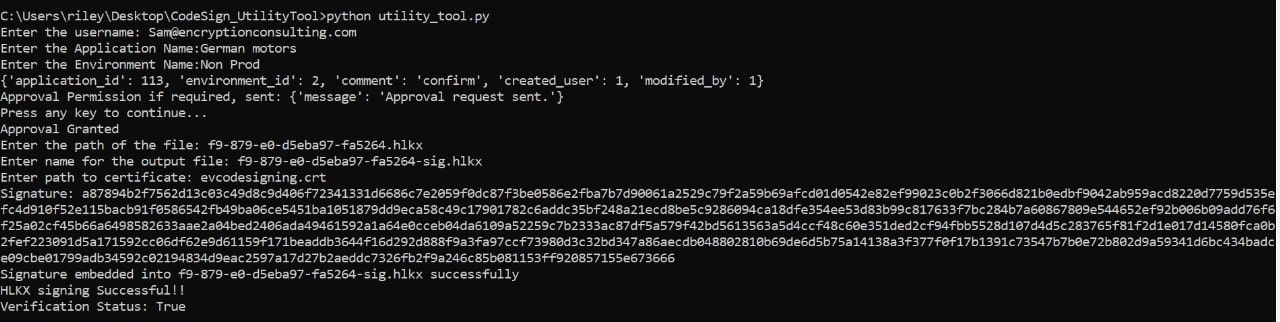
Using our custom Utility Tool
This method involves leveraging our in-house utility tool
designed to perform all kinds of Windows signing (even HLK
signing). This tool streamlines the signing process, making
it efficient and hassle-free.
NOTE: The Utility Tool prompts for the certificate path
and requires a .crt file (unlike the KSP/signtool method below, which requires .pem). It will
also prompt for an approval step if one is required for your account, and it writes the
signature to a separate output file rather than signing the input file in place — you'll
be prompted for the output file's name. No separate verification step is needed: the tool
verifies the signature automatically and reports the result as
Verification Status at the end of the run.
Enter the appropriate details which will be
prompted.
With this method, you can expect the following benefits:
Simplicity : Our
utility tool is designed with user-friendliness in mind.
It simplifies the HLK signing process, reducing
complexities and saving time.
Customization : We
understand that each hardware component and driver is
unique. Our utility tool allows for customization to
meet your specific requirements.
Efficiency : Time
is of the essence, and our tool is optimized for
efficiency. You can expect quicker results without
compromising quality.
Using our KSP (Encryption Consulting Key Storage
Provider) with Signtool
This method involves using our KSP (Encryption Consulting
Key Storage Provider) with Microsoft's signtool. This method
offers a higher level of security and is ideal for clients
who prioritize security and compatibility.
To enter our KSP (Encryption Consulting Key Storage
Provider).
[This will not vary and remain constant]
/kc
A key container within the CSP that holds the private
key.
[Rename it to the private key alias you’re going to
use]
/fd
File digest algorithm to use for creating file
signatures.
/f
Indicates the location of the public key file or
certificate.
[Make sure to sign using a .pem file only]
/tr
Specifies the URL of the RFC 3161 timestamp server. This
helps provide a timestamp for when the file was signed.
/td
Specifies the digest algorithm used by the RFC 3161
timestamp server
To verify the signed file, run:
signtool verify /pa <path to the signed .hlkx file>
With this method, you can expect the following benefits:
Enhanced Security :
Our KSP adds a layer of security to the signing process,
safeguarding your code and drivers from potential
threats.
Integration with Microsoft Tools :
By combining our KSP with Microsoft's signtool, you
benefit from the best of both worlds – our expertise and
Microsoft's trusted tools.
Compliance : We
ensure your signing process aligns with Microsoft's
standards, keeping your hardware and drivers fully
compliant.
Overcoming Common Challenges with Encryption Consulting LLC
While HLK signing is essential, it can come with its challenges.
Such as:
Addressing Driver Compatibility Issues
HLK signing can uncover compatibility issues that must be
addressed. This might involve revising code, fixing bugs, or
adjusting hardware components.
Troubleshooting Code Signing Problems
Code signing can sometimes be tricky, and errors can occur.
Knowing how to troubleshoot and resolve these issues is
crucial to achieving a successful HLK signing.
This is where Encryption Consulting LLC excels. Our team can
swiftly address compatibility issues and troubleshoot code
signing problems, ensuring your journey to HLK certification is
smooth.
Why choose Encryption Consulting’s CodeSign Secure for HLK
Signing?
We have three main benefits which support and help promote our
CodeSign Secure as an ideal fit for HLK Signing. Those are:
Fortified Security - FIPS 140-2 Level 3 HSM
Compliance
Encryption Consulting LLC has taken security to the next
level in response to CA/Browser Forum's June 1, 2023,
requirement. Our private keys for CodeSigning certificates
are stored, generated, and used within a Hardware Security
Module (HSM) that complies with FIPS 140-2 Level 3 standards
and never leaves the HSM in any situation. This rigorous
compliance ensures the highest level of security for your
code signing process, meeting industry standards and
safeguarding your digital signatures.
Client-Side Hashing - Unveiling the Benefits with
CodeSign Secure
Our CodeSign Secure, utilised in both the utility tool and
KSP methods, employs client-side hashing for your code
signing needs, and it brings several benefits to the table:
Enhanced Efficiency :
Client-side hashing reduces the load on your
infrastructure, making the code-signing process more
efficient. It minimises the need to transfer large files
to a remote server for hashing, saving time and resources.
Privacy and Control :
You maintain complete control over your data with
client-side hashing. Your sensitive code and files remain
within your network, reducing the risk of data exposure or
interception during transmission.
Improved Compliance :
Client-side hashing ensures that your code signing process
complies with industry regulations and standards. It
provides a transparent and auditable process, making
demonstrating compliance to stakeholders, auditors, or
regulatory authorities easier. This can be particularly
crucial for industries with stringent compliance
requirements.
Proxy-Based Access to HSM for Enhanced Security
Proxy-based access to the keys stored in a Hardware Security
Module (HSM) is one of the essential security elements
provided by Encryption Consulting LLC. This approach
significantly enhances security by safeguarding your private
keys from unauthorised access and potential breaches. Our
CodeSign Secure utilises proxy-based access to interact with
the private keys stored in the HSM, ensuring the integrity
and security of your code-signing process. This approach is
crucial in establishing trust, verifying digital signatures,
and securing the communication between your components and
the HSM.
By integrating these advanced security measures and technologies
into our code-signing process, Encryption Consulting LLC ensures
that your HLK certification is reliable and fortified against
potential threats, meeting the highest industry standards.