How CodeSign Secure is built, how a signing request flows through it, and how applications, certificates, environments, and teams relate to each other.
How CodeSign Secure works
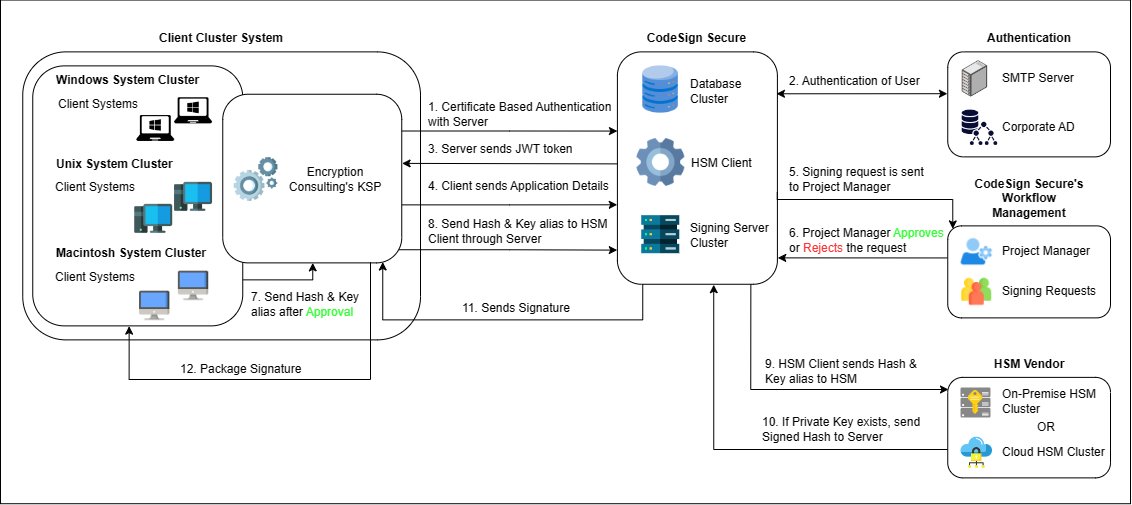
CodeSign Secure keeps every private signing key inside a FIPS 140-2 Level 3 hardware security module (HSM) and lets build machines sign with the tools they already use, such as SignTool, jarsigner, apksigner and many more. A client component on the build machine calculates the hash of the file locally and sends only the hash to the CodeSign Secure server. The server authenticates the client, checks permissions and the approval policy, asks the HSM to sign the hash, and returns the signature. The client then embeds the signature in the file.
Note:
The private key never leaves the HSM. Downloading a certificate from the portal gives you the public certificate only.
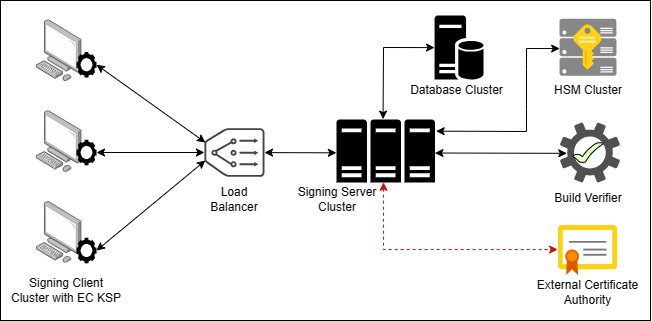
High-level architecture: signing clients, load balancer, signing server cluster, database cluster, HSM cluster, and build verifier.
Components
Component
Where it runs
What it does
CodeSign Secure server
Windows Server 2022, served by Apache over HTTPS on port 443 by default (the port can be changed, for example to 8443)
Hosts the portal (frontend) and the REST API under /api/ (backend). The API is stateless, so several servers can run behind a load balancer.
Entrust nShield, Thales Luna, Securosys Primus, or Utimaco SecurityServer, on-premises or in the cloud
Generates and stores private keys and performs every signing operation. High-availability HSM configurations are supported.
Load balancer
In front of the servers (cluster deployments)
Distributes client and portal traffic across the server nodes.
Build verifier (hash validator)
Part of the server
Performs pre-sign or post-sign hash validation for reproducible builds.
Encryption Consulting KSP
Windows build machines
Windows CNG key storage provider used by SignTool, Mage, NuGet, ClickOnce and other Windows tools.
EC KSP for Mac
macOS build machines
Lets codesign use keys held in CodeSign Secure.
PKCS#11 Wrapper
Windows, Linux and macOS
PKCS#11 library for apksigner, jarsigner, JSign, OpenSSL, XML signing and GPG.
Utility Tool
Windows
Interactive single-file and bulk signing, with an optional ClamAV malware scan before signing.
ec-signer
Container build host
Works with cosign to sign container images.
The server also connects to supporting services: an SMTP server for notifications and MFA codes, Microsoft Entra ID (Azure AD) for single sign-on, SharePoint for off-server backups, and Grafana Loki or Splunk for log export. See Ports and Protocols for every connection.
Deployment topologies
Topology
Description
When to use
Single server
One Windows Server 2022 machine runs the backend, frontend, Apache and MongoDB. This is what the installer sets up.
Evaluations, smaller teams, and deployments where a restore from backup is an acceptable recovery plan.
Cluster
Two or more CodeSign Secure servers run behind a load balancer and share a database cluster. The HSMs run in a high-availability configuration.
Production signing that must stay available during a server or HSM failure.
Steps 5 to 7 happen only when the environment policy is Certificate Owner or Quorum. Approvers are users with the System Admin or Project Manager role.
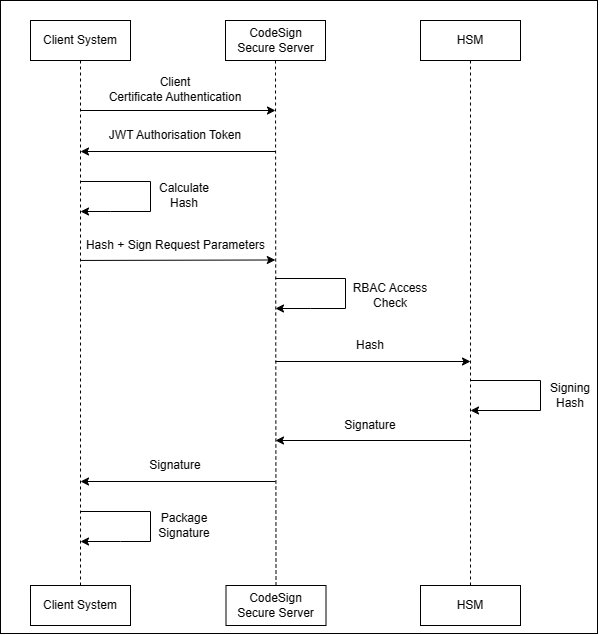
Authenticate. The client presents its authentication certificate (mutual TLS) and its API user credentials. The server returns a JSON Web Token (JWT) that authorizes the following calls.
Hash locally. The client calculates the hash of the file. Only the hash is sent over the network, whatever the size of the file.
Request. The client sends the hash, the key to use and the request parameters.
Check access. The server checks that the user is allowed to sign with that certificate: the user’s role needs the signing permission, and the user must belong to a team mapped to the certificate in App Management.
Apply the policy. The certificate’s environment decides what happens next. With No Approval, signing continues immediately. With Certificate Owner or Quorum, the request waits on the Signing Request page for approval, with MFA if the environment requires it.
Validate the build (optional). If the certificate’s key usage is set to pre-sign hash validation, the build verifier checks the hash first.
Sign. The server sends the hash and key alias to the HSM, which signs it.
Return and package. The signature returns to the client, which embeds it in the file.
Record. The request, the decision and the result are recorded in the logs and the Audit Trail.
Sequence of a signing request between the client system, the CodeSign Secure server and the HSM.
What leaves the build machine
Client
Sent to the server
Stays on the client machine
Windows KSP, EC KSP for Mac, PKCS#11 Wrapper
The file hash, the key to use, request details, and the client’s machine cert and credentials
The file itself
All clients
Nothing that contains the private key; the key never leaves the HSM
Signed output files
Timers that affect signing
Timer
Value
Effect
Signing request validity
100 seconds
An approver must act within this time. Otherwise, the request times out and the signing job fails.
MFA validation
15 minutes
An MFA validation stays valid for 15 minutes.
HSM health status cache
10 minutes
The Dashboard HSM status is refreshed from the HSM utilities and cached for up to 10 minutes.
Portal session
One per account
Signing in again revokes the account’s earlier sessions.
Core concepts and how they relate
Environment (approval policy + MFA)
   └─ Certificate (private key in the HSM, one environment)
          └─ mapped in an Application to one or more Teams
                 └─ Team members (users) ── Roles ── Permissions
Question
Where it is decided
Can this user sign with this certificate?
The user’s role must include the signing permission, and the user must be in a team mapped to the certificate in App Management.
Does the request need approval?
The policy of the certificate’s environment: Certificate Owner, Quorum, or No Approval.
Who can approve?
The certificate owner or the quorum members. Approvers must hold the System Admin or Project Manager role.
Is MFA needed to approve?
The environment’s Needs MFA setting.
Must the build be verified?
A signing project must be configured, and the certificate’s Key Usage: None, Pre-Sign Hash Validation, or Post-Sign Hash Validation must be set for the build verifier.
Which machines can connect?
Clients with a valid authentication certificate and API user credentials.