
CBOM Documentation

CBOM Secure

  • Product Overview
    • Overview
    • Dashboard Interface
    • Dashboard Operations
    • Data Visualization
    • Overview
    • Host
    • Template
      • Networked Deployments
      • Cloud Deployments
      • Off-Grid Deployments
    • Discovery History
      • Tags
      • Tag Scope
      • Integrations
      • Cloud Servers
      • CycloneDX Export
    • Sensors Reference
    • Overview
    • Summary Report
    • PQC Report
    • AI Services
    • Source Code Visualizer
    • Key
    • Certificate
    • CipherSuites
    • Analysis
    • Policy Management
    • User Policy
    • Standard Policy
    • Overview
    • Cases
    • Criteria
    • Notification Format
    • Rules
      • Connections
      • Health
    • User Management
    • Roles & Permissions
    • Audit Trail
    • System Logs
    • Top Bar and User Menu
    • System Configuration
  • Login and Authentication
    • Introduction
      • Components
      • Data Flows
      • Execution Models
      • Incremental Scanning
      • Security Model
      • Topologies
      • Sizing Guide
      • HA and Scaling
      • Ports and Firewall
      • Prerequisites
      • Docker Compose
      • Native on Linux
      • Deployment Server
      • Install Troubleshooting
      • Validation Checklist
      • Managing Services
      • Logging
      • Certificates
      • Configuration
      • Backup and Recovery
      • Ops Troubleshooting
      • Methods
      • SAML 2.0 SSO
      • OIDC and Entra ID
      • Token Authentication
      • Password Policy
      • Sensor vs Connector
      • Sensor Guide Structure
      • Capability Matrix
      • GitHub Sensor
        • AWS
        • Azure
        • Google Cloud
        • Active Directory
        • LDAP Directories
        • AD CS
        • Thales Luna HSM
        • Entrust nShield HSM
        • HashiCorp Vault KMIP
        • Windows Cert Store
        • Linux Trust Store
        • MSSQL TDE
      • Roadmap
      • Integration Model
      • CrowdStrike
      • ServiceNow
      • ServiceNow and Jira Setup
      • Notification Engine
  • Administrative Guide
    • Glossary
    • Configuration Reference
    • Data Model Reference
    • API Reference
    • API Authentication
    • CycloneDX Export Specification
    • Risk and PQC Scoring
    • Built-in Standards
    • Widget Catalogue
    • AI Services Data Handling

Discovery History

Discovery History shows what each deployment run actually delivered: how many documents were inserted, updated, skipped or rejected, the deployments involved, and any errors. A task can report a successful deployment and still have ingested nothing. This page is where you can see the difference.

The page is reached from Discovery > Discovery History in the left navigation menu.

Viewing the History

One row is one run of a task. Rows are listed newest first, across every task you have selected.
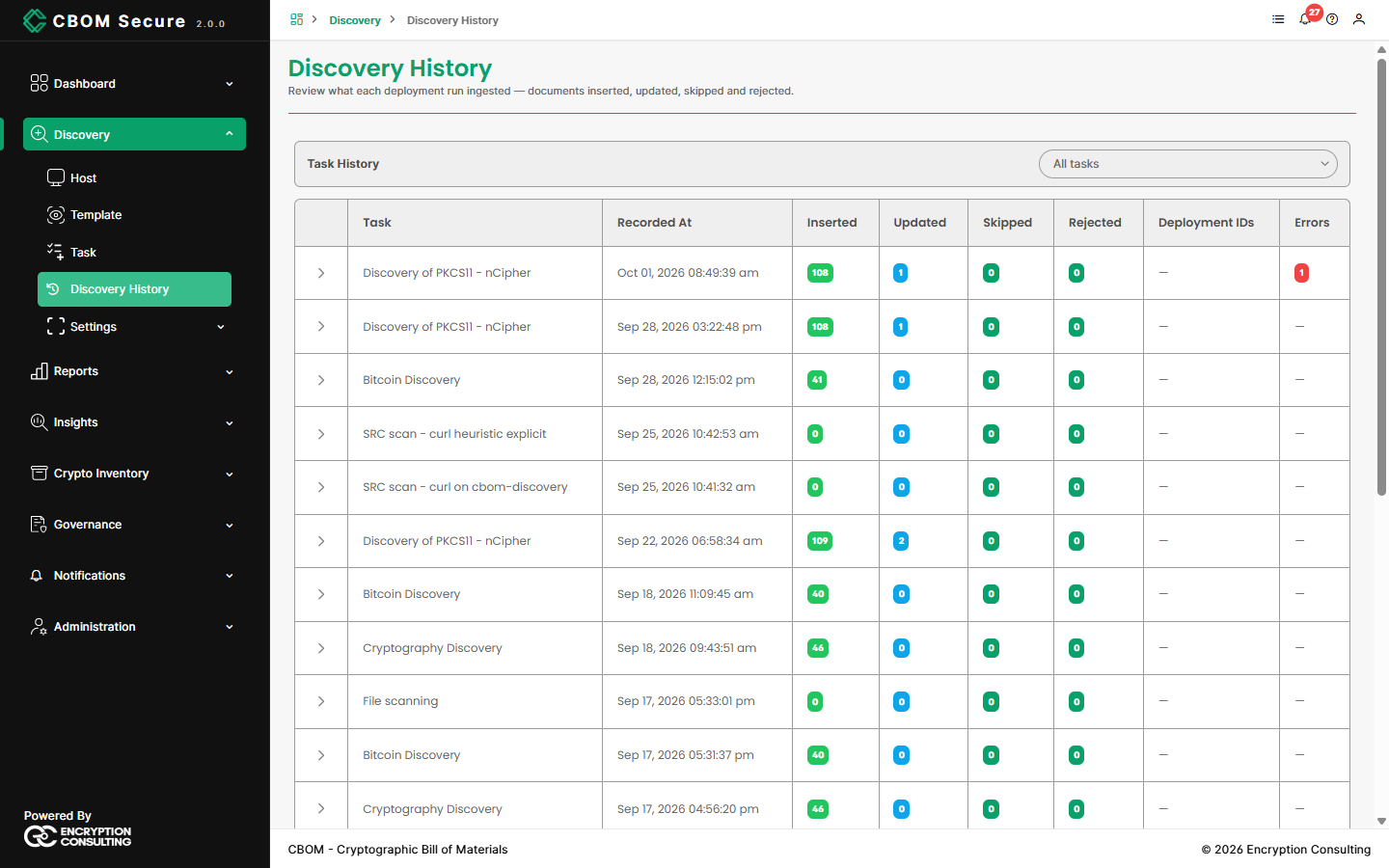
CBOM Secure Discovery — Discovery History
  • Task: The task that ran.

  • Recorded At: When the run was recorded, in your time zone.

  • Inserted: Documents that were new to the inventory.

  • Updated: Documents already in the inventory that this run saw again and refreshed.

  • Skipped: Documents the Collector received but could not save.

  • Rejected: Documents dropped because they did not pass schema validation.

  • Deployment IDs: The deployments the run produced, or a dash if none were recorded.

  • Errors: The errors the run reported, or a dash if there were none.

A run showing zero in every count usually means the scan found nothing to report, or that its results never reached the Collector. If you expected findings, check the Errors column and then System Logs.

Choosing Tasks

The task selector above the table starts at All tasks. Narrow it to one or more tasks to follow just those; at least one task must stay selected.

Off-grid tasks do not appear here. Their results are imported rather than deployed, so there is no deployment run to record — see Off-Grid Deployments.

Run Details

Click the arrow at the start of a row to expand it. The panel lists the run's deployment IDs and the full text of each error.
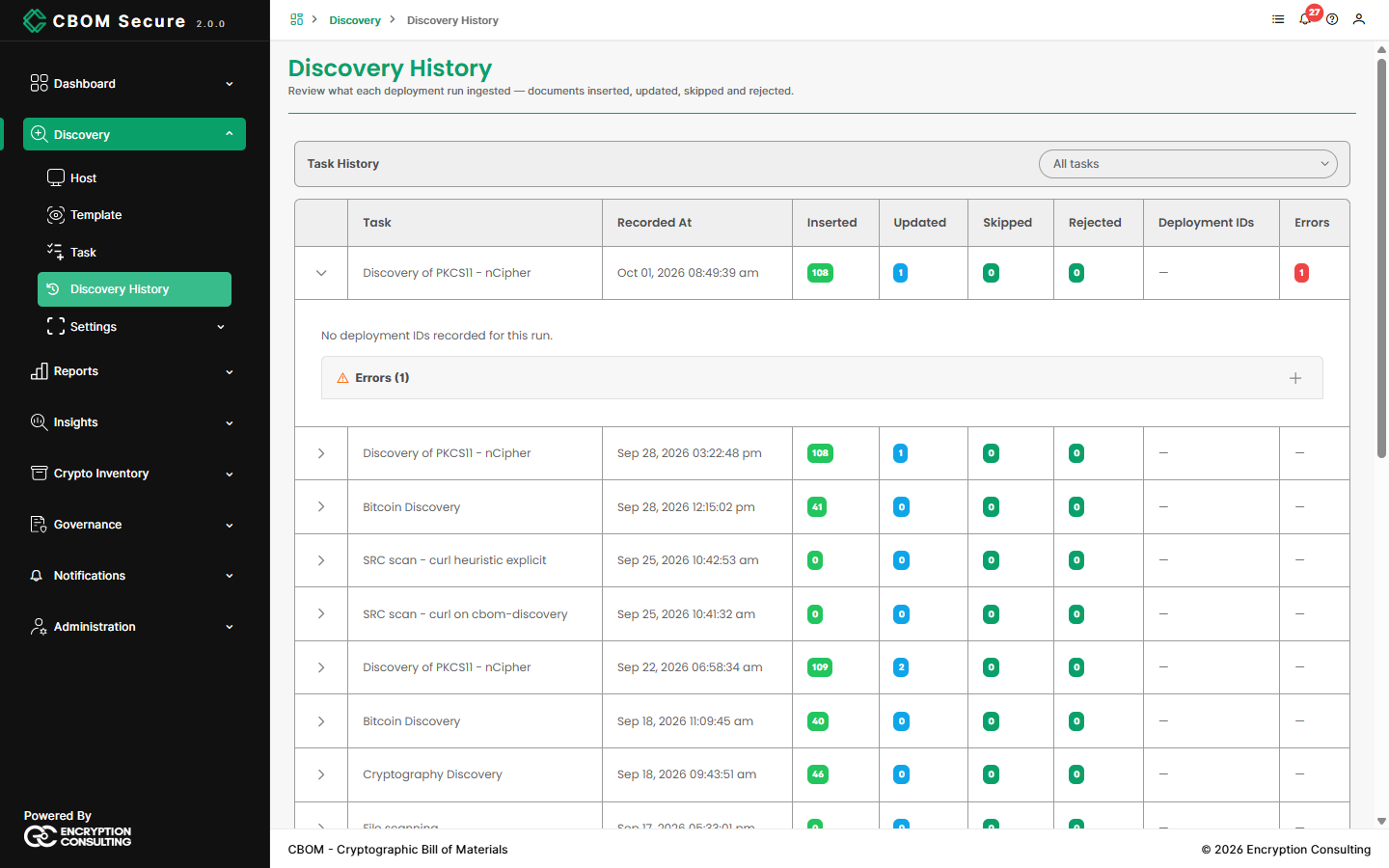
CBOM Secure Discovery — Discovery History run details

The most recent 100 runs are kept for each task. Older runs are dropped as new ones are recorded.

On this Page:
Support Privacy Policy Terms of Service

Copyright 2026 Encryption Consulting LLC. All rights reserved.