
1.1 CBOM Secure Architecture and Components
This part is the technical reference layer for CBOM Secure: what the platform is made of, how cryptographic data moves through it, how discovery is executed, and what the security model is. It is the material that pre-sales engineers, customer security reviewers and implementation teams need before a deployment begins.
1.1.1 High-Level Architecture
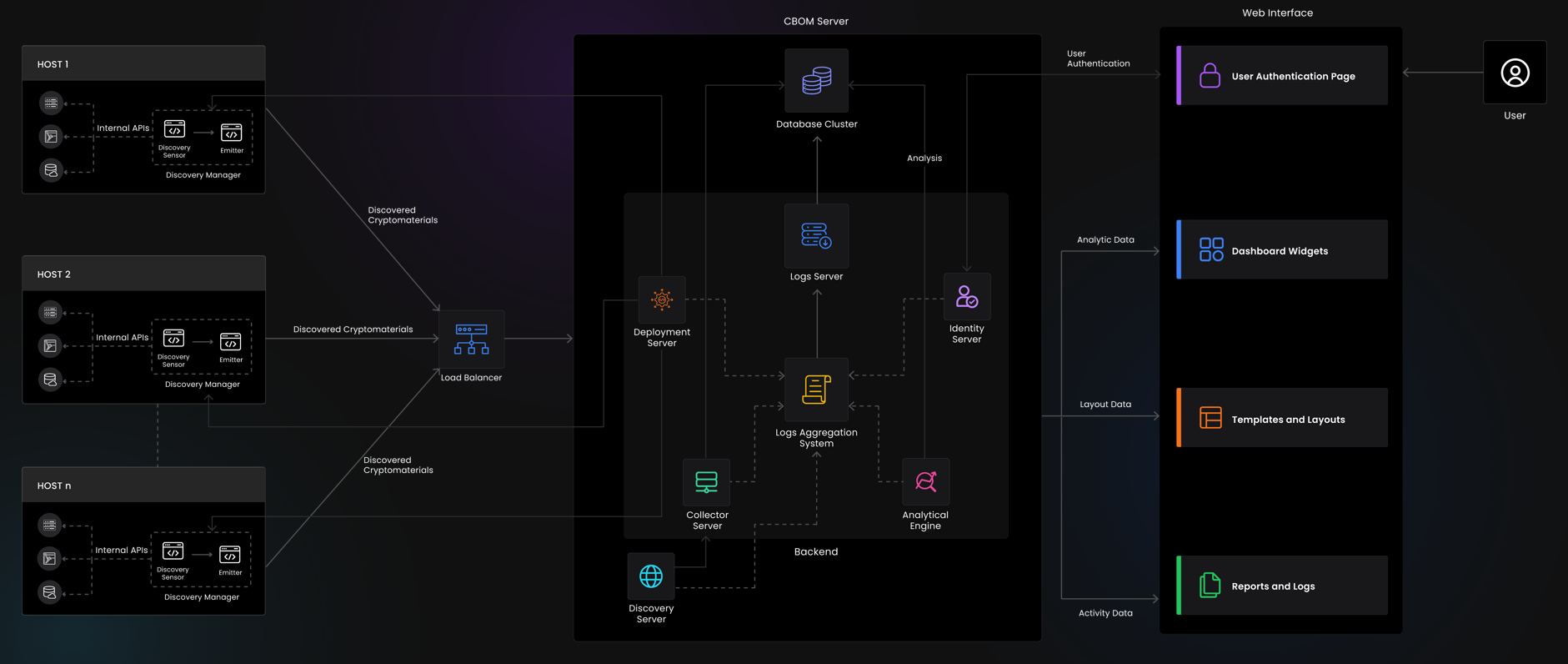
CBOM Secure is a service-oriented platform. Discovery is decoupled from ingestion, ingestion is decoupled from analysis, and analysis is decoupled from presentation. Each boundary is an explicit API or collection hand-off. That is what allows discovery to run in places the platform itself cannot reach — a DMZ, a cloud tenant, or a fully air-gapped network — while the rest of the platform stays central.
The platform separates into four layers plus supporting infrastructure:
-
Client access layer: the React single-page portal, the REST API surface, and the log dashboards.
-
Core services layer: CBOM-Server (the primary backend) and Collector-Services (the ingestion endpoint).
-
Discovery and execution layer: DiscoveryManager and the sensor library, executed on the platform, on a target host, through an EDR tool, or from an offline bundle.
-
Analysis layer: the deduplication engine, the policy and analytic rule engine, the criticality scoring layer, and the history recorder.
-
Supporting infrastructure: MongoDB, Keycloak, the message queue, and the OpenTelemetry, Loki and Grafana logging pipeline.
1.1.2 Client Access Layer
All external traffic terminates at a single reverse proxy. Nothing else is exposed. The proxy performs TLS termination and routes by path prefix:
/ — the frontend single-page application, served as static assets.
/cbomsrv/ — CBOM-Server, the primary REST API.
/collector/ — Collector-Services, the discovery result ingestion endpoint.
/grafana/ — the Grafana log dashboards.
Because the proxy is the only exposed surface, a remote sensor and an interactive user reach the platform over the same port with the same certificate. Firewall rules stay simple: one inbound port for the whole platform.
1.1.3 Core Services
CBOM-Server is a Flask application listening on port 5000 with an API base path of /cbomsrv/api/v1/. It is organised as feature-domain blueprints — administration, analytics, authentication, crypto material documents, collector tokens, configuration, deployment management, notifications, policy, tasks, history, off-grid import, deposit processing, and the dashboard widget layer. It owns configuration, identity integration, task and template definition, host inventory, policy definition, dashboard data, export, and every read API the portal consumes.
Collector-Services is a separate Flask application listening on port 5001. Its job is deliberately narrow: authenticate an inbound discovery payload, validate it against the crypto material schema, and write it to the staging collection. It performs no analysis and holds no business logic, which is what allows it to be exposed to networks that must not be able to reach the main backend. Authentication is a per-host RS256 JWT verified against a certificate held in the host inventory, so the collector holds no shared secret that would let one compromised host impersonate another.
The split matters operationally. Collector-Services can be scaled, restarted or firewalled independently of CBOM-Server, and an ingestion outage never takes the portal down.
1.1.4 Discovery and Execution Layer
DiscoveryManager is the execution harness. It loads a task definition, resolves which sensors the task calls for, runs them, and emits the results. It is designed to run detached from the platform: as a service on the platform host for agentless network and cloud scans, as a deployed binary on a target host, or as a one-shot executable inside an offline bundle.
Sensors are the discovery units. Each sensor knows how to interrogate one class of source — a cloud key management service, an HSM through PKCS#11, a TLS endpoint, a Java keystore, a database transparent-data-encryption configuration, a Git repository, a compiled binary. Every sensor emits documents conforming to a single crypto material schema, which is precisely what allows a certificate found in a cloud key vault and the same certificate found on a web server to be recognised as one material rather than two.
The sensor library is maintained as a separately versioned component, and its schemas are registered into the platform when CBOM-Server starts. That registration is what makes a new sensor appear in the task template builder without a platform code change.
1.1.5 Analysis Layer
Analysis runs behind the ingestion boundary, over data already in the database:
-
Deduplication engine: reads the staging collection, computes a canonical identity for each document, and rolls duplicates up into a single inventory record with an accumulated deployment footprint.
-
Policy and analytic rule engine: evaluates each material against the active policy set (algorithm allow-lists, minimum key sizes, validity windows, post-quantum readiness) and records a pass or fail per policy.
-
Criticality scoring: derives a risk level per material from configured factors. Some factors are population-derived rather than per-material: a key flips from safe to critical when an unrelated material is found sharing its public key hash.
-
History recorder: appends a point-in-time snapshot to a separate audit database whenever a material meaningfully changes.
1.1.6 Supporting Infrastructure
MongoDB is the primary datastore. The operational database holds discovered material, host inventory, tasks, templates, policies, configuration and dashboard definitions. A separate audit database holds the change history, isolated so that it can carry its own retention and access rules and so that ordinary operational access does not confer access to the audit trail.
Keycloak is the identity provider. CBOM Secure does not store user passwords; it delegates authentication and holds only the authorisation mapping — user, role, permission group — plus a subject reference.
A message queue carries discovery results as an alternative to the HTTP ingestion path, for higher throughput and more reliable delivery when the sensor fleet is large.
Logging is an OpenTelemetry pipeline. Services emit OTLP to a collector, the collector forwards to Loki, and Grafana queries Loki. Operators therefore read platform logs the same way regardless of which service produced them, and log retention is configured in one place rather than per service.
1.1.7 Component Reference
Ports listed are internal defaults; only the reverse proxy port is exposed externally.
-
Reverse proxy: 443 external — TLS termination and path routing. The only externally exposed component.
-
Frontend: 3000 internal — single-page application static assets.
-
CBOM-Server: 5000 internal — primary REST API, configuration, tasks, policy, dashboards, export.
-
Collector-Services: 5001 internal — discovery result ingestion and schema validation.
-
Deployment server: remote host management: package build, delivery over SSH, WinRM and SMB, and remote execution.
-
Discovery server: runs cloud and network sensors centrally and emits to the collector.
-
MongoDB: 27017 internal — operational and audit databases.
-
Keycloak: 8080 internal — identity provider.
-
Message queue: transport for discovery results.
-
OpenTelemetry collector: 4317 gRPC and 4318 HTTP — log ingestion.
-
Loki: 3100 internal — log storage and query.
-
Grafana: 3000 internal, proxied at /grafana/ — log dashboards.