
Audit Trail
The Audit Trail answers who did what, when, and from where. Every audited action in CBOM Secure — a sign-in, a host added, a policy changed, a deployment started — leaves one record. Each record carries the person who acted, the roles they held at that moment, what they acted on, and how it ended.
Records are append-only. Nothing in the product can edit or delete one, and they expire only through the retention period set for the installation.
The page is reached from Administration > Audit Trail in the left navigation menu.
Viewing the Audit Trail
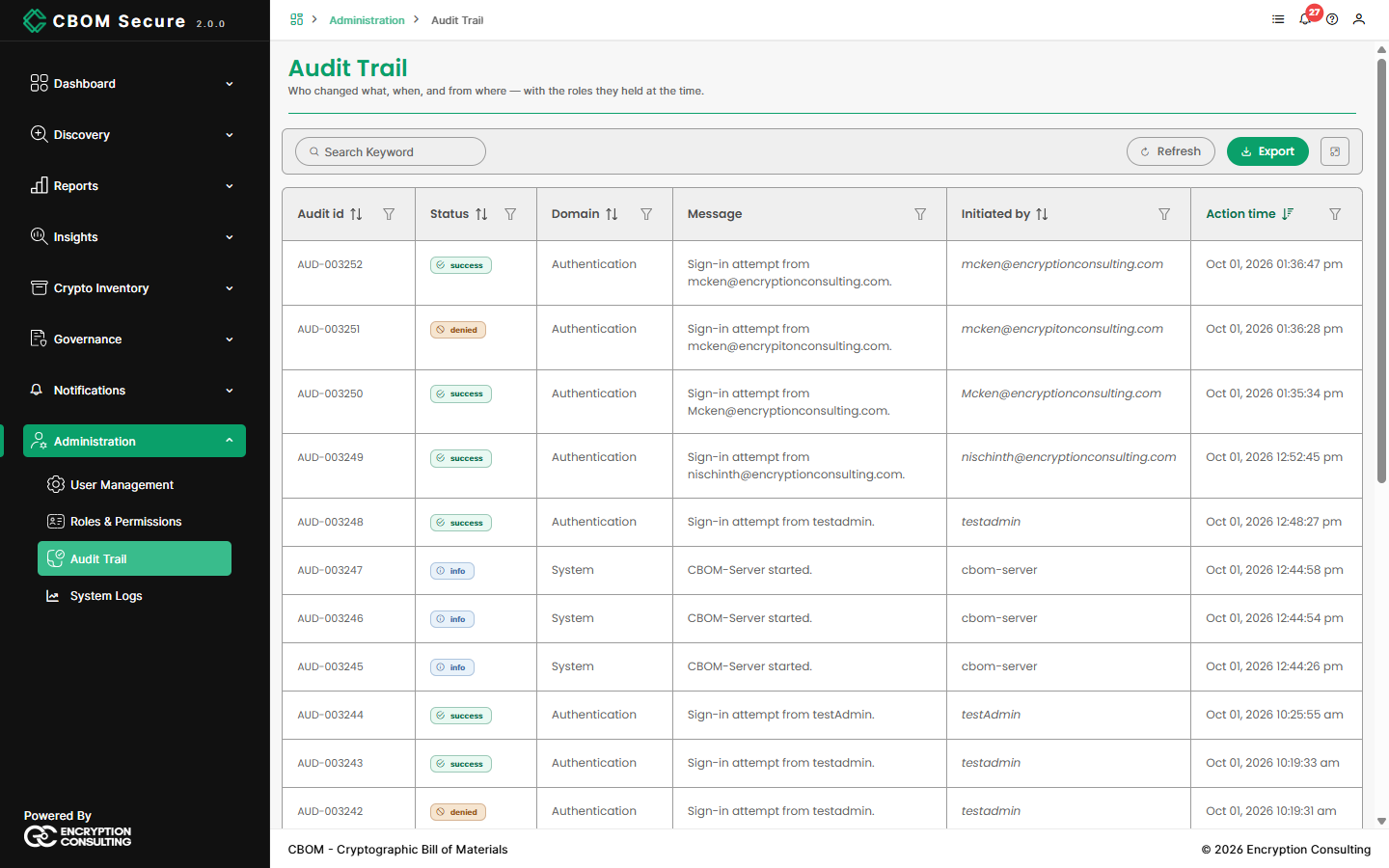
The newest records are shown first. The toolbar carries a Search Keyword box, Refresh, Export and a full-screen toggle.
-
Audit id: The record's permanent identifier,
AUD-followed by a number. -
Status: How the action ended — see Status Values below.
-
Domain: The area of the product the action belongs to, such as Authentication, Hosts, Tasks, Policy or System.
Message: A one-line description of what happened.
-
Initiated by: The user who acted. A service name (for example
cbom-server) marks an event the platform raised itself, such as a server start. Action time: When the action took place, in your time zone.
Each column header carries a filter icon. Apply sets a filter and Clear removes it. You can narrow by:
Time: The last 24 hours, 7 days or 30 days, or all.
Status: Any combination of the five status values.
-
Domain and action: Authentication, User Management, Host Management, Discovery, Crypto Material, Policy, Configuration, Integrations, Notifications, Audit, Ingestion and System. Ingestion and System are hidden until you choose them, because they are mostly background activity.
-
Who: A particular user, or a kind of actor — people, service accounts, discovery agents or the system itself.
What: The type and id of the object acted on, or a request id.
Status Values
success: The action did what was asked.
-
failure: The action was attempted and failed — an error, a validation problem, an unreachable target.
-
denied: The request was refused because the user was not authorised, or a sign-in was rejected. It is kept separate from failure because a refusal is a security event, not a fault.
-
partial: The action finished but did only part of the work — for example, a deployment that succeeded on some hosts and failed on others.
-
info: The record states a fact rather than a result: a long action starting, or the server starting. When counting actions, leave info out. Otherwise a long action is counted twice, once at its start and once at its result.
Viewing a Record
Click any row to open the full Audit Record:
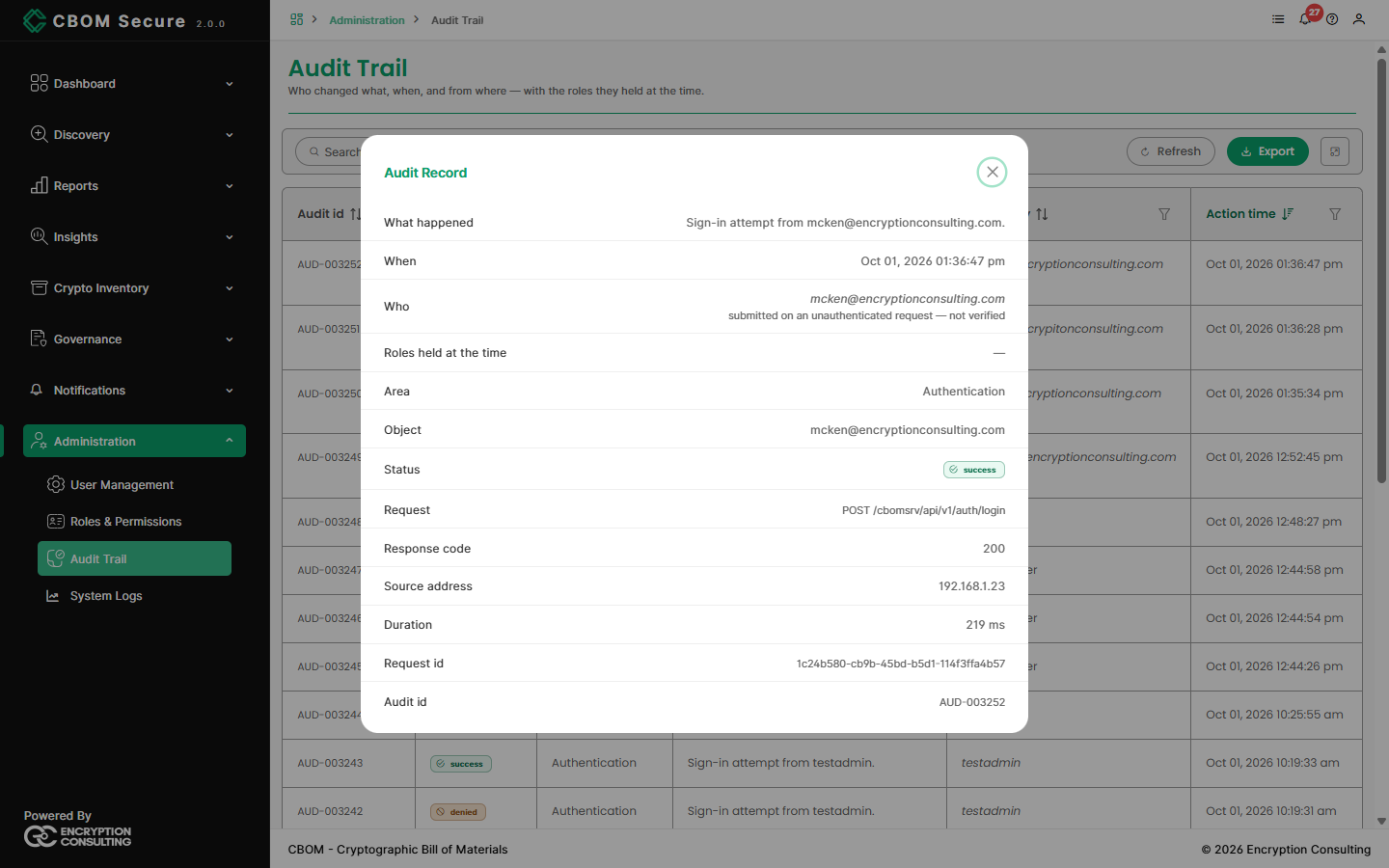
What happened, When, Who: The message, the time and the user.
-
Roles held at the time: The user's roles when the action was taken, not their roles today. A later role change does not alter the record.
Area and Object: The domain, and the specific item acted on.
-
Request, Response code, Source address, Duration: The API call behind the action, its HTTP result, the client address, and how long it took.
-
Request id: Ties this record to the matching lines on System Logs.
A sign-in record is marked submitted on an unauthenticated request — not verified. The name shown is the one typed at the sign-in screen, which the platform cannot confirm until the sign-in succeeds.
Values such as passwords, tokens and keys are removed from a record before it is stored. They never appear here or in an export.
Who Sees What
The records a user sees depend on their role, and the server enforces this. It is not a setting on the page:
admin and auditor: Every record.
manager: Every record except those in the Audit domain.
user: Only records of their own actions.
Export downloads the records that match the current filters as CSV or NDJSON, up to 100,000 records, and applies the same visibility rule. The button is not offered to the user role.