
Roles & Permissions
Roles & Permissions is where you decide what each role on the platform is allowed to do. Every gate described elsewhere in this guide — who can open User Management, who can see Standard Policy, which buttons appear on the Host page — resolves back to the grid on this page.
It is reached from Administration > Roles & Permissions in the left navigation menu, and needs the config:read permission. Changing anything additionally needs config:update.
The Permission Matrix
Permissions are listed down the page and roles across it, with a checkbox at each intersection. A tick means that role holds that permission.
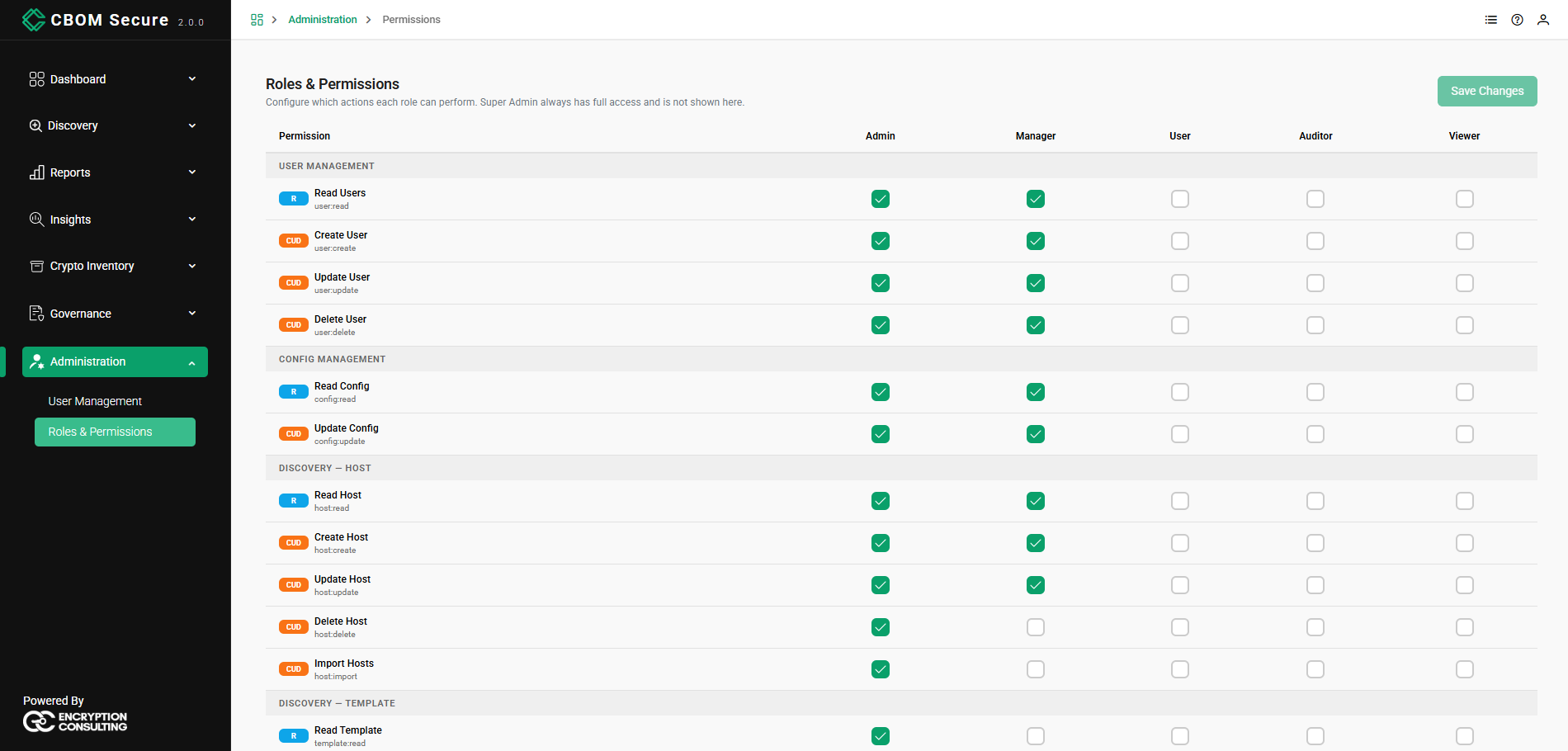
Each permission row carries three things:
-
A tier badge: R for a read-only permission, CUD for one that creates, updates or deletes. It is a quick way to see which rows hand out the ability to change data.
-
A display name: What the permission does in plain words, such as Delete Host.
-
The permission scope: The identifier the platform actually checks, such as host:delete. This is the name used throughout this guide when a page explains what it is gated on.
The Roles
Five roles are configurable here: Admin, Manager, User, Auditor and Viewer. These are the same roles offered when you assign roles to an account in User Management, and a user may hold more than one — their effective permissions are the union of every role they hold.
Super Admin is deliberately absent. As the page itself notes, Super Admin always has full access and is not shown, so it cannot be locked out by an edit here.
None of the five roles is locked in the shipped configuration, so every checkbox is editable. A role that is locked shows an indicator in its column heading and its checkboxes are disabled.
Permission Groups
Permissions are grouped by the area of the platform they govern, which is also the order they appear in:
User Management: read, create, update and delete users.
Config Management: read and update the platform configuration.
-
Discovery — Host: read, create, update and delete hosts, plus Import Hosts for the CSV import.
Discovery — Template: read, create, update and delete templates.
-
Discovery — Task: read, create and delete tasks, plus Run Discovery for deploying them.
Discovery — Integrations: read, create, update and delete integrations.
Discovery — Cloud Servers: read, create, update and delete cloud servers.
Discovery — Export: Export Report, which governs CycloneDX Export.
Policy Management — User Policy: read, create, update and delete user policies.
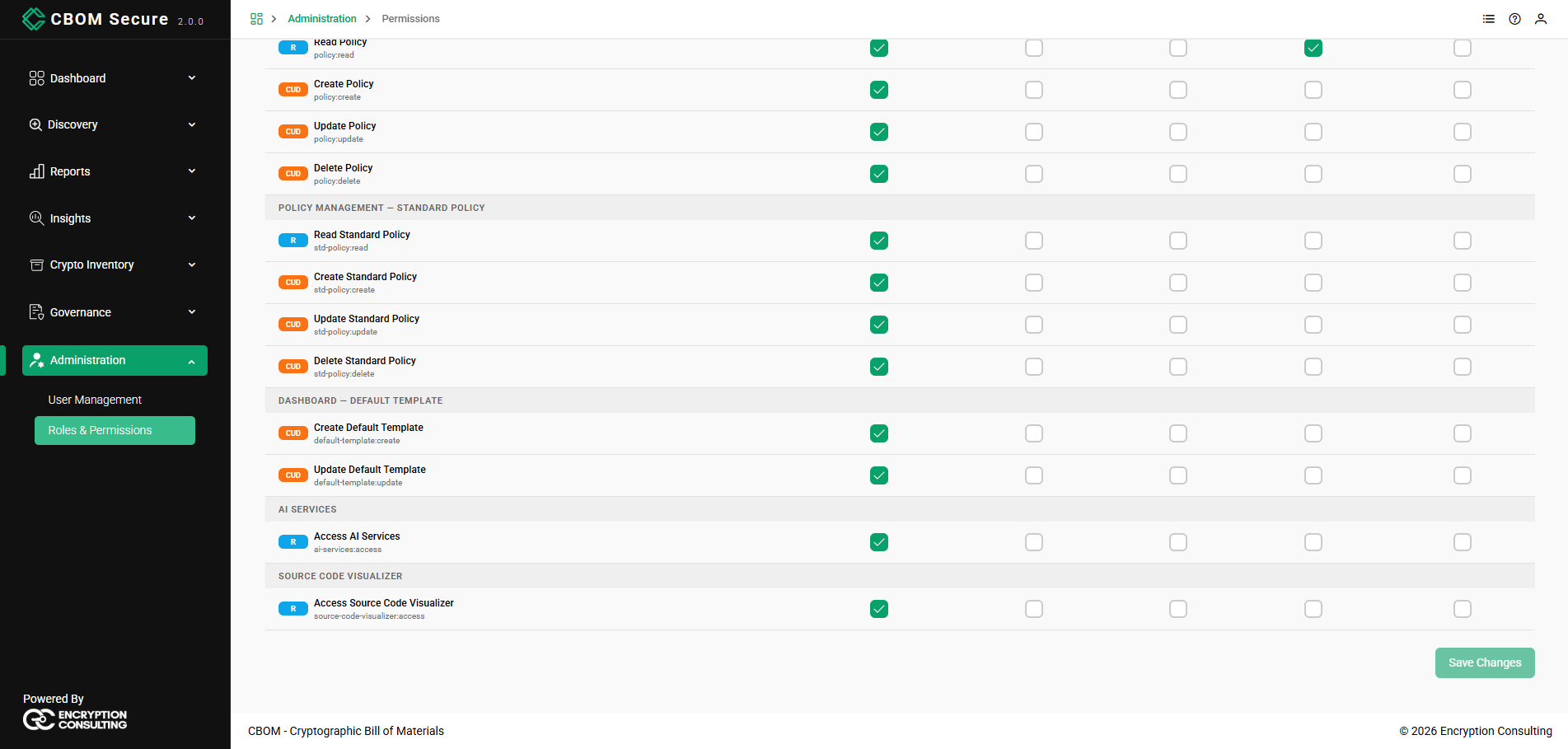
Policy Management — Standard Policy: the same four for standard policies.
Dashboard — Default Template: create and update the default dashboard layouts.
AI Services: Access AI Services.
Source Code Visualizer: Access Source Code Visualizer.
Note that User Policy and Standard Policy are separate groups with separate permissions. Granting one does not grant the other, which is why a role can see one of the two Governance entries and not the other.
Changing a Role
Tick or clear a checkbox to grant or withdraw that permission for that role. Nothing is written until you click Save Changes, which appears at both the top and the bottom of the page and stays disabled until there is an edit to save — so a greyed-out button means no unsaved changes rather than a lack of permission to save.
Leaving the page without saving discards the edits.
-
Withdrawing a read permission hides the corresponding navigation entry outright. A role without user:read, for example, does not see Administration at all, and a role with none of policy:read or std-policy:read does not see Governance.
-
Withdrawing a create, update or delete permission leaves the page reachable but removes the action — the button or context-menu entry simply is not rendered.
-
Take care when editing Admin: removing config:read or config:update from it removes access to this page for anyone holding only that role. Super Admin remains able to restore it.
The Shipped Configuration
As delivered, the roles are graded from full access down to none:
-
Admin: every permission in the matrix.
-
Manager: user management, configuration, and host read, create and update — but not host:delete or host:import, and none of the template, task, policy or standard-policy permissions.
-
User: only Run Discovery and the CSV import.
-
Auditor: only Read Policy, matching a review-only remit.
-
Viewer: no permissions at all. It exists as a starting point for a role you intend to build up.
Because ai-services:access and source-code-visualizer:access are granted to Admin only, the Insights menu is invisible to the other four roles until you grant them here.
The permission catalogue
Permissions are grouped by the area of the product they govern. Each group holds the individual permissions for that area, and most follow a read / create / update / delete shape.
| Group | Governs |
|---|---|
| User Management | Listing, creating, editing and deleting user accounts |
| Roles and Permissions | Viewing and changing this page itself |
| UI Preferences | A user's own theme, font, text size and table page size |
| System Configuration | Reading, saving, activating and diffing configuration versions; triggering a reload |
| Discovery — Hosts | Hosts and off-grid hosts, including bulk CSV import |
| Discovery — Cloud Servers | Cloud discovery targets and their drafts |
| Discovery — Task Templates | Templates and the sensor schemas behind them |
| Discovery — Tasks | Tasks, and running discovery |
| Discovery — Off-grid | Bundle generation and result import |
| Discovery — Integrations | Integration credentials, synchronisation and deduplication |
| Discovery — Tags | Tag definitions |
| Discovery — Tag Scopes | Named tag expressions and their cache |
| Cryptographic Materials | Reading the inventory, its history, and exporting it |
| Policy — User Policies | Policies your organisation writes |
| Policy — Standard Policies | The built-in baselines |
| Dashboards and Layouts | Managing and exporting dashboards; setting the default layout |
| Notifications | Rules, templates, scopes, destinations, delivery and case handling |
| Deployment | Reading deployment history |
| Audit Trail | Reading and exporting the audit trail |
| System Health | The system logs and health views |
| AI Services | Access to the AI features |
| Source Code Visualizer | Access to the source-code visualisation |
The catalogue is served by the platform and this page renders what it is given, so what you see here is always what the deployment actually enforces. It is not a second list maintained alongside the first — a permission that appears here is carried by a real route.
What a permission actually controls
This page governs the API, not just the console. Unticking a permission does not merely hide a button: the request is refused server-side as well. A user who loses the delete permission for policies cannot delete a policy from the console, from a script, or with a direct API call.
That is worth stating plainly because the opposite arrangement is common and is a trap. Where a permission model only drives the interface, the button disappears and the endpoint stays open — so the control is cosmetic, and anyone who can open a terminal still has it.
Every route in the product is either mapped to exactly one permission or explicitly exempt, and that mapping is verified rather than assumed, so a new endpoint cannot ship without one.
Reference reads
A few things every signed-in user can read regardless of role, because the console cannot render without them: the role list, the branding and display settings, and a handful of similar reference lookups. These carry no inventory data and no configuration secrets. They are deliberately not gated — making them permission-dependent would produce a blank page rather than a secure one.
The administrator floor
Three permissions cannot be removed from the administrator role:
| Permission | Why it is protected |
|---|---|
| View permissions | Opening this page |
| Manage permissions | Changing what is on this page |
| View users | Finding the account to fix |
Saving the permission map replaces it wholesale. Without this floor an administrator could untick manage permissions for their own role and lock every administrator out of the only page that would undo it — with no way back short of editing the database by hand. The floor is reapplied on every save, so the three stay granted whatever the form submits.
This protects the role, not any individual account. An administrator can still remove the administrator role from a user, including themselves.
Enforcement modes
Authorisation runs in one of three modes, set in the platform's configuration file.
| Mode | Behaviour |
|---|---|
| Enforce | A request without the required permission is refused. The normal setting. |
| Report only | Nothing is refused; what would have been refused is recorded. For validating a role change before committing to it. |
| Off | No check. For diagnosis only. |
The mode is deliberately not editable from System Configuration. An administrator must not be able to switch authorisation off from a page that authorisation protects. Changing it means editing the configuration and restarting, which is a deliberate act with a record.
Report-only mode is how to change roles safely on a live deployment. Switch to report only, make the change, leave it for a working week, then read what would have been denied. A permission someone genuinely needs shows up as a denial from a real user doing real work, rather than as a support call after you have already enforced it.
When the permission map cannot be read
If the permission map cannot be read — a database blip, for instance — the request is allowed, and the decision is recorded as degraded.
This is deliberate, and it is worth understanding rather than discovering. "This caller lacks the permission" and "we could not find out what this caller has" are different statements, and only the first is an authorisation decision. Denying on the second turns three seconds of database trouble into a total lockout, including for the administrator who would fix it. The degraded marker is what makes the condition visible; watch for it rather than treating it as noise.
Designing a role set
Start from what the roles can do today, then narrow. The shipped map grants each role exactly what the API already permitted before permissions were enforced, so turning enforcement on changes nothing for anyone. That is the point: the first enforcement is a non-event, and every subsequent restriction is a deliberate decision you can attribute.
Give reads generously and writes narrowly. Most of the value of this product is in people looking at the inventory. Restricting reads produces workarounds — exported spreadsheets, shared accounts — that are worse for security than the read would have been.
Watch the permissions that cross a boundary:
| Permission | Why it is worth attention |
|---|---|
| Manage permissions | Holding it means being able to grant yourself anything else |
| Edit hosts | Host records carry target credentials |
| Manage integrations | Integration records carry third-party credentials |
| Run discovery | Starts activity against production systems |
| Export the audit trail | The whole organisation's activity record, in one file |
| Edit configuration | Changes platform behaviour globally |
Keep a break-glass administrator. At least one local administrative account that does not depend on the corporate identity provider, with a strong password in a credential store. A misconfigured federation should not be able to lock everyone out.
Changing a role safely
Switch to report-only mode.
Make the change here.
Leave it for a full business cycle — a week, or a month if monthly reporting matters.
Review what would have been denied.
Grant back anything a legitimate user needed.
Switch back to enforce.
A role change takes effect without a restart; the decision cache is short-lived, so allow up to a minute for it to propagate.
Recovering from a bad permission map
Keep a dump of the permission map before changing it. Restoring it is a single operation and does not require restoring the database — which matters, because the state you are recovering from is one where nobody can open this page.
If nobody can sign in at all and no dump exists, the map can be rebuilt from the API's own route definitions, which produces exactly what the product permitted before anyone edited it. Both operations are administrative tools run against the database; see Upgrade and Migration for how the tools in that family work.
Auditing
Every change on this page is recorded in the audit trail: who changed it, when, and the outcome. The record carries the roles the actor held at the time, not the roles they hold now — so a permission change made by someone who has since been demoted still reads correctly a year later.
Denials are recorded too, which makes an over-restrictive role visible as a pattern rather than as a series of individually puzzling complaints.