Renewal Manager Workflow
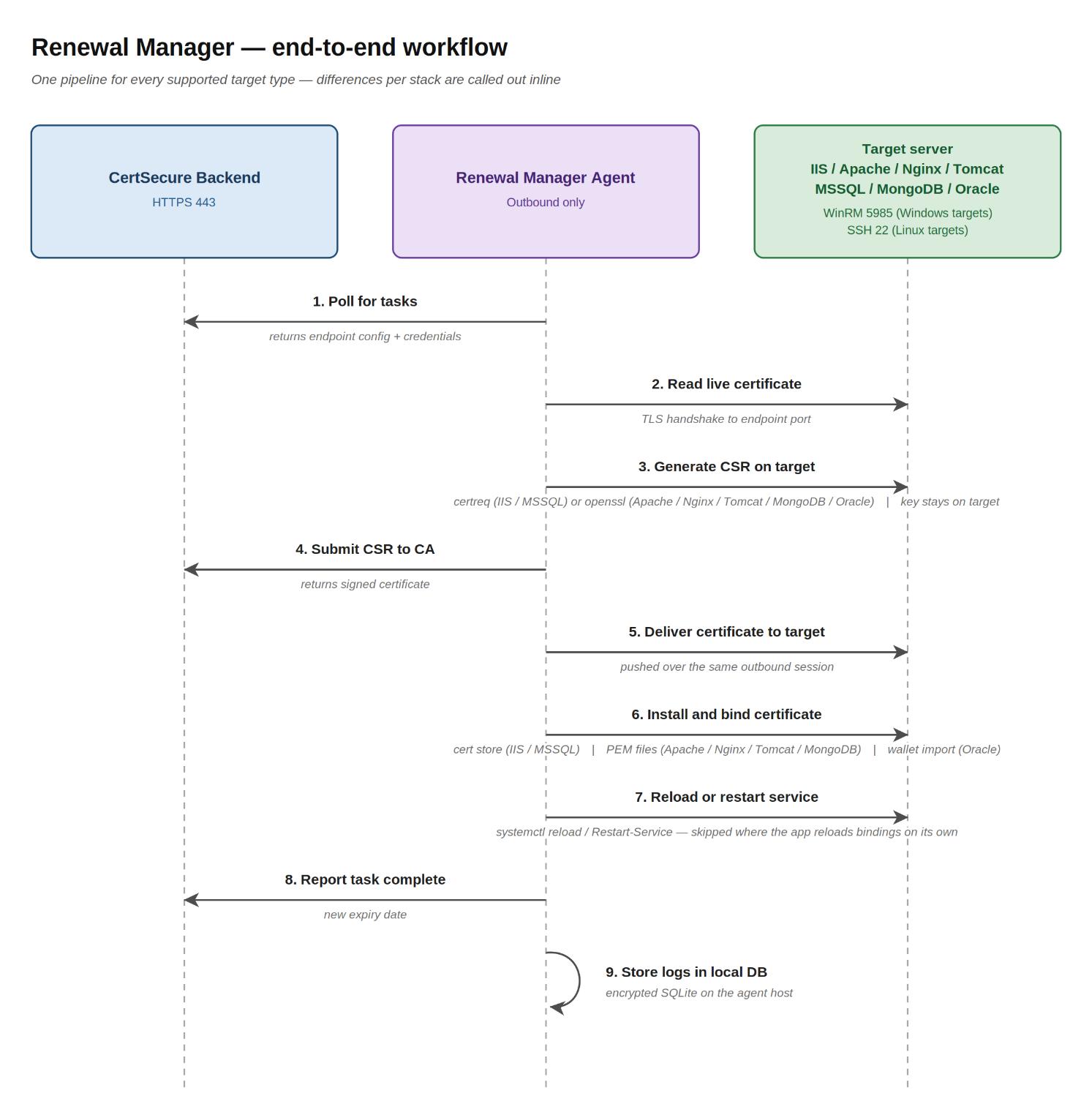
This section describes the end-to-end workflow that CertSecure Renewal
Manager follows to renew SSL/TLS certificates on target servers. It
illustrates the data flow between the CertSecure Backend, the Renewal Manager
Agent, and the target application server for each of the supported server
types.
-
Poll for tasks: The Renewal Manager Agent periodically calls the
CertSecure Backend over HTTPS 443 to fetch any pending renewal tasks. The
response carries the endpoint configuration and the credentials the agent
will use to reach the target server.
-
Read live certificate: The agent opens a TLS connection to the endpoint
port on the target server and reads the currently deployed certificate.
Its subject, SANs, and thumbprint are captured; the thumbprint is used
later to identify which certificate to replace on the target.
-
Generate CSR on target: The agent opens an outbound remote session to the
target — WinRM 5985 for Windows targets, SSH 22 for Linux targets — and
runs certreq (IIS and MSSQL) or openssl (Apache, Nginx, Tomcat, MongoDB,
Oracle) to generate a fresh private key and Certificate Signing Request.
The private key is created on the target and never leaves the target
host.
-
Submit CSR to CA: The agent submits the CSR to the CertSecure Backend
along with the requested CA and template. The backend routes it to the
configured CA and returns the signed certificate on the same call.
-
Deliver certificate to target: The agent delivers the signed certificate
to the target server over the same outbound remote session opened in step
3.
-
Install and bind certificate: The agent installs and binds the
certificate using the mechanism appropriate to the stack: import into
LocalMachine\My for IIS and MSSQL, atomic swap of the PEM files for
Apache, Nginx, Tomcat, and MongoDB, or PKCS12 import into the wallet for
Oracle.
-
Reload or restart service: The agent instructs the application to pick up
the new certificate. Linux uses systemctl reload; Windows uses
Restart-Service. Stacks that reload bindings automatically — such as IIS —
skip this step.
-
Report task complete: The agent reports success back to the CertSecure
Backend, including the new certificate's expiry date, closing out the
renewal task.
-
Store logs in local DB: The agent writes a detailed log entry for the
renewal into its encrypted local SQLite database on the agent host, so
operators can review the full history of any renewal after the fact.
Workflow for Targets Managed Through an Interface
For Cloudflare, AudioCodes, Cisco ISE, Cisco ACI, and Palo Alto PAN-OS, the agent does not open a WinRM or SSH session to the target. It works through the management interface of the target instead, so the steps above that use a remote session are carried out there. The details differ for each target and are given on the page of that target.
Two examples. For Cisco ACI the certificate request is generated on the APIC, so the private key never leaves the controller. For Cisco ISE, before the certificate is bound, the agent imports the CA certificates of the issued chain into the Trusted Certificates of ISE.
Workflow for Automated Endpoints
When Automation is on for an endpoint, the Renewal Manager checks the certificate deployed on it and renews it by itself, without a user starting the renewal, when the certificate is within the configured number of days of expiring (Renew if expiring in (days), from 2 to 35). A scan is requested as soon as automation is turned on or the number of days is changed. Manual and scheduled renewals are for endpoints with automation off. See Automatic Renewal.
Push Certificate Workflow
A pushed certificate follows the same path, but stops after the certificate has been delivered:
- The agent generates a CSR remotely on the target.
- It submits the CSR to the CA, using the CA, template, and owner chosen in the Push Certificate dialog.
- It receives the signed certificate.
- It places the certificate where the server type keeps its certificates: the Local Machine certificate store for IIS and MSSQL, files in the target directories for Apache, Nginx, and Tomcat, a combined PEM file for MongoDB, or the Oracle wallet.
- It does not update any binding, restart any service, or change any configuration file.
Note: Tomcat and Nginx endpoints can use a JKS or PKCS12 keystore instead of certificate and key files on disk. This is described on the
Tomcat and
Nginx pages.
