CertSecure Documentation
  • Overview
    • About CertSecure Manager
    • Documentation Guide
  • Reference Guide
    • Header Bar
      • CertSecure Documentation
      • Swagger API
      • Profile Section
      • Search
    • Dashboard
      • Key Performance Indicators
      • Expiring Certificates
      • CA metrics
      • Key Strength
      • Signing Algorithm
      • Certificate Risk Report Profile
      • PKI Posture Management
      • NDES Health Information
    • AI Assistant
      • Chat
      • Configuration
      • Usage Report
    • Inventory
      • Overview
        • Overall
        • CertSecure
      • Template Management
        • Switch Templates
        • Exclusion List
        • Alert Templates
        • Certificate Templates
      • Template Categories
    • Discovery
      • Inventory
      • Scan Config
      • Cloud Config
      • Vault Config
      • Discovery Analytics
      • Scan Details
      • Discovery Ingestion
    • Reports
    • Utilities
      • ACME
      • Tasks
      • Integrations
        • Renewal Manager
        • Load Balancers
        • Discovery Agents
        • CLI Tool
        • Key Management
        • SEIM Tools
        • DevOps Tools
        • Ansible Automation Platform
      • NDES
      • Azure Key Vault
      • API Tokens
    • Enrollment
      • Certificate Request
      • Generate CSR
      • Enroll CSR
      • Generate Certificate
      • Import Certificate
      • Bulk Certificate Generation
      • Manage Policies
      • Organization Details
    • Administration
      • Users
      • Roles and permission
      • Certificate Authorities
      • Departments
    • Miscellaneous
      • Logging
      • Service Setup
        • Zoom
        • Zendesk
      • Settings
        • Configure Realms
        • Schedule Alerts
        • Metrics
        • Web Branding
        • About License
  • Setup & Architecture
    • Identity and Access Control
    • Architecture
    • Installation
      • Pre-requisites
      • Windows
      • Linux
      • Docker
    • Upgrade
      • Windows
      • Docker
  • Release Notes
    • Releases for 2026
      • v3.4.0
      • v3.3.1
      • v3.3.0
    • Releases for 2025
      • v3.2.0
      • v3.1.0
    • Releases for 2024
      • v3.0.0
  • Workflow
    • Approval Workflow
  • API Reference
    • Getting Started
    • Authorizing Requests
    • Securing API Access
    • Request and Response Conventions
    • Endpoint Reference
      • Health
      • API Token Management
      • CA Management
      • Templates
      • Certificate Enrollment
      • Inventory
      • Certificate Discovery
      • Tasks
      • Watcher Groups
      • Alerts
      • Reports
      • Logs
      • Monitoring
      • Scheduling
      • SMTP
      • ACME
      • Azure Key Vault
      • Google Cloud (GCP)
      • HashiCorp Vault
      • EJBCA
      • ServiceNow
  • Integration Guide
    • Renewal Manager
      • Workflow
      • Setup
      • Troubleshooting
      • IIS
      • Apache
      • Tomcat
      • Nginx
      • MSSQL
      • MongoDB
      • Oracle
      • Cloudflare
      • AudioCodes
      • Cisco ISE
      • Palo Alto PAN-OS
      • Cisco ACI
    • Load Balancer
      • F5
        • Workflow
        • Setup
        • Onboarding
        • UI Guide
        • Troubleshooting
      • NetScaler
        • Workflow
        • Setup
        • UI Guide
        • Troubleshooting
    • Certificate Authorities
      • ACME CAs
      • AWS
      • DigiCert Connector
      • EJBCA
      • GlobalSign
      • GoDaddy
      • HashiCorp Vault PKI
      • Microsoft AD CS
      • Sectigo
      • Sectigo-PS
    • Ansible Automation Platform
    • Azure Key Vault
  • Discovery Agent Setup Guide

Cisco ISE

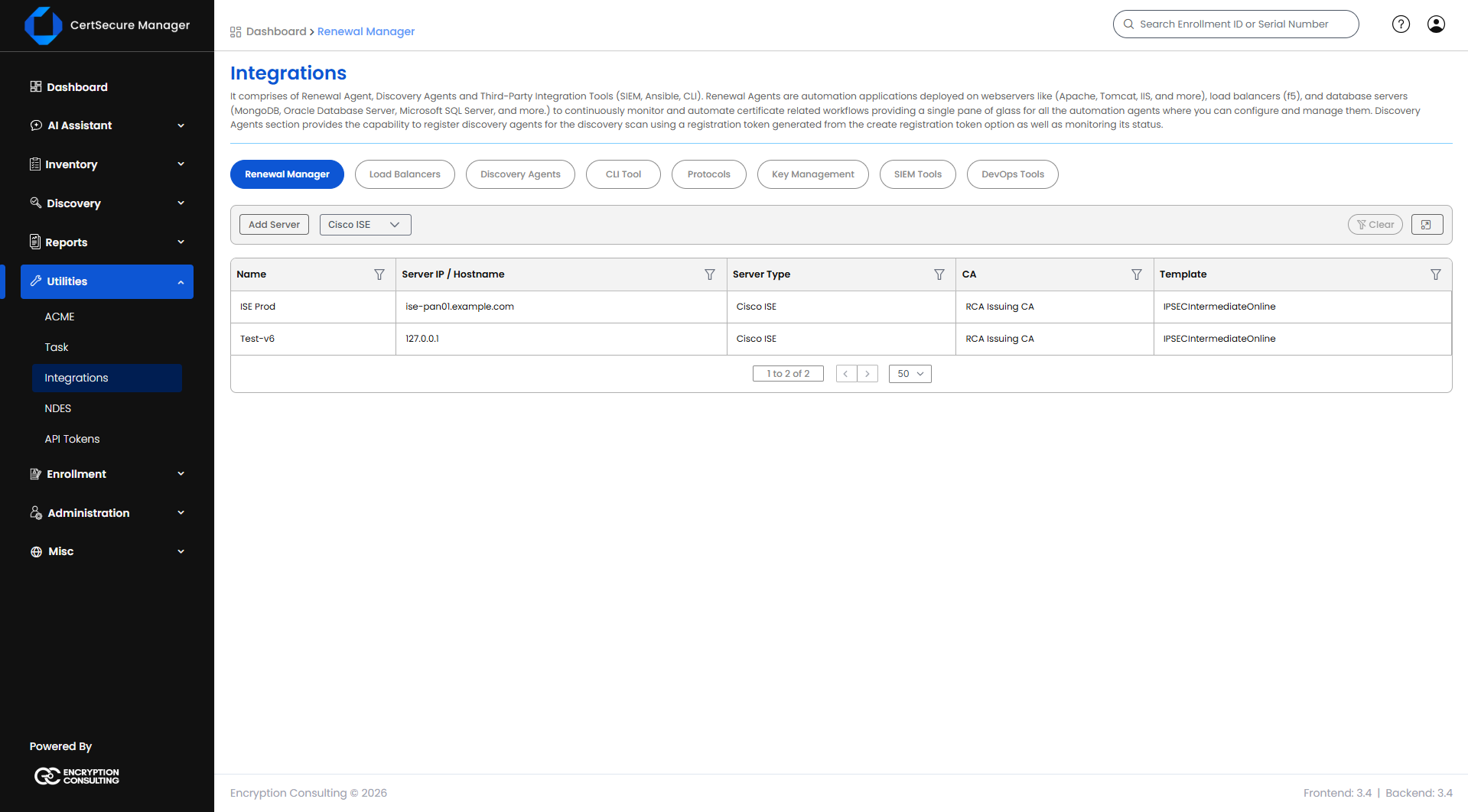
Renews system certificates on a Cisco Identity Services Engine (ISE) deployment. One server is one ISE deployment, addressed through its Primary Admin Node (PAN). Each endpoint is one system certificate on one ISE node, together with the set of roles that certificate carries. The Renewal Manager works through the ISE management interface, so no WinRM or SSH session is opened and no operating system is selected.

Supported operating system(s): Not applicable. ISE is managed over HTTPS.
Before You Start
  • The Renewal Manager must be Online and must be able to reach the Primary Admin Node over HTTPS.
  • An ISE administrator account whose credentials are saved on the server. The ISE Open API service must be enabled.
  • The CA template used for ISE certificates must have Subject Name set to Supply in the request, and Extended Key Usage set to both Server Authentication and Client Authentication. See CA Template Requirements below.
  • Know which roles each system certificate holds on each node. ISE shows this in the Used By column of its System Certificates list.
Adding a Cisco ISE Server
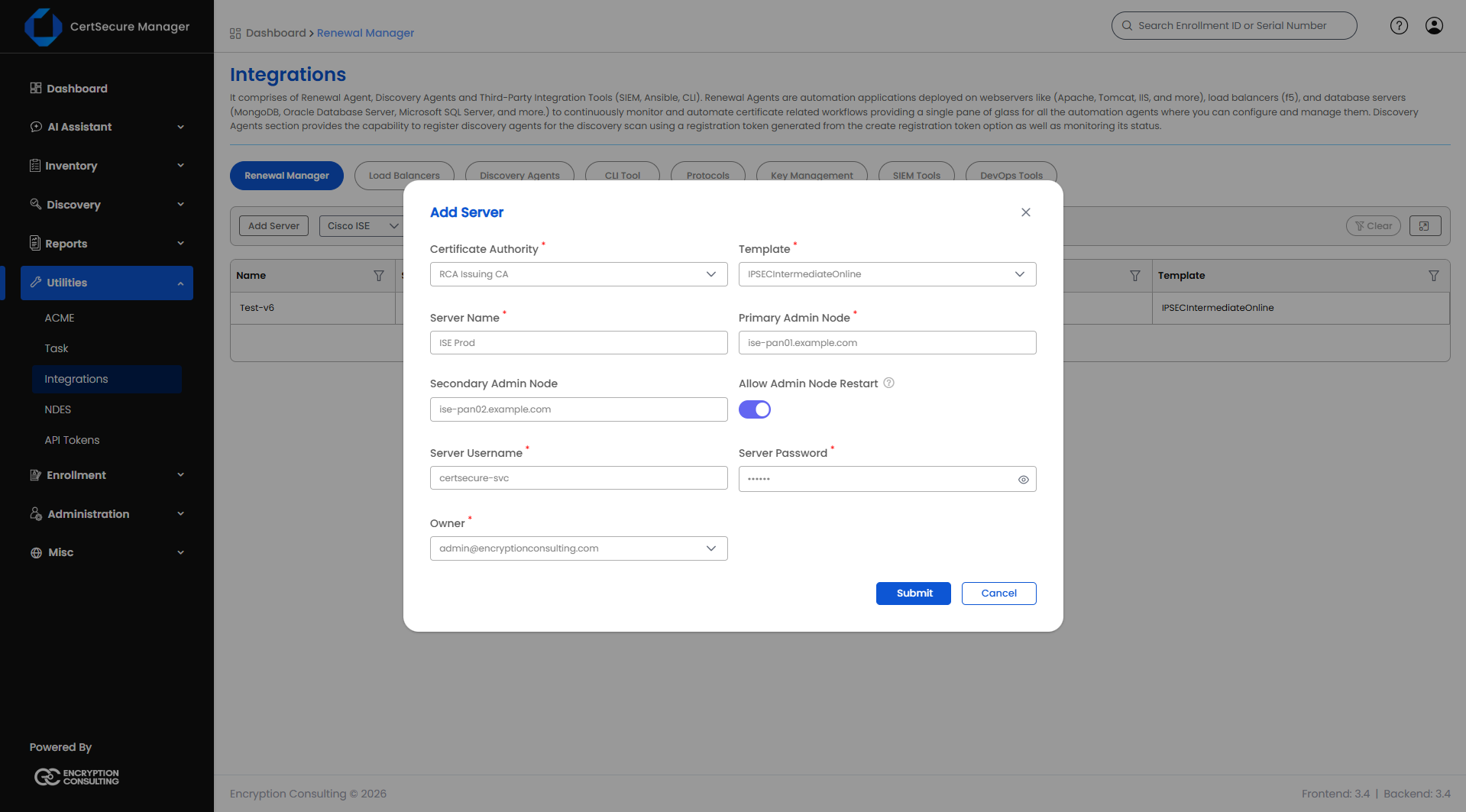
  1. On the Renewal Manager tab, click Add Server (or click the Cisco ISE tile in the connector grid).
  2. Fill in the fields below.
  3. Click Submit.
Cisco ISE - Add Server
Field Applies to What it means
Server Type Required, Add only Cisco ISE. Already selected when you start from the Cisco ISE tile.
Server Name Required, Add only A unique display name for this ISE deployment. Cannot be changed later. Maximum 50 characters.
Primary Admin Node Required The hostname or IP address of the Primary Admin Node. Enter the host only, without a scheme (https://), port, or path. The address cannot be changed after the server is added.
Secondary Admin Node Optional The hostname or IP address of the secondary Policy Administration Node, if the deployment has one. Same format as the Primary Admin Node.
Allow Admin Node Restart Optional Off by default. Renewing an Admin certificate restarts the ISE node, which takes 10 to 20 minutes. Leave this off and Admin endpoints stay manual only: automation will skip them.
Server Username Required The ISE administrator account.
Server Password Required on Add The password for Server Username. Stored encrypted. On Edit, leave blank to keep the existing password.
Certificate Authority Required The CA that will issue renewed certificates for this ISE deployment.
Template Required The certificate template/profile to request from the selected CA. Options depend on the CA chosen.
Owner Required The person responsible for this deployment. Autocompletes as you type an organization user's name or email.
Organization ID Only when CA = DigiCert The DigiCert organization ID to request the certificate under.
Order Validity Only when CA = DigiCert How many days the requested certificate should be valid for.
Note: The CA, template, and owner are set on the server, and every endpoint of the deployment is renewed with them.
Cisco ISE Server List Actions
Cisco ISE - Server List

Right-click a server row (or open its actions menu) to see:

  • View Details – opens a read-only summary of the server's configuration.
  • Edit Details – reopens the Add Server form pre-filled, so you can update credentials, CA, template, owner, Secondary Admin Node, or Allow Admin Node Restart.
  • Manage Endpoints – opens the endpoint list for this server.
  • View Tasks – opens the task history for this server.
  • Delete – deletes the server after a confirmation prompt. Deleting a server also removes every endpoint added under it.
Note: Switching Allow Admin Node Restart off also turns off automatic renewal for the Admin endpoints of that server, because an automated Admin renewal would otherwise be reported as automated while it is skipped.
How Endpoints Work on ISE

An ISE endpoint is a system certificate on one node, not an address and port. It is identified by the node hostname together with its set of roles, so one node can have several endpoints, for example one for Admin and a separate one for EAP.
  • The roles you select on an endpoint must be the roles of a single certificate, as grouped in one row of ISE's Used By column. Roles that sit on different certificates need an endpoint each.
  • ISE gives each role to exactly one certificate per node, and the Portal role to one certificate per portal group tag. CertSecure Manager therefore refuses an endpoint that claims a role (or portal group tag) that another endpoint on the same ISE node already holds. Two endpoints claiming the same role would otherwise bind it back and forth at every renewal.
  • An endpoint with the same Node Hostname and the same set of roles (and portal group tag) as an existing one is skipped, not treated as an error.
Adding a Cisco ISE Endpoint
  1. From the server list, open Manage Endpoints on the server (right-click → Manage Endpoints).
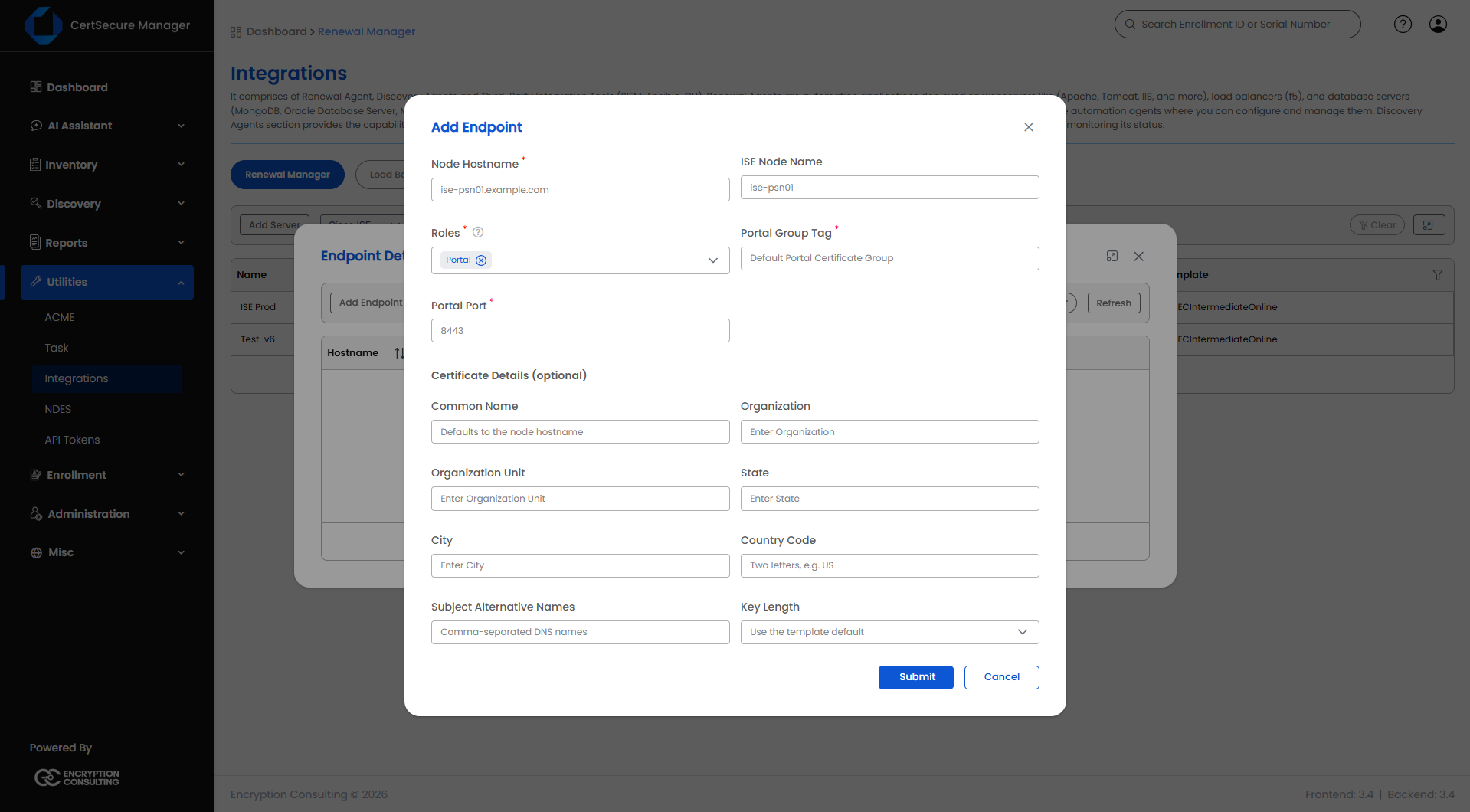
  2. Click Add Endpoint.
  3. Fill in the fields below.
  4. Click Submit.
Cisco ISE - Add Endpoint
Field Applies to What it means
Node Hostname Required The fully qualified domain name of the ISE node that holds the certificate. Stored in lowercase.
ISE Node Name Optional The short ISE hostname of the node. Defaults to the first part of the Node Hostname. Letters, digits, and hyphens only, up to 63 characters.
Roles Required One or more of Admin, EAP, Portal, pxGrid, RADIUS DTLS: the roles that this certificate holds on the node. At least one is required.
Portal Group Tag Required when the Portal role is selected The portal group tag of the certificate, for example Default Portal Certificate Group. It is not accepted unless Portal is selected.
Portal Port Required when the Portal role is selected The port the portal serves on. The default is 8443. Whole number from 1 to 65535.
Certificate Details (optional) Optional Overrides for the request that the Renewal Manager sends to ISE. See below.

The endpoint list shows Hostname, ISE Node, Roles, and Portal Group Tag for each endpoint.
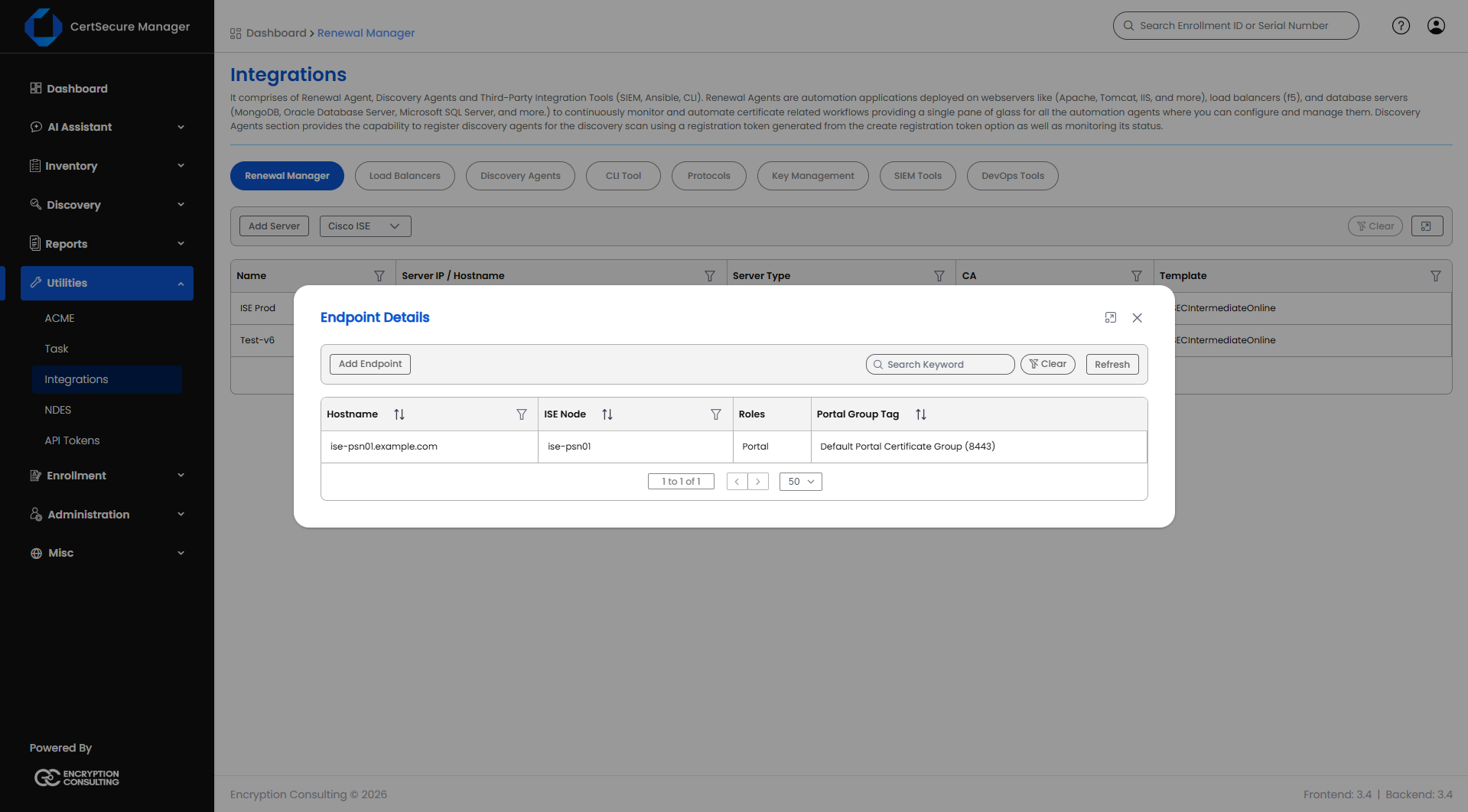
Cisco ISE - Endpoint List
Certificate Details (optional)

By default the Renewal Manager copies the subject, the Subject Alternative Names (SANs), and the key size from the certificate that is being replaced. Fill in any of the fields below to override one of them. The node's fully qualified name is always kept in the SANs.

Field What it means
Common Name The subject common name.
Organization The subject organization.
Organization Unit The subject organizational unit.
State The subject state or province.
City The subject locality.
Country Code The two-letter country code, for example US.
Subject Alternative Names Comma-separated DNS names. Between 1 and 50 names. Stored in lowercase and without duplicates.
Key Length 2048 Bits or 4096 Bits. ISE cannot generate 3072-bit keys. Leave blank to use the default.

Text values must be 1 to 64 characters and must not contain any of the characters , + = " \ < > # ; or control characters, because they become part of the certificate subject. An email address is not accepted, because ISE has no use for it.

Note: Use Certificate Details when ISE refuses to bind a certificate because its Trusted Certificates store already holds a certificate with the same subject. This commonly happens on a new node, where ISE's default self-signed certificate has the node name as its subject and cannot be deleted while it is still a system certificate. Giving the new certificate a different subject avoids the clash.
Note: An endpoint cannot be edited. To change one, delete it and add it again.
Endpoint Actions

From the endpoint list, use the row actions (right-click or the actions menu) to:
  • View Details – opens the Endpoint Information window.
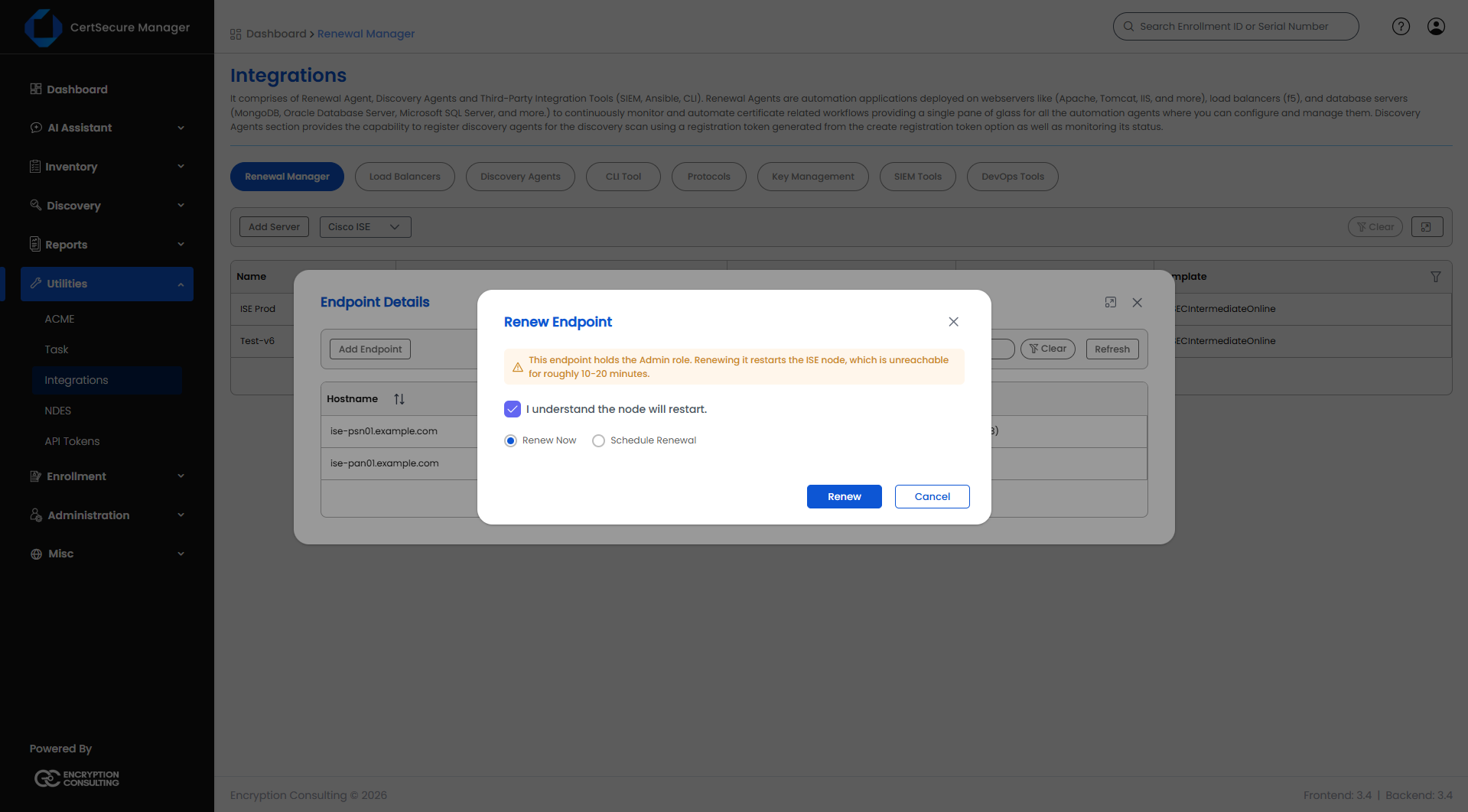
  • Renew – opens the Renew Endpoint dialog.
  • Delete – removes this endpoint from the server. It does not affect other endpoints on the same server.
  • Change Request – raises a ServiceNow change request about the endpoint. Shown only to users who can raise change requests.
Renewing a Cisco ISE Certificate
  1. Open Manage Endpoints on the server, find the endpoint, right-click and choose Renew.
  2. If the endpoint holds the Admin role, read the warning and tick I understand the node will restart.
  3. Pick one of:
    • Renew Now – queues the renewal immediately.
    • Schedule Renewal – pick a date and time at least 30 minutes from now using Enter Schedule Time.
  4. Click Renew (or Schedule if you chose to schedule it).
Cisco ISE - Renew Endpoint

Before you can renew manually:

  • The Renewal Manager Agent must be Online.
  • The endpoint must already exist under the server. Add it first if it does not.
Note: Renewing an endpoint that holds the Admin role restarts the ISE node. The node is unreachable for roughly 10 to 20 minutes.
What Happens When You Renew
  1. The agent asks ISE to create a certificate signing request for the node, using the subject, SANs, and key size of the certificate being replaced, or the values you gave under Certificate Details.
  2. It submits the request to the CA and receives the signed certificate together with the CA chain.
  3. Before binding, it imports into ISE's Trusted Certificates each CA certificate in the chain that ISE does not already trust. If the chain it received has no root certificate (public CAs usually leave it out), the agent completes the chain by following the issuer (AIA) address of the top certificate. If the chain is still incomplete, the bind is refused and the reason is shown in the task.
  4. It binds the signed certificate to the node with the roles of the endpoint.
  5. For an Admin certificate, the node restarts, and the agent checks that the node serves the new certificate again.
Note: The agent does not require you to import the CA root into ISE yourself.
CA Template Requirements

The certificate template used for ISE must be set up as follows, or ISE refuses the certificate.

  • Subject Name: Supply in the request. A template that builds the subject from Active Directory fails with the error CERTSRV_E_SUBJECT_DNS_REQUIRED, or "DNS name is unavailable".
  • Extended Key Usage: Server Authentication and Client Authentication. ISE refuses a certificate with only Server Authentication for some roles, for example EAP, with the error "Certificate does not have client authenticate constraint". Issue both.
Viewing Tasks

Here is how to check renewal progress:

  1. Right-click a server → View Tasks.
  2. Use Search Keyword, the column filters, or Refresh to find a specific task.

When a task fails with one of the common ISE problems, a short hint appears under the task details. The hints are listed in the troubleshooting table below.

Troubleshooting
Message in the task details What to do
The roles "are split across certificates" These roles live on different ISE certificates. Register one endpoint per certificate, matching a single row of ISE's Used By column.
"serves serial … but ISE reports …" Something else is answering on that address, such as a load balancer, or a bind that has not finished. Check what is listening there, then retry once the node has settled.
"ISE already has a pending certificate signing request" A pending request is blocking a new one. Delete it in ISE under Administration → System → Certificates → Certificate Signing Requests.
"CA did not return a signed certificate in time" The CA connector is offline, busy, or waiting for approval. Check the connector agent and the matching Certificate Request task.
CERTSRV_E_SUBJECT_DNS_REQUIRED or "DNS name is unavailable" Set the certificate template's subject name to Supply in the request.
"does not have client authenticate constraint" Add Client Authentication to the template's Extended Key Usage, alongside Server Authentication.
"same subject name" with "Trusted Certificates" ISE's trust store already holds a certificate with this subject. Delete the endpoint and add it again with a different subject under Certificate Details.
"refused to remove that entry" ISE will not remove that trust entry while it is a system certificate. Give the new certificate a different subject under Certificate Details.
"did not serve the new Admin certificate within …" The node did not return after the Admin restart in time. Check it with show application status ise. Further Admin renewals on this server were skipped deliberately.
"ISE rejected the credential" or "HTTP 401" Fix the stored credentials with Edit Details on the server, or enable the Open API service in ISE.
"did not match the one this agent trusts" The ISE Admin certificate was replaced outside CertSecure. Set CA_BUNDLE under [CISCOISE] in the Renewal Manager's conf.ini.
The form shows "Portal group tag is required for the Portal role" Enter a portal group tag, or remove the Portal role.
Adding the endpoint fails with "node '<name>' already has an endpoint (…) that claims role '<role>'" Another endpoint on the same ISE node already holds that role (or portal group tag). Remove the role from the new endpoint, or delete the other endpoint first.
On this Page:
Support Privacy Policy Terms of Service

Copyright 2026 Encryption Consulting LLC. All rights reserved.