
- Overview
- Reference Guide
- Setup & Architecture
- Release Notes
- Workflow
- API Reference
- Integration Guide
- Discovery Agent Setup Guide
Cloudflare
Renews the custom (uploaded) certificates that Cloudflare serves for your domains. Cloudflare is a cloud service and not a server, so there is no operating system, IP address, or remote login to configure. The Renewal Manager works with the Cloudflare API using an API credential, and the new certificate is uploaded to the Cloudflare zone instead of being written to disk.
Supported operating system(s): Not applicable. Cloudflare is managed through its API.
Before You Start
- The Renewal Manager must be Online.
- A Cloudflare credential: either an API token, or the account email together with the Global API Key. An API token needs the permission Zone → SSL and Certificates → Edit on the zones you want managed, and Zone → Zone → Read so that the zones can be listed.
-
When the server is added, the CertSecure Manager backend reads your Cloudflare account to import its domains. The backend therefore needs outbound HTTPS (TCP 443) access to
api.cloudflare.com. If Cloudflare cannot be reached at that moment, the server is still added and the import is reported as failed. - Custom certificates are available only on Cloudflare zones whose plan includes them. A zone whose plan or token permissions do not allow access to custom certificates is reported in the import result and does not stop the other zones from being imported.
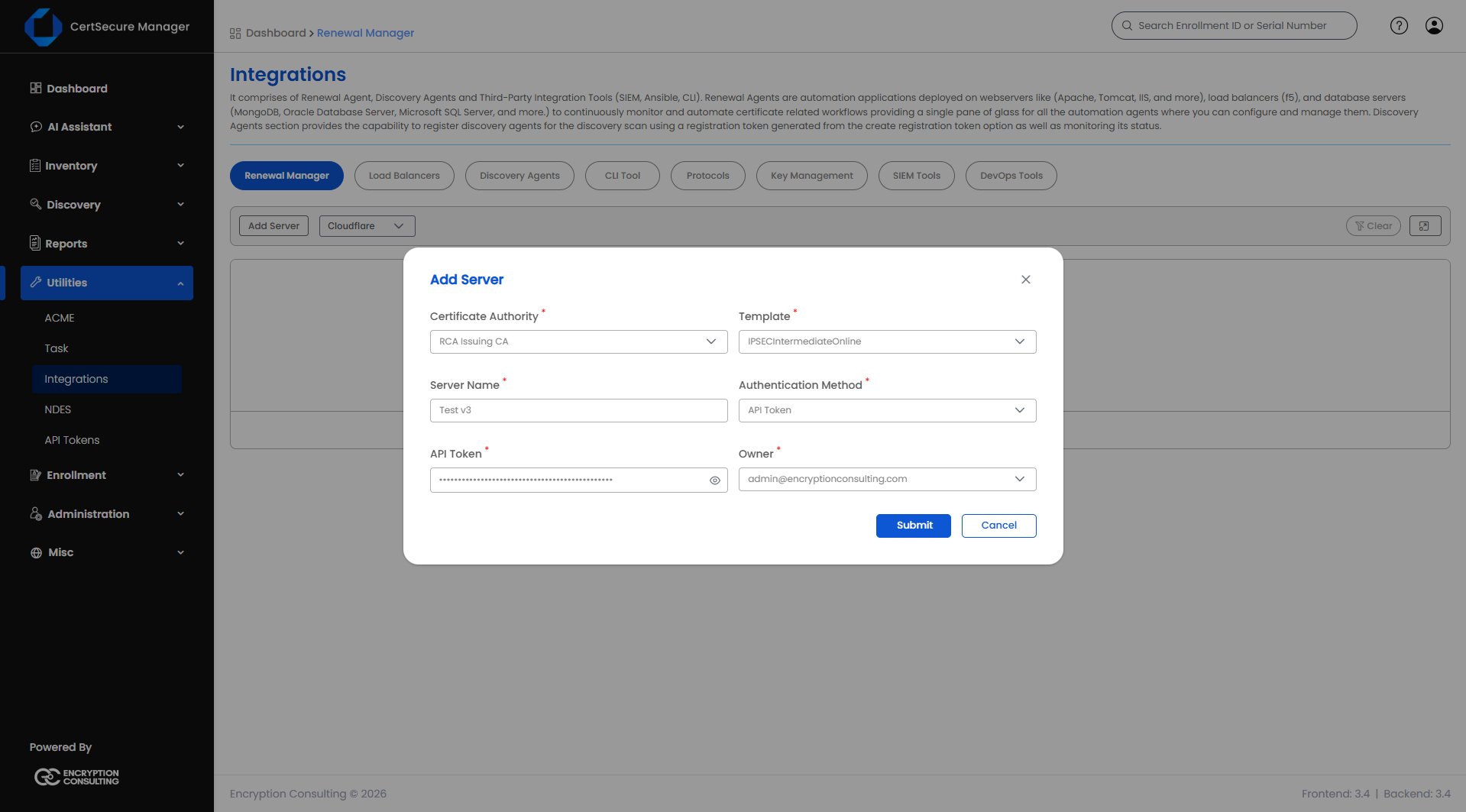
Adding a Cloudflare Server
- On the Renewal Manager tab, click Add Server (or click the Cloudflare tile in the connector grid).
- Fill in the fields below.
- Click Submit.
| Field | Applies to | What it means |
|---|---|---|
| Server Type | Required, Add only | Cloudflare. Already selected when you start from the Cloudflare tile. |
| Server Name | Required, Add only | A unique display name for this Cloudflare account. Cannot be changed later. Maximum 50 characters. |
| Authentication Method | Required | API Token, or Email + Global API Key. Changing the method clears both credential fields, so a value typed for one method is never submitted as the other. |
| Account Email | Only when the method is Email + Global API Key | The email address of the Cloudflare account. |
| API Token / Global API Key | Required | The credential for the method chosen. The label changes with the method. Stored encrypted. |
| Certificate Authority | Required | The CA that will issue renewed certificates for the domains of this account. |
| Template | Required | The certificate template/profile to request from the selected CA. Options depend on the CA chosen. |
| Owner | Required | The person responsible for this account. Autocompletes as you type an organization user's name or email. |
| Organization ID | Only when CA = DigiCert | The DigiCert organization ID to request the certificate under. |
| Order Validity | Only when CA = DigiCert | How many days the requested certificate should be valid for. |
Note: The form does not ask for an operating system, IP address, or service name. Cloudflare has none of these.
What Happens When You Add the Server
The domains of the account are imported at the moment you click Submit. CertSecure Manager uses the credential you entered to read the account and then adds the endpoints for you.
- Only active zones are imported. Zones that are not active are skipped.
- One endpoint is created for each custom certificate in a zone. A custom certificate that covers several hostnames becomes one endpoint, named after one of the hostnames it covers. It is one endpoint because the certificate is renewed as a whole, and the new certificate covers every hostname of the record.
- For each zone, an endpoint for the zone's own domain (the apex) is also added when no custom certificate already represents it. Cloudflare serves that domain with its own managed certificate. Renewing such an endpoint uploads a custom certificate to the zone and changes the zone's SSL setup, so review these endpoints before the first renewal.
- A custom certificate that covers only wildcard names, or whose hostnames are all already represented by another certificate in the zone, cannot be turned into an endpoint. Add an endpoint manually for a hostname it covers and enter its Certificate ID.
- The import reads at most 200 zones and stops after 45 seconds. If the account is larger, add the remaining domains manually.
The result of the import is recorded as a task named Cloudflare Domain Import (Renewal Manager) on the Tasks page. Its details give the number of domains imported, how many already have a custom certificate, and any zones that were skipped, could not be read, or were only partly imported.
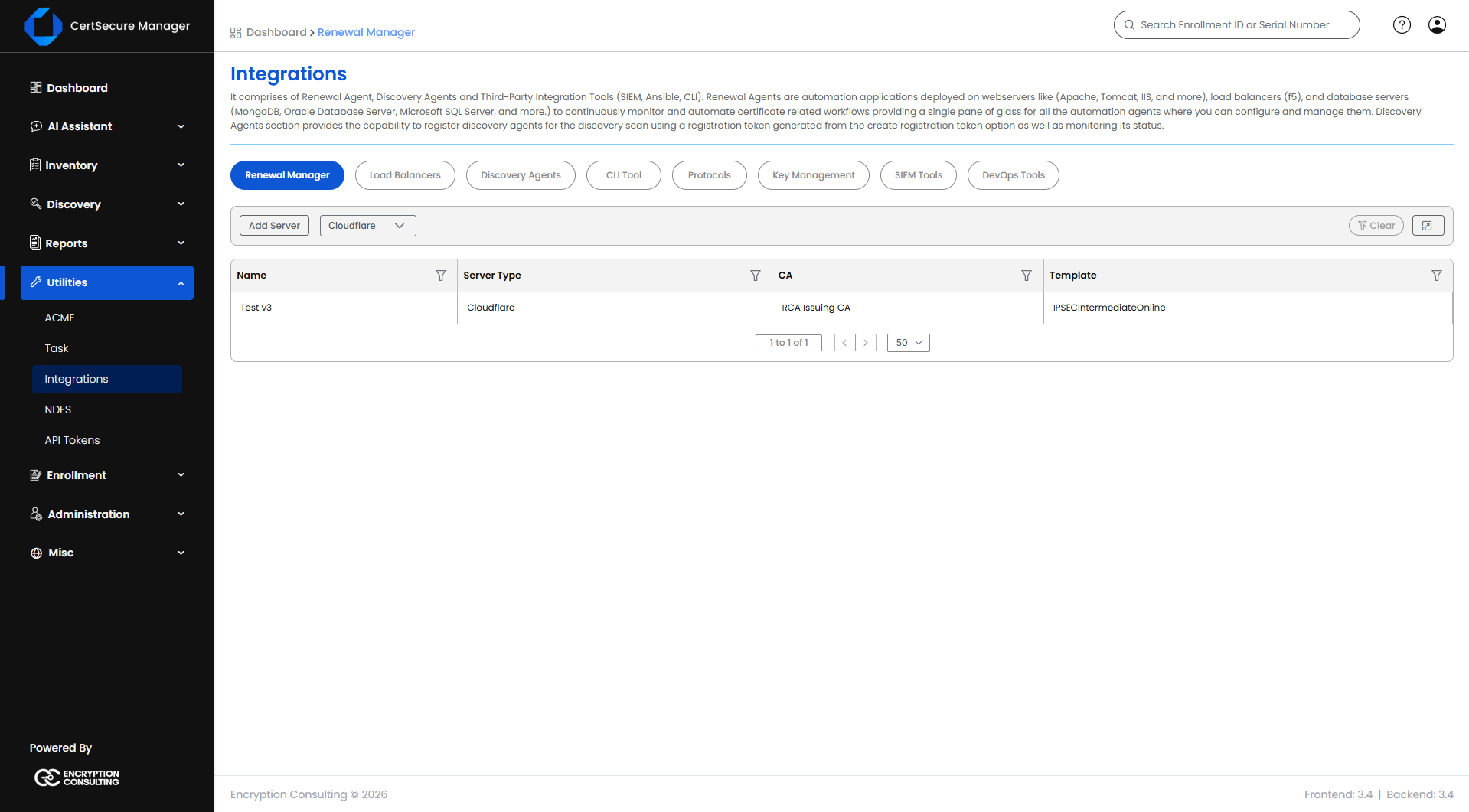
Note: If Cloudflare rejects the credential, the server is not added and the error reads "Cloudflare rejected the API token". Check the token permissions listed under Before You Start. Any other problem with the import, such as a timeout or no route to Cloudflare, does not block the server: it is added, and the problem is reported in the import task.
Cloudflare Server List Actions
Right-click a server row (or open its actions menu) to see:
- View Details – opens a read-only summary of the server's configuration.
- Edit Details – reopens the form pre-filled, so you can update the credential, CA, template, or owner.
- Manage Endpoints – opens the endpoint list for this server.
- Delete – deletes the server after a confirmation prompt. Deleting a server also removes every endpoint added under it.
Note: View Tasks and Push Certificate are not available for Cloudflare servers.
Adding a Cloudflare Endpoint
The import normally creates the endpoints. Add one manually for a domain the import did not create, for example one that was skipped or created after the import.
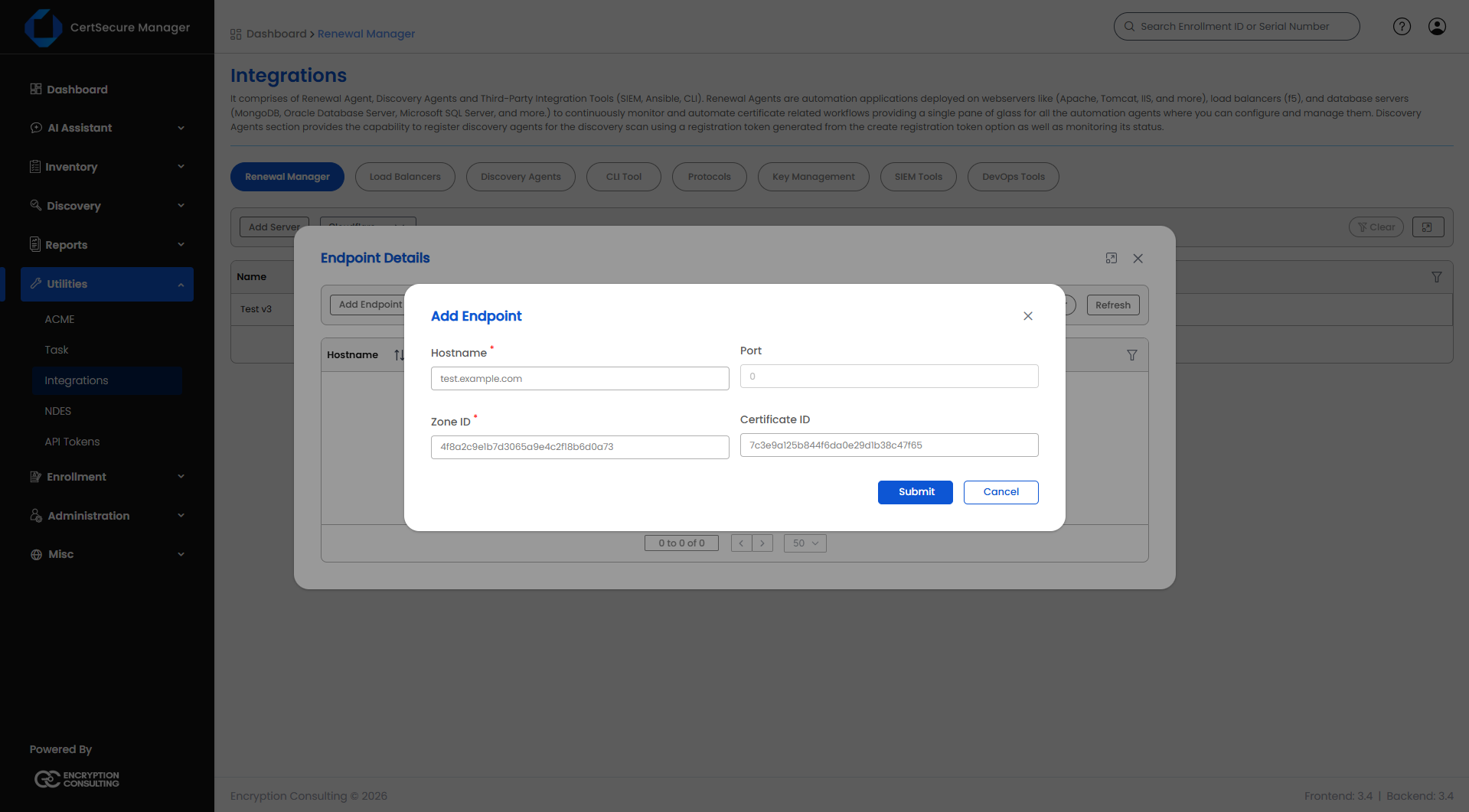
- From the server list, open Manage Endpoints on the server (right-click → Manage Endpoints).
- Click Add Endpoint.
- Fill in the fields below.
- Click Submit.
| Field | Applies to | What it means |
|---|---|---|
| Hostname | Required | The hostname that identifies the certificate, for example www.example.com. The agent uses it to read the certificate Cloudflare currently serves. Stored in lowercase. A hostname can be added only once per server. |
| Port | Fixed | Cloudflare serves custom certificates on port 443 only, so the port cannot be entered. |
| Zone ID | Required | The Cloudflare zone the hostname belongs to. 32 hexadecimal characters. |
| Certificate ID | Optional | The ID of the existing custom certificate in Cloudflare that should be replaced. 32 hexadecimal characters. If left blank, the Renewal Manager finds the custom certificate for this hostname by listing the zone at renewal time. |
The endpoint list shows Hostname, Zone ID, and Certificate ID for each endpoint.
Note: An endpoint cannot be edited. To change one, delete it and add it again.
Endpoint Actions
From the endpoint list, use the row actions (right-click or the actions menu) to:
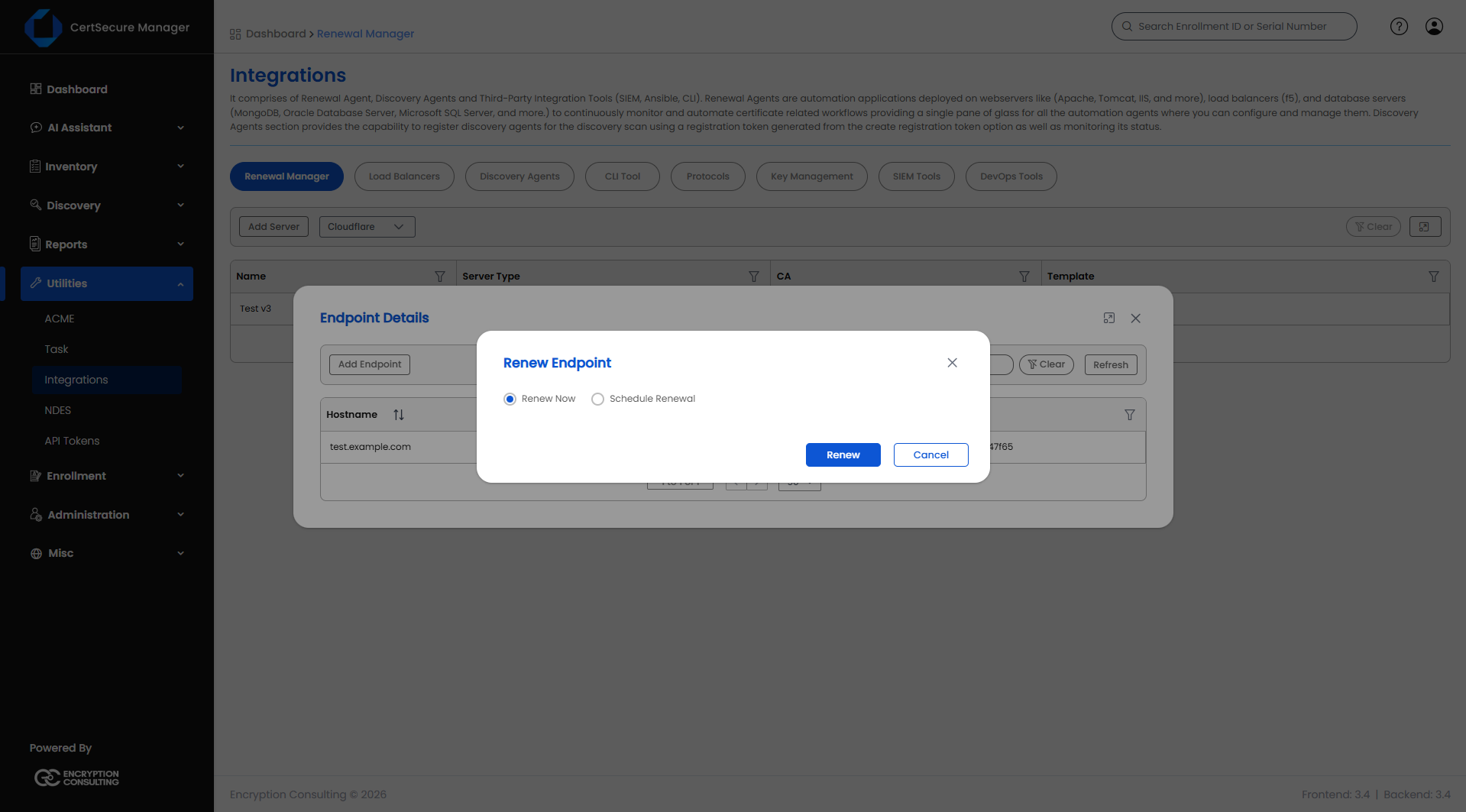
- View Details – opens the Endpoint Information window.
- Renew – opens the Renew Endpoint dialog.
- Delete – removes this endpoint from the server. It does not affect other endpoints on the same server.
Renewing a Cloudflare Certificate
- Open Manage Endpoints on the server, find the endpoint, right-click and choose Renew.
-
Pick one of:
- Renew Now – queues the renewal immediately.
- Schedule Renewal – pick a date and time at least 30 minutes from now using Enter Schedule Time.
- Click Renew (or Schedule if you chose to schedule it).
Before you can renew manually:
- The Renewal Manager Agent must be Online.
- The endpoint must already exist under the server. Add it first if it does not.
What Happens When You Renew
- The agent reads the certificate that Cloudflare currently serves for the hostname.
- It creates a certificate request and submits it to the CA, and receives the new certificate.
- It uploads the new certificate to the zone through the Cloudflare API, replacing the existing custom certificate for the hostname, or creating one if there is none. The agent checks the live zone at that moment, so a certificate added or replaced in Cloudflare since the import is taken into account.
Before You Renew
- A certificate that covers several hostnames is renewed as one. The certificate issued must cover every hostname of the existing record, otherwise the renewal is refused.
- The credential stored on the server must still be valid. If the token was rotated or its permissions were reduced, use Edit Details on the server and enter the new credential.
Troubleshooting
| Symptom | What to check |
|---|---|
| Adding the server fails with "Cloudflare rejected the API token" | The token is wrong, expired, or lacks permissions. It needs Zone → SSL and Certificates → Edit on the zones to manage, and Zone → Zone → Read. For the Email + Global API Key method, check the email and key. |
| The server was added but has no endpoints | Open the Cloudflare Domain Import (Renewal Manager) task on the Tasks page. It states whether the import failed (for example, Cloudflare could not be reached), or whether zones were skipped or could not be read. Add the missing endpoints manually. |
| A zone is reported as not accessible | The zone's Cloudflare plan may not include custom certificates, or the token's SSL and Certificates permission may not cover that zone. |
| The form shows "Zone ID must be 32 hexadecimal characters" | Copy the Zone ID again from the Cloudflare dashboard. Zone IDs and Certificate IDs are 32 hexadecimal characters. |
| The endpoint cannot be added because the hostname already exists | A hostname can be added once per server. Hostnames are compared in lowercase. |