
- Overview
- Reference Guide
- Setup & Architecture
- Release Notes
- Workflow
- API Reference
- Integration Guide
- Discovery Agent Setup Guide
This page explains how the CertSecure Manager documentation is organized, how to move between pages, and how to search for a topic, so that you can quickly find the information you need.
The documentation is divided into sections, each listed at the top level of the sidebar:
| Section | What You Will Find |
|---|---|
| Overview | An introduction to CertSecure Manager and how to use this documentation. |
| Reference Guide | A description of every area of the CertSecure Manager portal, from the dashboard to administration and settings. |
| Setup & Architecture | How sign-in and access control work, the architecture of CertSecure Manager and its components, and step-by-step guides for installing it on Windows, Linux, or Docker. |
| Workflow | How the Approval Workflow works: configuring approval policies for CA templates, and approving or denying certificate requests. |
| API Reference | How to connect to the CertSecure Manager REST API, and a reference for each group of endpoints. |
| Integration Guide | Guides for connecting CertSecure Manager with the platforms and services it works alongside: the Renewal Manager, Load Balancer (F5 and NetScaler), Certificate Authorities, Ansible Automation Platform, and Azure Key Vault. |
| Discovery Agent Setup Guide | How to install and configure the Discovery Agent and run certificate discovery scans. |
Every page of the documentation shares the same layout. The screenshot below shows a typical page with its main navigation features numbered. Each number is described in the table that follows the screenshot.
Tip: Hover over a numbered marker or an area of the screenshot to see the name of that feature, and click it to jump to its description.
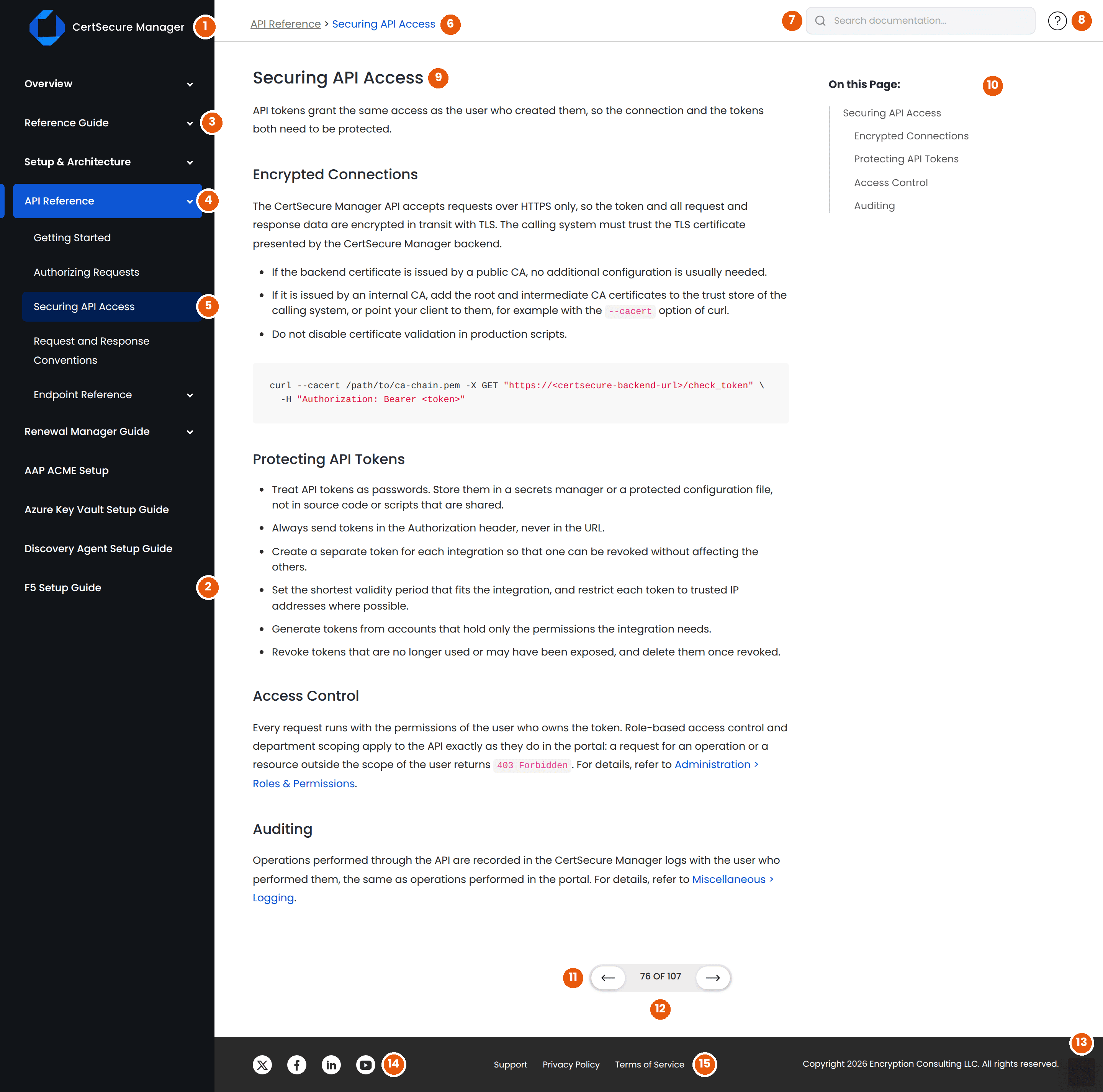
| No. | Feature | Description |
|---|---|---|
| 1 | CertSecure Manager Logo | Takes you back to the About CertSecure Manager page, the starting point of the documentation, from any page. |
| 2 | Section List | The sidebar lists every section of the documentation: Overview, Reference Guide, Setup & Architecture, Release Notes, Workflow, API Reference, Integration Guide, and the Discovery Agent Setup Guide. Click a section name to open its overview page. |
| 3 | Section Arrow | An arrow next to a section or page means that it contains further pages. When you open that section or page, it expands in the sidebar to list the pages it contains. |
| 4 | Current Section | The section that contains the page you are reading is highlighted and expanded, so you can always see which part of the documentation you are in and move to another page in the same section. |
| 5 | Current Page | The page you are reading is highlighted within its section. |
| 6 | Breadcrumb | Shows where the current page sits in the documentation, for example API Reference > Securing API Access. Click the first item to go to the parent page. |
| 7 | Search Box | Searches all sections of the documentation. Results appear as you type and link directly to the matching part of a page. For details, see Searching the Documentation. |
| 8 | Help and Support | Opens the Encryption Consulting contact page, where you can reach the support team if you cannot find what you need in the documentation. |
| 9 | Page Title | The name of the page you are reading. It matches the page name in the sidebar and the last item of the breadcrumb. |
| 10 | On this Page | Lists the headings of the current page. Click a heading to jump to that part of the page. As you scroll, the heading you are currently reading is highlighted. |
| 11 | Previous and Next | Move to the previous or next page in reading order. Reading order follows the sidebar from top to bottom, so you can read a whole section page by page. |
| 12 | Page Counter | Shows the position of the current page within the documentation, for example 76 OF 107. |
| 13 | Back to Top | Appears in the lower-right corner once you scroll down a page. Click it to return to the top of the page. |
| 14 | Social Links | Links to the Encryption Consulting pages on X, Facebook, LinkedIn, and YouTube. |
| 15 | Support and Legal Links | Links to Encryption Consulting support, the privacy policy, and the terms of service. |
Note:
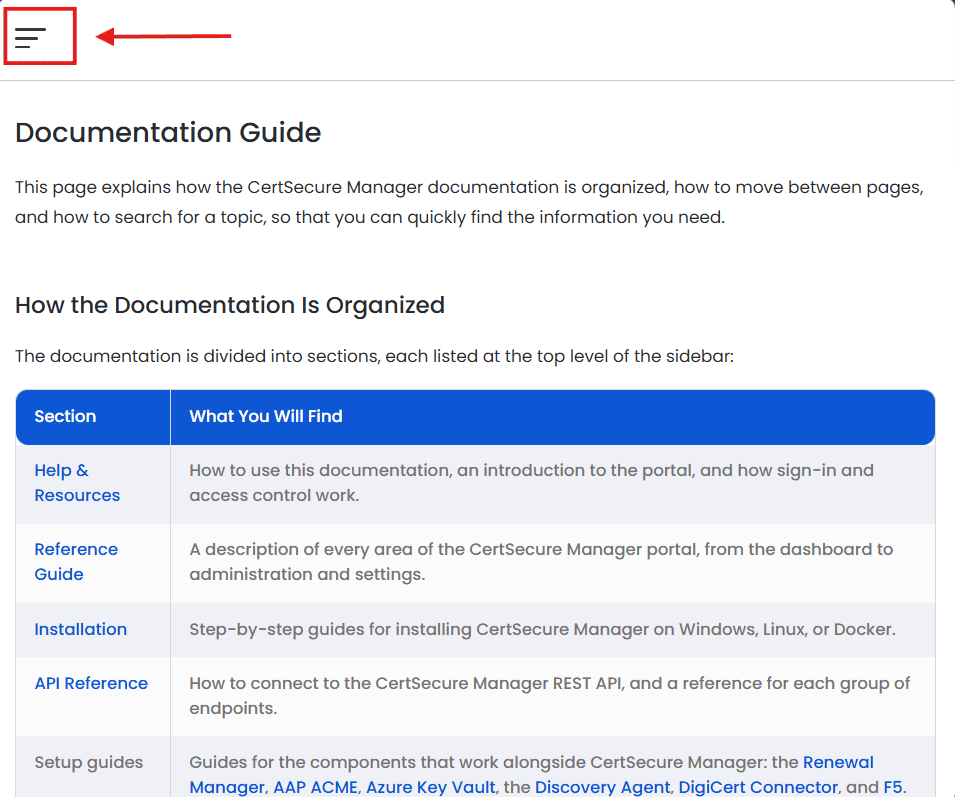
The documentation is designed for desktop browsers. On screens below 767px, the sidebar is hidden; open it with the menu button at the top of the
page.
Use the Search documentation... box at the top right side of every page to find a topic across all sections.
Tip: Search for the exact name of a field, setting, menu item, or API endpoint, for example API Tokens or /enrollment/renew_cert, to find the section that describes it.
The documentation uses the following conventions:
| Convention | Meaning |
|---|---|
| Menu paths, for example Utilities > API Tokens | The navigation path in the CertSecure Manager portal. Each > separates one menu level from the next. |
| Note, Important, and Tip boxes | Additional information, cautions, or recommendations related to the surrounding steps. Read Important boxes before continuing. |
| Code blocks | Commands, configuration values, and examples. Enter them exactly as shown, replacing any placeholders. |
Values in angle brackets, for example <API_HOSTNAME> |
Placeholders. Replace them with the values for your environment. |
| Numbered steps | Procedures that must be completed in the order shown. |
| Screenshots | The screen you should see at that point in a procedure. Details such as names and values can differ in your environment. |
You can open this documentation at any time from the header bar of the CertSecure Manager application. For details, refer to Header Bar > CertSecure Documentation.