CertSecure Documentation
  • Overview
    • About CertSecure Manager
    • Documentation Guide
  • Reference Guide
    • Header Bar
      • CertSecure Documentation
      • Swagger API
      • Profile Section
      • Search
    • Dashboard
      • Key Performance Indicators
      • Expiring Certificates
      • CA metrics
      • Key Strength
      • Signing Algorithm
      • Certificate Risk Report Profile
      • PKI Posture Management
      • NDES Health Information
    • AI Assistant
      • Chat
      • Configuration
      • Usage Report
    • Inventory
      • Overview
        • Overall
        • CertSecure
      • Template Management
        • Switch Templates
        • Exclusion List
        • Alert Templates
        • Certificate Templates
      • Template Categories
    • Discovery
      • Inventory
      • Scan Config
      • Cloud Config
      • Vault Config
      • Discovery Analytics
      • Scan Details
      • Discovery Ingestion
    • Reports
    • Utilities
      • ACME
      • Tasks
      • Integrations
        • Renewal Manager
        • Load Balancers
        • Discovery Agents
        • CLI Tool
        • Key Management
        • SEIM Tools
        • DevOps Tools
        • Ansible Automation Platform
      • NDES
      • Azure Key Vault
      • API Tokens
    • Enrollment
      • Certificate Request
      • Generate CSR
      • Enroll CSR
      • Generate Certificate
      • Import Certificate
      • Bulk Certificate Generation
      • Manage Policies
      • Organization Details
    • Administration
      • Users
      • Roles and permission
      • Certificate Authorities
      • Departments
    • Miscellaneous
      • Logging
      • Service Setup
        • Zoom
        • Zendesk
      • Settings
        • Configure Realms
        • Schedule Alerts
        • Metrics
        • Web Branding
        • About License
  • Setup & Architecture
    • Identity and Access Control
    • Architecture
    • Installation
      • Pre-requisites
      • Windows
      • Linux
      • Docker
    • Upgrade
      • Windows
      • Docker
  • Release Notes
    • Releases for 2026
      • v3.4.0
      • v3.3.1
      • v3.3.0
    • Releases for 2025
      • v3.2.0
      • v3.1.0
    • Releases for 2024
      • v3.0.0
  • Workflow
    • Approval Workflow
  • API Reference
    • Getting Started
    • Authorizing Requests
    • Securing API Access
    • Request and Response Conventions
    • Endpoint Reference
      • Health
      • API Token Management
      • CA Management
      • Templates
      • Certificate Enrollment
      • Inventory
      • Certificate Discovery
      • Tasks
      • Watcher Groups
      • Alerts
      • Reports
      • Logs
      • Monitoring
      • Scheduling
      • SMTP
      • ACME
      • Azure Key Vault
      • Google Cloud (GCP)
      • HashiCorp Vault
      • EJBCA
      • ServiceNow
  • Integration Guide
    • Renewal Manager
      • Workflow
      • Setup
      • Troubleshooting
      • IIS
      • Apache
      • Tomcat
      • Nginx
      • MSSQL
      • MongoDB
      • Oracle
      • Cloudflare
      • AudioCodes
      • Cisco ISE
      • Palo Alto PAN-OS
      • Cisco ACI
    • Load Balancer
      • F5
        • Workflow
        • Setup
        • Onboarding
        • UI Guide
        • Troubleshooting
      • NetScaler
        • Workflow
        • Setup
        • UI Guide
        • Troubleshooting
    • Certificate Authorities
      • ACME CAs
      • AWS
      • DigiCert Connector
      • EJBCA
      • GlobalSign
      • GoDaddy
      • HashiCorp Vault PKI
      • Microsoft AD CS
      • Sectigo
      • Sectigo-PS
    • Ansible Automation Platform
    • Azure Key Vault
  • Discovery Agent Setup Guide

Approval Workflow

The Approval Workflow adds a review step to certificate issuance. When an approval policy is applied to a certificate template, certificates requested from that template are not issued immediately. Instead, each request is sent to the PKI Admin of the requester's department for review, and the certificate is issued only after the request is approved.

This gives your organization control over which certificates are issued from sensitive Certificate Authorities (CAs) and templates, without changing how users request certificates.

How the Workflow Works

The Approval Workflow has four stages:

  1. Configure the approval policy: An Admin or PKI Admin selects one or more templates of a CA and sets the number of approvals required for each.
  2. Save the policy: The approval requirement takes effect for all new certificate requests from those templates.
  3. Request a certificate: A user requests a certificate from one of those templates. Instead of being issued, the certificate is submitted as a request to the PKI Admin of the user's department.
  4. Approve or deny the request: The PKI Admin reviews the request under Certificate Request and approves or denies it. The certificate is issued only when the request is approved.

Roles Involved

Role Responsibility in the workflow
Admin or PKI Admin Configures the approval policy for CA templates under Enrollment > Manage Policies.
Requester (any other user) Requests certificates as usual. Requests from templates with an approval policy wait for approval.
PKI Admin of the requester's department Reviews the request under Enrollment > Certificate Request and approves or denies it.
Step 1: Configure the Approval Policy

This step is performed by a user with the Admin or PKI Admin role.
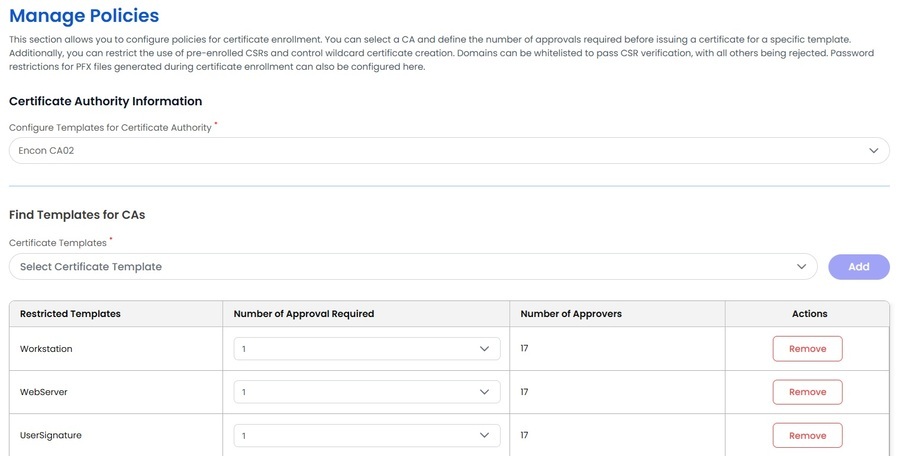
  1. Go to Enrollment > Manage Policies.
  2. Under Certificate Authority Information, select the CA in Configure Templates for Certificate Authority.
  3. In the Find Templates for CAs section, select one or more templates from Certificate Templates and click Add. The templates are added to the table below.
  4. For each template, choose the Number of Approval Required. The Number of Approvers column shows how many users are available to approve requests for that template.
Manage Policies: Find Templates for CAs with the number of approvals required

To stop requiring approval for a template, click Remove in its row.

Step 2: Save the Policy

Save the policies to apply your changes. From this point, every new certificate request for the selected templates follows the Approval Workflow. Certificates that were already issued are not affected.

For details of the other settings on this page, see Manage Policies.

Step 3: Request a Certificate

The workflow starts when a user requests a certificate from a template that has an approval policy, using any of the following:

  • Generate Certificate
  • Enroll CSR
  • Bulk Certificate Generation

The user fills in the request and submits it as usual, and the request is initialized.
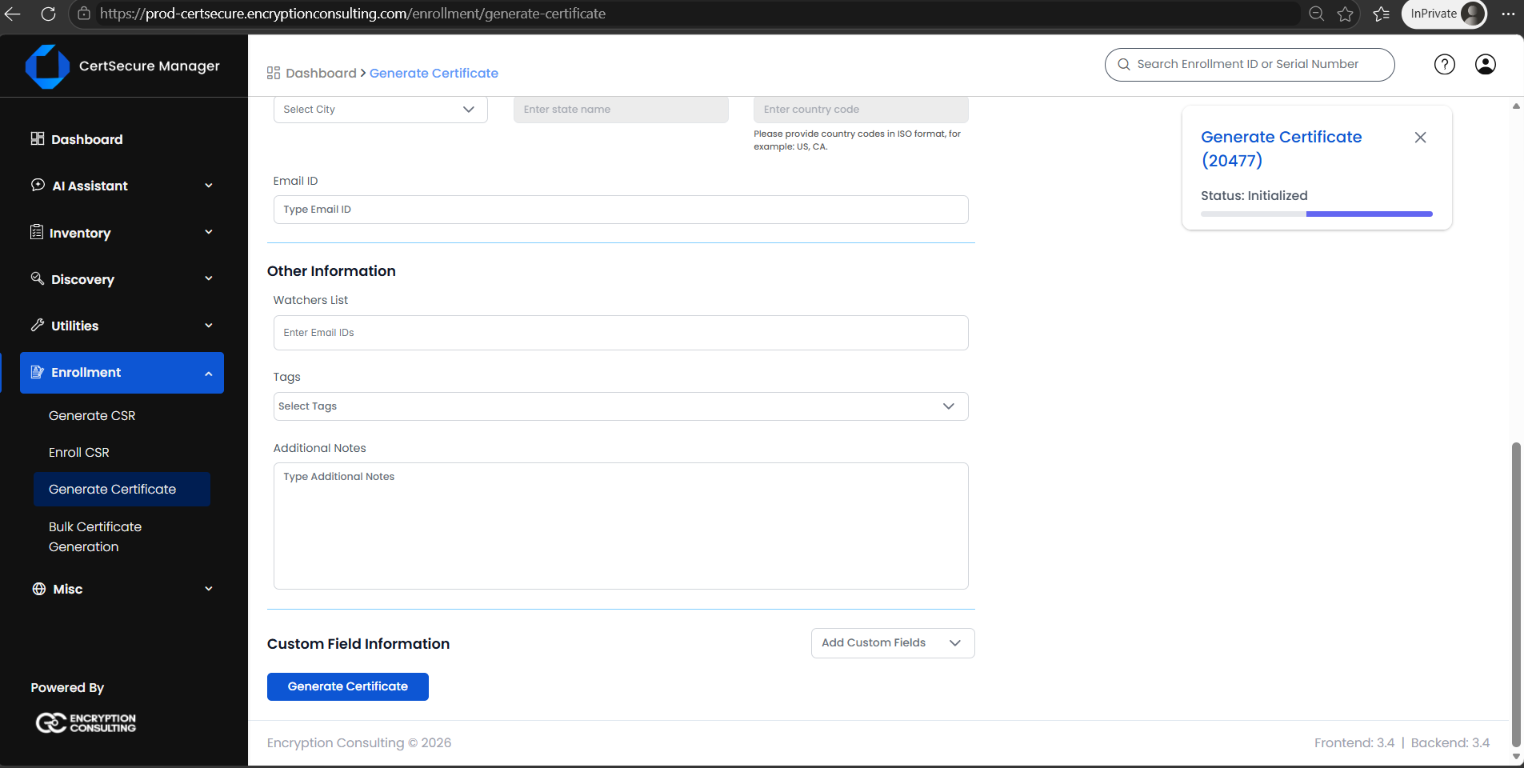
Generate Certificate: the request is submitted and initialized

Because the template requires approval, the certificate is not issued immediately. CertSecure Manager shows a message with the number of approvals required, for example Certificate has to be approved by: 1 Approver, and sends the request to the PKI Admin of the user's department.
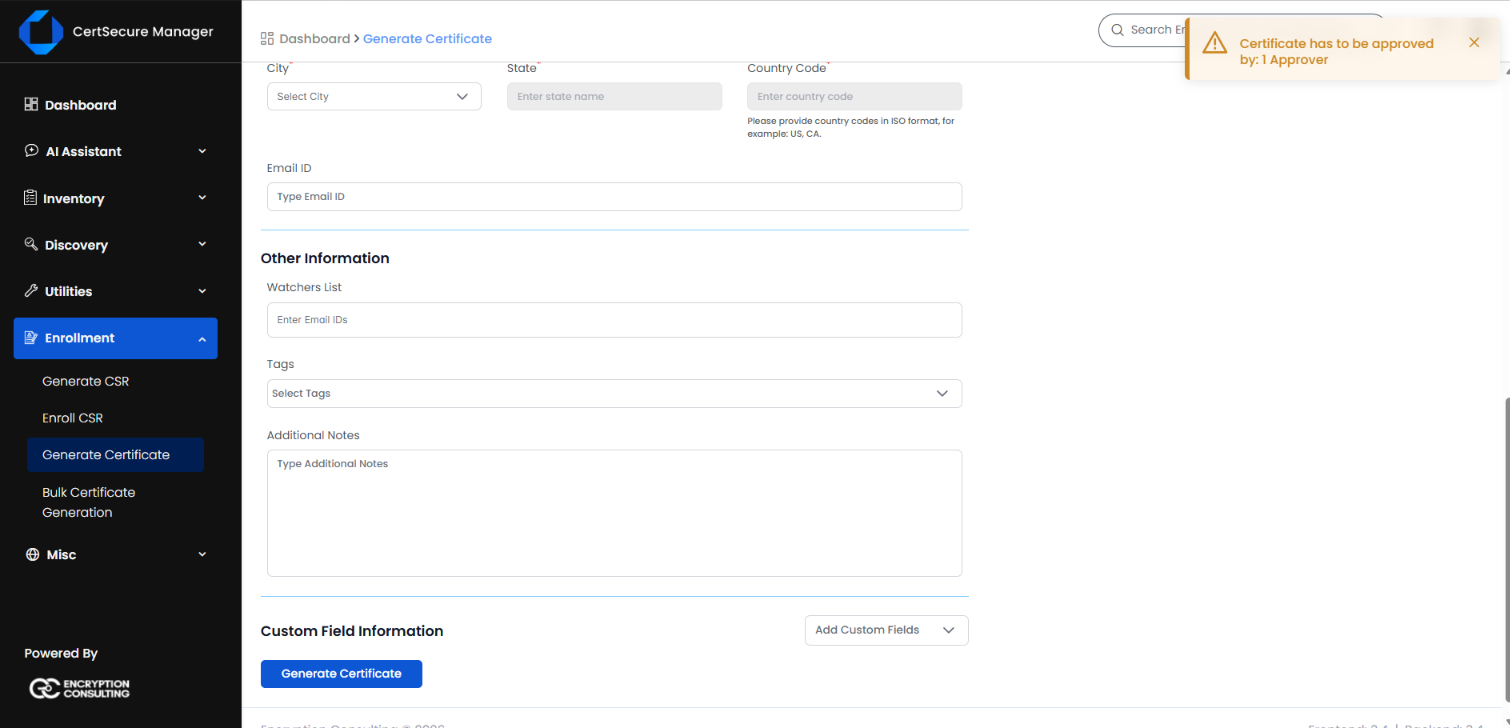
Message: Certificate has to be approved by 1 Approver
Step 4: Approve or Deny the Request

This step is performed by the PKI Admin of the requester's department.
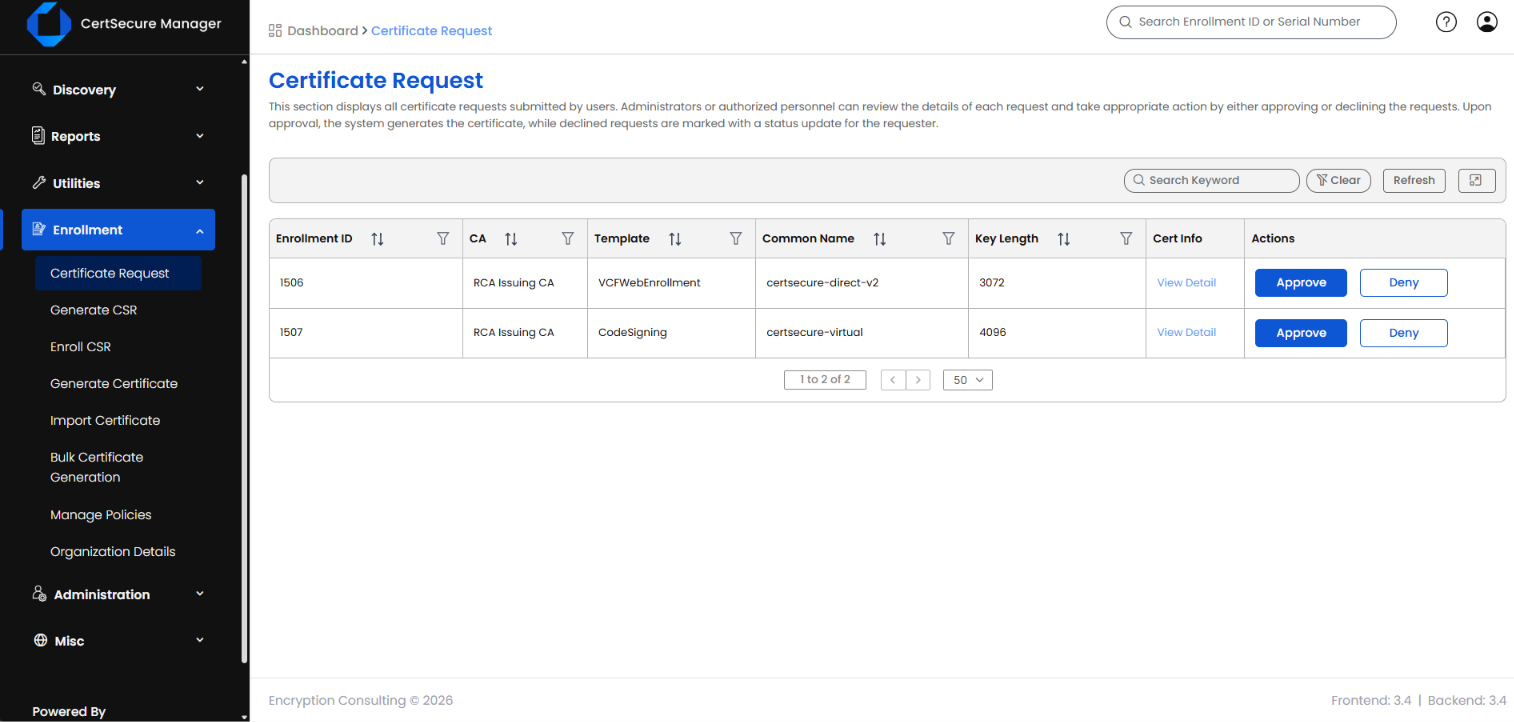
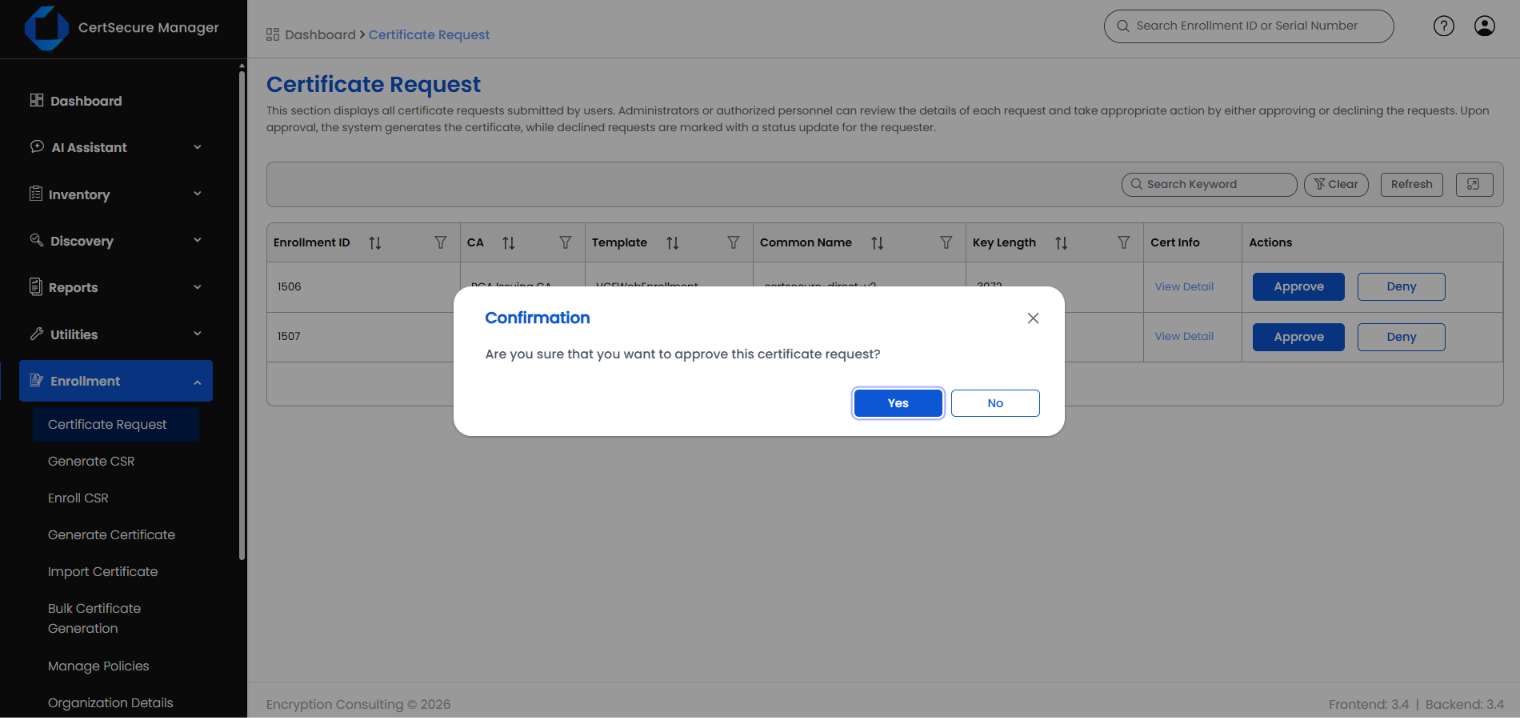
  1. Go to Enrollment > Certificate Request. The page lists the pending requests with their Enrollment ID, CA, Template, Common Name and Key Length.
  2. Click View Detail under Cert Info to review the details of a request before you decide.
Certificate Request: pending requests with Approve and Deny actions

To approve a request

  1. Click Approve in the row of the request.
  2. In the confirmation dialog, click Yes.
Confirmation dialog for approving a certificate request

A Certificate Approved message confirms the approval, and the request is removed from the list. Once the required number of approvals is reached, CertSecure Manager issues the certificate.
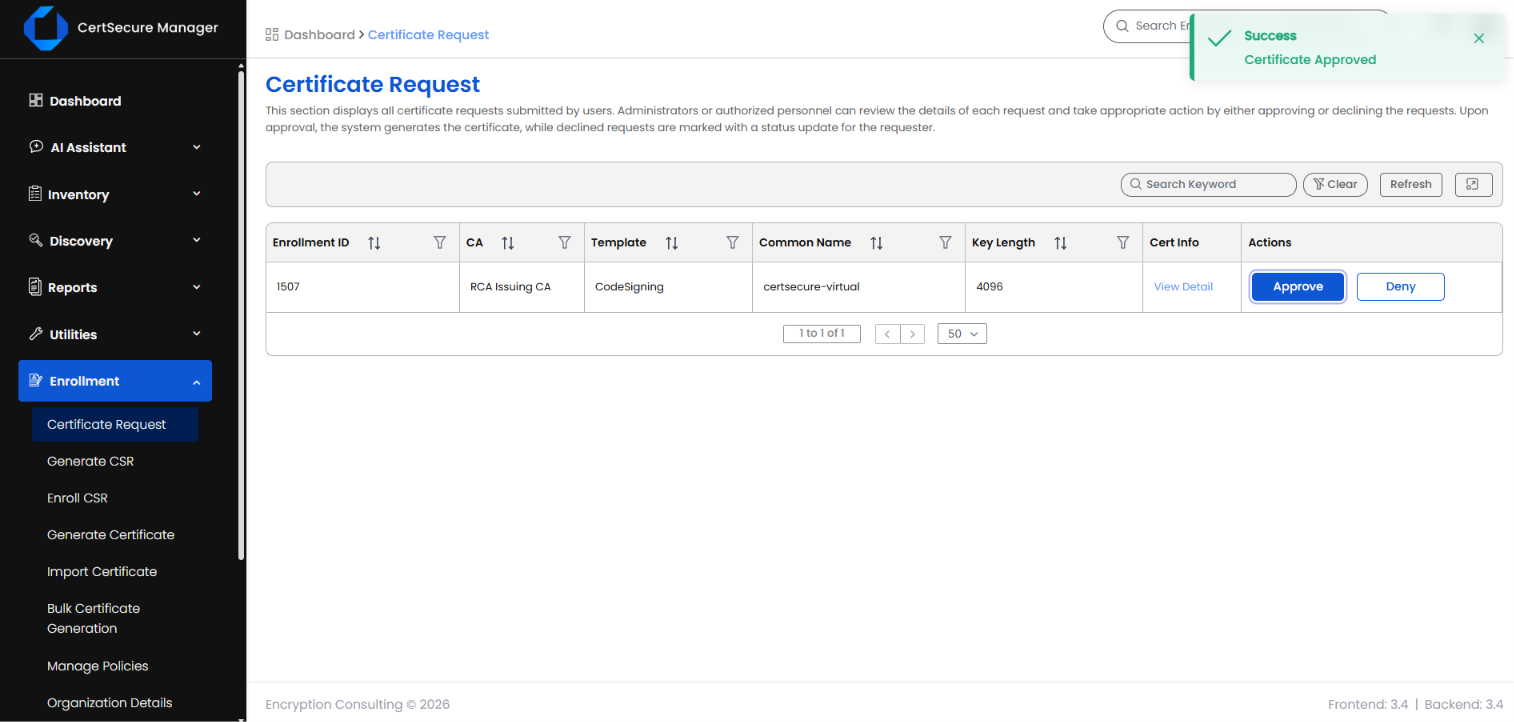
Certificate Approved message after approving a request

To deny a request

Click Deny in the row of the request and confirm. The certificate is not issued, and the request is marked as declined for the requester.

Note: Requests from templates without an approval policy are not affected by this workflow. Their certificates are issued as soon as the request is submitted.

On this Page:
Support Privacy Policy Terms of Service

Copyright 2026 Encryption Consulting LLC. All rights reserved.