CertSecure Documentation
  • Overview
    • About CertSecure Manager
    • Documentation Guide
  • Reference Guide
    • Header Bar
      • CertSecure Documentation
      • Swagger API
      • Profile Section
      • Search
    • Dashboard
      • Key Performance Indicators
      • Expiring Certificates
      • CA metrics
      • Key Strength
      • Signing Algorithm
      • Certificate Risk Report Profile
      • PKI Posture Management
      • NDES Health Information
    • AI Assistant
      • Chat
      • Configuration
      • Usage Report
    • Inventory
      • Overview
        • Overall
        • CertSecure
      • Template Management
        • Switch Templates
        • Exclusion List
        • Alert Templates
        • Certificate Templates
      • Template Categories
    • Discovery
      • Inventory
      • Scan Config
      • Cloud Config
      • Vault Config
      • Discovery Analytics
      • Scan Details
      • Discovery Ingestion
    • Reports
    • Utilities
      • ACME
      • Tasks
      • Integrations
        • Renewal Manager
        • Load Balancers
        • Discovery Agents
        • CLI Tool
        • Key Management
        • SEIM Tools
        • DevOps Tools
        • Ansible Automation Platform
      • NDES
      • Azure Key Vault
      • API Tokens
    • Enrollment
      • Certificate Request
      • Generate CSR
      • Enroll CSR
      • Generate Certificate
      • Import Certificate
      • Bulk Certificate Generation
      • Manage Policies
      • Organization Details
    • Administration
      • Users
      • Roles and permission
      • Certificate Authorities
      • Departments
    • Miscellaneous
      • Logging
      • Service Setup
        • Zoom
        • Zendesk
      • Settings
        • Configure Realms
        • Schedule Alerts
        • Metrics
        • Web Branding
        • About License
  • Setup & Architecture
    • Identity and Access Control
    • Architecture
    • Installation
      • Pre-requisites
      • Windows
      • Linux
      • Docker
    • Upgrade
      • Windows
      • Docker
  • Release Notes
    • Releases for 2026
      • v3.4.0
      • v3.3.1
      • v3.3.0
    • Releases for 2025
      • v3.2.0
      • v3.1.0
    • Releases for 2024
      • v3.0.0
  • Workflow
    • Approval Workflow
  • API Reference
    • Getting Started
    • Authorizing Requests
    • Securing API Access
    • Request and Response Conventions
    • Endpoint Reference
      • Health
      • API Token Management
      • CA Management
      • Templates
      • Certificate Enrollment
      • Inventory
      • Certificate Discovery
      • Tasks
      • Watcher Groups
      • Alerts
      • Reports
      • Logs
      • Monitoring
      • Scheduling
      • SMTP
      • ACME
      • Azure Key Vault
      • Google Cloud (GCP)
      • HashiCorp Vault
      • EJBCA
      • ServiceNow
  • Integration Guide
    • Renewal Manager
      • Workflow
      • Setup
      • Troubleshooting
      • IIS
      • Apache
      • Tomcat
      • Nginx
      • MSSQL
      • MongoDB
      • Oracle
      • Cloudflare
      • AudioCodes
      • Cisco ISE
      • Palo Alto PAN-OS
      • Cisco ACI
    • Load Balancer
      • F5
        • Workflow
        • Setup
        • Onboarding
        • UI Guide
        • Troubleshooting
      • NetScaler
        • Workflow
        • Setup
        • UI Guide
        • Troubleshooting
    • Certificate Authorities
      • ACME CAs
      • AWS
      • DigiCert Connector
      • EJBCA
      • GlobalSign
      • GoDaddy
      • HashiCorp Vault PKI
      • Microsoft AD CS
      • Sectigo
      • Sectigo-PS
    • Ansible Automation Platform
    • Azure Key Vault
  • Discovery Agent Setup Guide

Schedule Alerts

Schedule Alerts

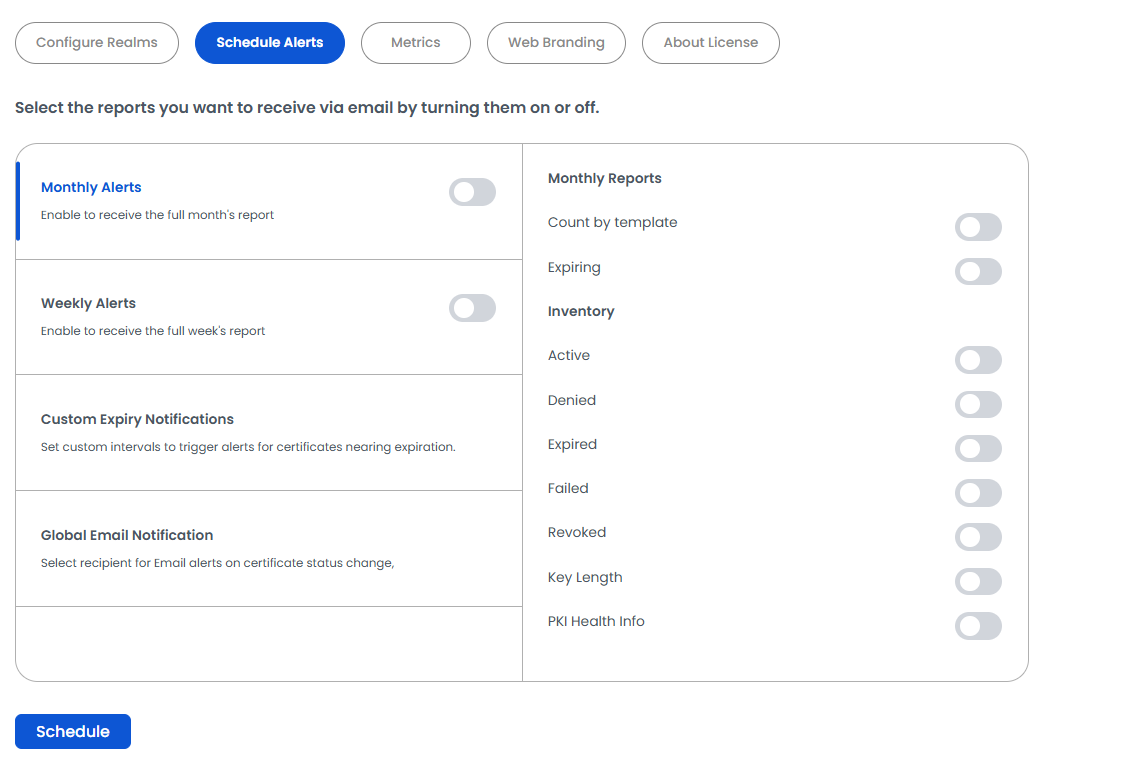
This section allows you to configure automated email reports for certificate inventory and health monitoring. You can enable weekly or monthly alerts to receive reports directly in your inbox.

Prerequisite: Alerts are delivered by email, so an SMTP server must first be configured under Miscellaneous → Service Setup.

Here are the available Report Options:

  • Monthly/Weekly Reports

    • Get insights into expiring certificates and template-based certificate counts.
    • Inventory Reports – Monitor certificate status, including active, denied, expired, failed, revoked, and key length details.
    • PKI Health Info – Stay informed about the overall health of your PKI environment.

    Weekly and monthly reports are selected independently. These selections are personal: they apply only to the signed-in user, so each user who wants these reports must turn them on for their own account.

  • Custom Expiry Notifications

    Custom intervals can be set to trigger email alerts for certificates nearing expiration:
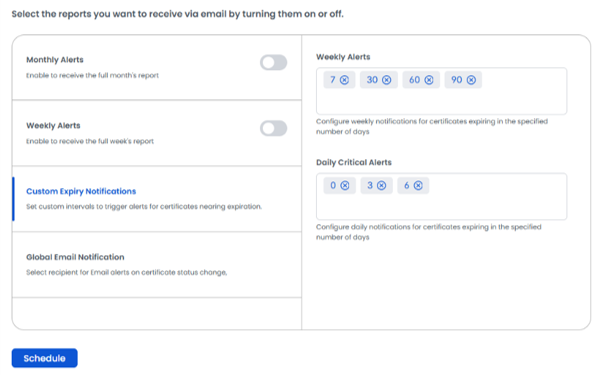
    Custom Expiry Notifications
    • Weekly Alerts
      1. Sends one email per week containing a list of certificates that will expire within the specified number of days.
      2. Multiple timeframes can be configured.
      3. Default values: 7, 30, 60, and 90 days. To add a value, enter a number; to remove one, click its ⊗ icon.
      4. Example: If 7, 15, and 30 are entered, an alert will be sent weekly with certificates expiring in the next 7, 15, and 30 days.
    • Daily Critical Alerts
      1. Sends an email each day listing certificates set to expire within the defined intervals.
      2. Recommended for critical short-term monitoring.
      3. Default values: 0, 3, and 6 days, where 0 means certificates expiring today. Keep these values small.
      4. Example: If 0 and 3 are entered, daily alerts will include certificates expiring today and within the next 3 days.

    Once configured, reports will be sent based on your selected schedule, ensuring proactive management of your certificate lifecycle.

    Good to know: These intervals apply to the whole installation, not only to your account. If Certificate Criticality Levels (below) are enabled, they are used instead of these intervals.

  • Global Email Notification

    Toggle Certificates state email notification between the certificate owners and watchers.

    • All: Sends the email notification to both owner and watchers of the certificates.
    • Owner: Sends the email notification only to the owner of the certificates.
    • Watcher: Sends the email notification only to the watchers of the certificates.

    All is the default. This setting applies to the whole installation, to every certificate.
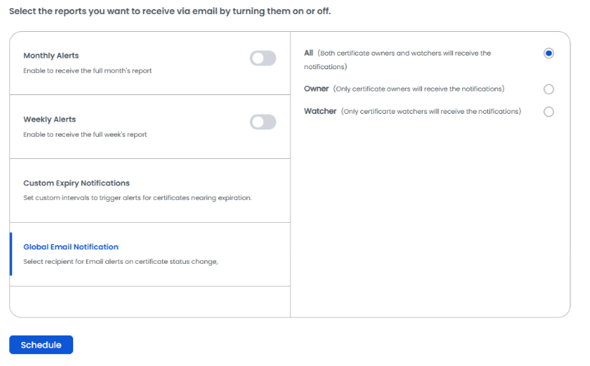
    Global Email Notifications

Important: Changes are saved only when you click Schedule at the bottom of the page. One click saves the settings of all categories. Check the confirmation message; if an error is shown (for example, overlapping criticality ranges), nothing is saved, so fix it and click Schedule again.

On this Page:
Support Privacy Policy Terms of Service

Copyright 2026 Encryption Consulting LLC. All rights reserved.