AWS Certificate Manager and AWS Private CA
CertSecure Manager connects to two AWS services. AWS Certificate Manager (AWS-ACM) issues public certificates, and AWS Private CA (AWS-PCA) issues certificates from a private CA that you run in AWS. Both are agentless: the CertSecure Manager backend calls the AWS APIs directly, so no connector has to be installed. Both are configured from the same AWS tile under Administration > Certificate Authorities > Agentless CAs.
Prerequisites
CertSecure Manager
- Your account has the Manage Certification Authorities permission.
- The license covers the AWS CA type, so the AWS tile can be configured.
- The CertSecure Manager backend has outbound HTTPS (TCP 443) access to the AWS endpoints it uses, without TLS interception by a proxy.
AWS
- An Access Key and Secret Key for an AWS principal that is allowed to use the service: AWS Certificate Manager for AWS-ACM, AWS Private CA for AWS-PCA.
- For AWS-ACM, ACM is available in the region you will use. Certificates for Amazon CloudFront must be issued in us-east-1. ACM issues a public certificate only after every domain on it has been validated in AWS, and a CAA record on the domain must allow Amazon.
- For AWS-PCA, the Private CA exists and its status is ACTIVE, and the credentials belong to the same AWS account and region as the CA. The CA certificate should be valid for well beyond the validity of the certificates you plan to issue from it.
Adding an AWS Connection
- Go to Administration > Certificate Authorities.
- Under Agentless CAs, select Configure on the AWS tile. The AWS CA page lists the connections in an AWS-ACM group and an AWS-PCA group.
- Select Add New Connection.
- Select the CA Type: AWS-ACM or AWS-PCA.
- Enter the CA Name and, optionally, a Description.
- Enter the Access Key and Secret Key, and select the Region.
-
For AWS-PCA:
- Select List Private CAs. The Private CAs that the credentials can see in the selected region are listed. Choose one under CA ARN, or enter the CA ARN yourself.
- Select Test credentials & read authority, then complete the Default Certificate Template fields that appear.
AWS-ACM does not issue from a template, so for AWS-ACM the dialog shows "This CA does not issue from a template." instead.
- Add a Note if your change process requires one, then select Save.
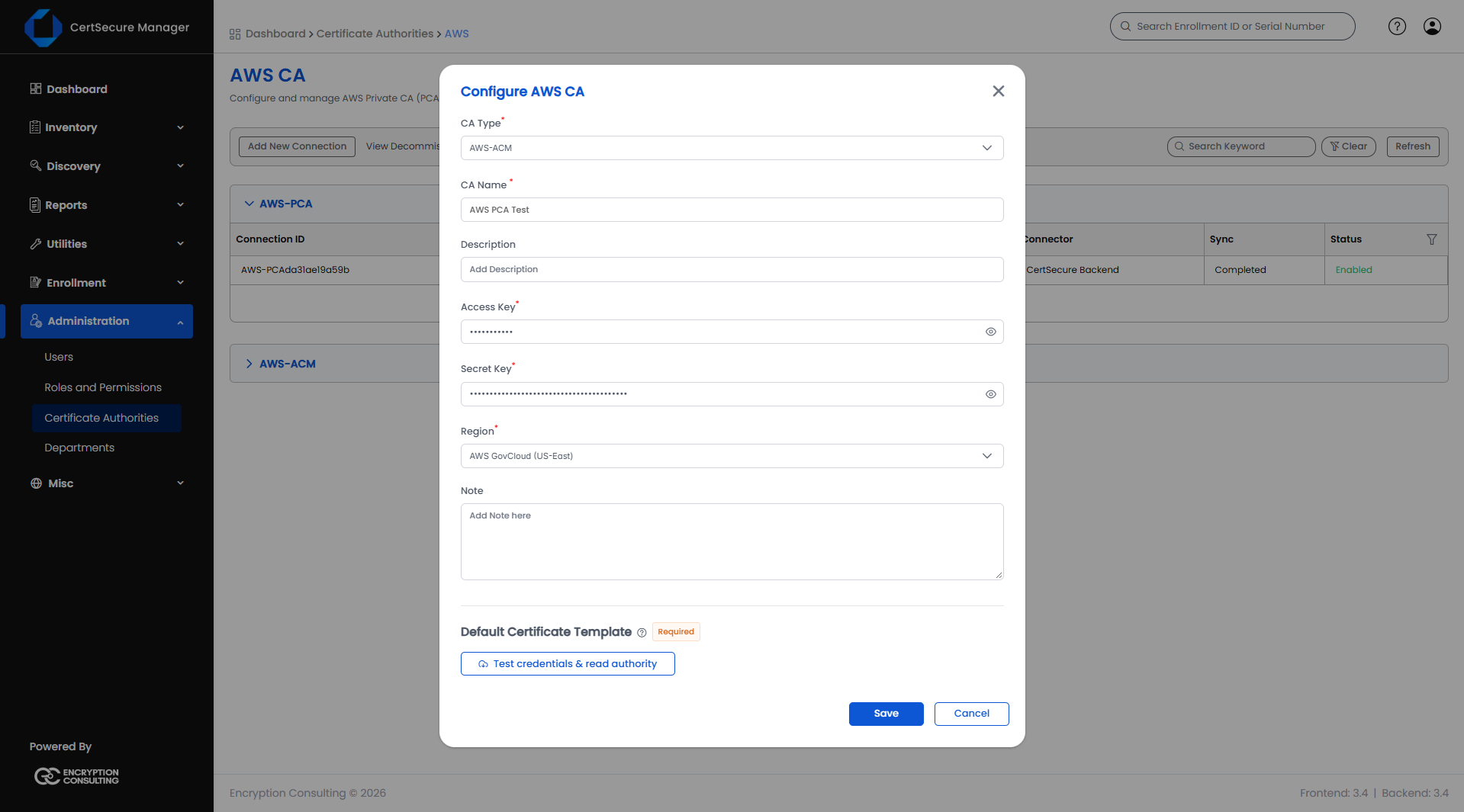
Note: The Region list includes AWS GovCloud (US-West) and AWS GovCloud (US-East). For these regions CertSecure Manager automatically uses the arn:aws-us-gov partition for AWS Private CA template ARNs.
Verifying the Connection
The new connection appears in its group with these columns: Connection ID, Certification Authority, Access Key, Connector, Sync and Status.
- The Status of a working connection is Enabled.
- Sync shows the result of the synchronization with AWS once it has run.
- The CA can then be selected in the Certificate Authority list at enrollment.
- For AWS-ACM, the ACM certificates of the account and region appear in Inventory. Compare a few records with the AWS console.
The right-click menu of a connection offers View Details, Edit, Check Credential, and Decommission (Restore for a decommissioned connection). See Managing a Configured CA.
