
CertSecure Documentation
  • Overview
    • About CertSecure Manager
    • Documentation Guide
  • Reference Guide
    • Header Bar
      • CertSecure Documentation
      • Swagger API
      • Profile Section
      • Search
    • Dashboard
      • Key Performance Indicators
      • Expiring Certificates
      • CA metrics
      • Key Strength
      • Signing Algorithm
      • Certificate Risk Report Profile
      • PKI Posture Management
      • NDES Health Information
    • AI Assistant
      • Chat
      • Configuration
      • Usage Report
    • Inventory
      • Overview
        • Overall
        • CertSecure
      • Template Management
        • Switch Templates
        • Exclusion List
        • Alert Templates
        • Certificate Templates
      • Template Categories
    • Discovery
      • Inventory
      • Scan Config
      • Cloud Config
      • Vault Config
      • Discovery Analytics
      • Scan Details
      • Discovery Ingestion
    • Reports
    • Utilities
      • ACME
      • Tasks
      • Integrations
        • Renewal Manager
        • Load Balancers
        • Discovery Agents
        • CLI Tool
        • Key Management
        • SEIM Tools
        • DevOps Tools
        • Ansible Automation Platform
      • NDES
      • Azure Key Vault
      • API Tokens
    • Enrollment
      • Certificate Request
      • Generate CSR
      • Enroll CSR
      • Generate Certificate
      • Import Certificate
      • Bulk Certificate Generation
      • Manage Policies
      • Organization Details
    • Administration
      • Users
      • Roles and permission
      • Certificate Authorities
      • Departments
    • Miscellaneous
      • Logging
      • Service Setup
        • Zoom
        • Zendesk
      • Settings
        • Configure Realms
        • Schedule Alerts
        • Metrics
        • Web Branding
        • About License
  • Setup & Architecture
    • Identity and Access Control
    • Architecture
    • Installation
      • Pre-requisites
      • Windows
      • Linux
      • Docker
    • Upgrade
      • Windows
      • Docker
  • Release Notes
    • Releases for 2026
      • v3.4.0
      • v3.3.1
      • v3.3.0
    • Releases for 2025
      • v3.2.0
      • v3.1.0
    • Releases for 2024
      • v3.0.0
  • Workflow
    • Approval Workflow
  • API Reference
    • Getting Started
    • Authorizing Requests
    • Securing API Access
    • Request and Response Conventions
    • Endpoint Reference
      • Health
      • API Token Management
      • CA Management
      • Templates
      • Certificate Enrollment
      • Inventory
      • Certificate Discovery
      • Tasks
      • Watcher Groups
      • Alerts
      • Reports
      • Logs
      • Monitoring
      • Scheduling
      • SMTP
      • ACME
      • Azure Key Vault
      • Google Cloud (GCP)
      • HashiCorp Vault
      • EJBCA
      • ServiceNow
  • Integration Guide
    • Renewal Manager
      • Workflow
      • Setup
      • Troubleshooting
      • IIS
      • Apache
      • Tomcat
      • Nginx
      • MSSQL
      • MongoDB
      • Oracle
      • Cloudflare
      • AudioCodes
      • Cisco ISE
      • Palo Alto PAN-OS
      • Cisco ACI
    • Load Balancer
      • F5
        • Workflow
        • Setup
        • Onboarding
        • UI Guide
        • Troubleshooting
      • NetScaler
        • Workflow
        • Setup
        • UI Guide
        • Troubleshooting
    • Certificate Authorities
      • ACME CAs
      • AWS
      • DigiCert Connector
      • EJBCA
      • GlobalSign
      • GoDaddy
      • HashiCorp Vault PKI
      • Microsoft AD CS
      • Sectigo
      • Sectigo-PS
    • Ansible Automation Platform
    • Azure Key Vault
  • Discovery Agent Setup Guide

Getting Started

The CertSecure Manager API exposes the certificate lifecycle management capabilities of CertSecure Manager over HTTPS. Requests and responses use JSON unless an endpoint returns a file, such as a certificate, a PFX file, or a report.

What You Can Do with the API
  • Enroll certificates from a CSR or from subject details, and renew, revoke, or download them.
  • Query the certificate inventory of each CA and retrieve counts by status, expiry, key length, and template.
  • Configure and run certificate discovery scans across networks, cloud providers, and vaults.
  • Generate certificate, risk, and key strength reports.
  • Manage CAs, templates, watcher groups, alerts, scheduled reports, and SIEM log forwarding.
  • Integrate with ACME, Azure Key Vault, Google Cloud, HashiCorp Vault, EJBCA, and ServiceNow.
Base URL

All endpoints are served from the URL of your CertSecure Manager backend. The endpoint paths in this reference are relative to that URL:

https://<certsecure-backend-url>/<endpoint>

For example, the version endpoint of a backend is https://<certsecure-backend-url>/version. The API is available over HTTPS only.

Swagger API

Every CertSecure Manager backend publishes an interactive Swagger API page at https://<certsecure-backend-url>/api/docs/. You can use it to browse all endpoints, authorize with your token, and send test requests. The same page can be opened from the CertSecure Manager portal, as described in Header Bar > Swagger API.
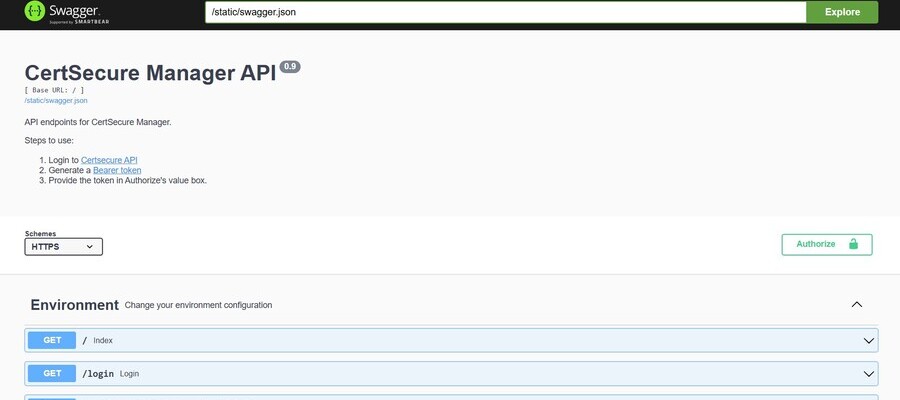
Swagger API

The underlying API definition (Swagger 2.0) can be downloaded from https://<certsecure-backend-url>/static/swagger.json and imported into tools such as Postman.

API Version

The API version matches the CertSecure Manager release; this reference describes version 3.3. To check the version of your backend, call GET /version, which does not require authentication:

curl -X GET "https://<certsecure-backend-url>/version"
{
    "Backend": "3.3.1",
    "Frontend": "3.3.1",
    "mode": "saas"
}
Before You Begin
  • A CertSecure Manager user account with the permissions required for the operations you plan to call.
  • An API token, generated as described in Authorizing Requests.
  • Network access over HTTPS from the calling system to the CertSecure Manager backend.
On this Page:
Support Privacy Policy Terms of Service

Copyright 2026 Encryption Consulting LLC. All rights reserved.