
CertSecure Documentation
  • Overview
    • About CertSecure Manager
    • Documentation Guide
  • Reference Guide
    • Header Bar
      • CertSecure Documentation
      • Swagger API
      • Profile Section
      • Search
    • Dashboard
      • Key Performance Indicators
      • Expiring Certificates
      • CA metrics
      • Key Strength
      • Signing Algorithm
      • Certificate Risk Report Profile
      • PKI Posture Management
      • NDES Health Information
    • AI Assistant
      • Chat
      • Configuration
      • Usage Report
    • Inventory
      • Overview
        • Overall
        • CertSecure
      • Template Management
        • Switch Templates
        • Exclusion List
        • Alert Templates
        • Certificate Templates
      • Template Categories
    • Discovery
      • Inventory
      • Scan Config
      • Cloud Config
      • Vault Config
      • Discovery Analytics
      • Scan Details
      • Discovery Ingestion
    • Reports
    • Utilities
      • ACME
      • Tasks
      • Integrations
        • Renewal Manager
        • Load Balancers
        • Discovery Agents
        • CLI Tool
        • Key Management
        • SEIM Tools
        • DevOps Tools
        • Ansible Automation Platform
      • NDES
      • Azure Key Vault
      • API Tokens
    • Enrollment
      • Certificate Request
      • Generate CSR
      • Enroll CSR
      • Generate Certificate
      • Import Certificate
      • Bulk Certificate Generation
      • Manage Policies
      • Organization Details
    • Administration
      • Users
      • Roles and permission
      • Certificate Authorities
      • Departments
    • Miscellaneous
      • Logging
      • Service Setup
        • Zoom
        • Zendesk
      • Settings
        • Configure Realms
        • Schedule Alerts
        • Metrics
        • Web Branding
        • About License
  • Setup & Architecture
    • Identity and Access Control
    • Architecture
    • Installation
      • Pre-requisites
      • Windows
      • Linux
      • Docker
    • Upgrade
      • Windows
      • Docker
  • Release Notes
    • Releases for 2026
      • v3.4.0
      • v3.3.1
      • v3.3.0
    • Releases for 2025
      • v3.2.0
      • v3.1.0
    • Releases for 2024
      • v3.0.0
  • Workflow
    • Approval Workflow
  • API Reference
    • Getting Started
    • Authorizing Requests
    • Securing API Access
    • Request and Response Conventions
    • Endpoint Reference
      • Health
      • API Token Management
      • CA Management
      • Templates
      • Certificate Enrollment
      • Inventory
      • Certificate Discovery
      • Tasks
      • Watcher Groups
      • Alerts
      • Reports
      • Logs
      • Monitoring
      • Scheduling
      • SMTP
      • ACME
      • Azure Key Vault
      • Google Cloud (GCP)
      • HashiCorp Vault
      • EJBCA
      • ServiceNow
  • Integration Guide
    • Renewal Manager
      • Workflow
      • Setup
      • Troubleshooting
      • IIS
      • Apache
      • Tomcat
      • Nginx
      • MSSQL
      • MongoDB
      • Oracle
      • Cloudflare
      • AudioCodes
      • Cisco ISE
      • Palo Alto PAN-OS
      • Cisco ACI
    • Load Balancer
      • F5
        • Workflow
        • Setup
        • Onboarding
        • UI Guide
        • Troubleshooting
      • NetScaler
        • Workflow
        • Setup
        • UI Guide
        • Troubleshooting
    • Certificate Authorities
      • ACME CAs
      • AWS
      • DigiCert Connector
      • EJBCA
      • GlobalSign
      • GoDaddy
      • HashiCorp Vault PKI
      • Microsoft AD CS
      • Sectigo
      • Sectigo-PS
    • Ansible Automation Platform
    • Azure Key Vault
  • Discovery Agent Setup Guide

Authorizing Requests

Except for a few public endpoints, every request to the CertSecure Manager API must be authenticated with an API token. The token is sent as a bearer token in the Authorization header of each request.

Generating an API Token

API tokens are generated in the CertSecure Manager portal:
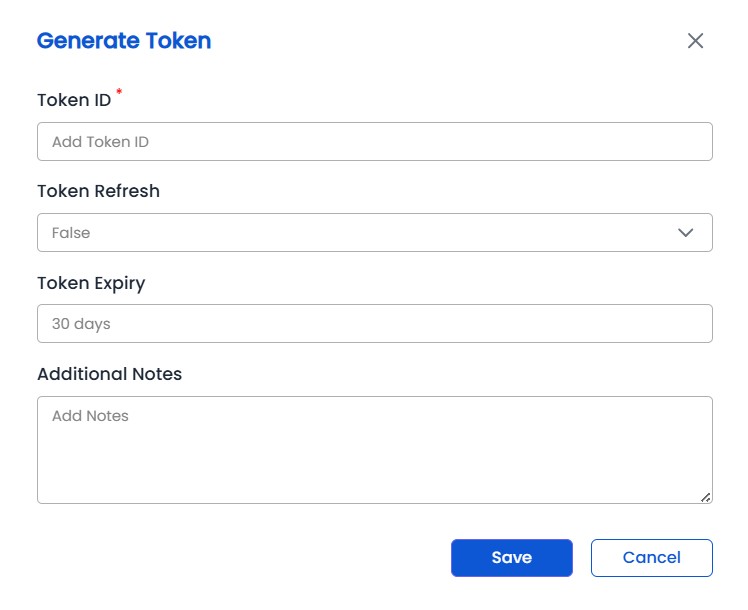
  1. Go to Utilities, then API Tokens.
  2. Click Generate Token and provide a token name, the validity period in days, and, optionally, the trusted IP addresses that may use the token and notes.
  3. Choose whether the token can be refreshed. Tokens with Token Refresh set to true can be renewed; tokens with Token Refresh set to false are one-time tokens that expire at the end of their validity period.
  4. Copy the generated token and store it securely.
Generate Token

Generating and managing tokens requires the Manage API Tokens permission. For details, refer to Utilities > API Tokens. Tokens can also be managed through the API Token Management endpoints.

Sending the Token

Pass the token in the Authorization header using the Bearer scheme:

Authorization: Bearer <token>

curl

curl -X GET "https://<certsecure-backend-url>/check_token" \
  -H "Authorization: Bearer <token>"

PowerShell

$headers = @{ Authorization = "Bearer <token>" }
Invoke-RestMethod -Method Get -Uri "https://<certsecure-backend-url>/check_token" -Headers $headers

Python

import requests

headers = {"Authorization": "Bearer <token>"}
response = requests.get("https://<certsecure-backend-url>/check_token", headers=headers)
print(response.status_code, response.text)

A valid token returns 200 with the body True.

Authorizing in the Swagger API
  1. Open the Swagger API page at https://<certsecure-backend-url>/api/docs/.
  2. Click Authorize.
  3. In the value box, enter Bearer <token> and click Authorize.
  4. Close the dialog. Requests sent with Try it out now include the token.
Public Endpoints

The following endpoints do not require a token:

Endpoint Description
GET /check Reachability check of the backend.
GET /version Backend and frontend versions.
GET /v2/acme ACMEv2 directory used by ACME clients.
Authentication Errors

When a token is missing or cannot be used, the API returns 401 Unauthorized with one of the following messages:

Response Body Meaning
{"message": "Token is missing!"} The Authorization header was not sent.
{"message": "Token is invalid!"} The header is malformed, for example the Bearer prefix is missing, or the token is not recognized.
{"message": "Token has expired"} The validity period of the token has ended. Refresh the token or generate a new one.
{"message": "Token is inactive"} The token has been revoked.
{"error": "Invalid or expired session"} The token could not be validated. Generate a new token and try again.

A valid token that lacks the permission for an operation returns 403 Forbidden.

On this Page:
Support Privacy Policy Terms of Service

Copyright 2026 Encryption Consulting LLC. All rights reserved.