
- Overview
- Reference Guide
- Setup & Architecture
- Release Notes
- Workflow
- API Reference
- Integration Guide
- Discovery Agent Setup Guide
The logging system provides detailed insights into various activities within the platform, ensuring transparency, security, and auditability. It includes logs for certificate downloads, certificate management, environment changes, ownership transfers, and user management.
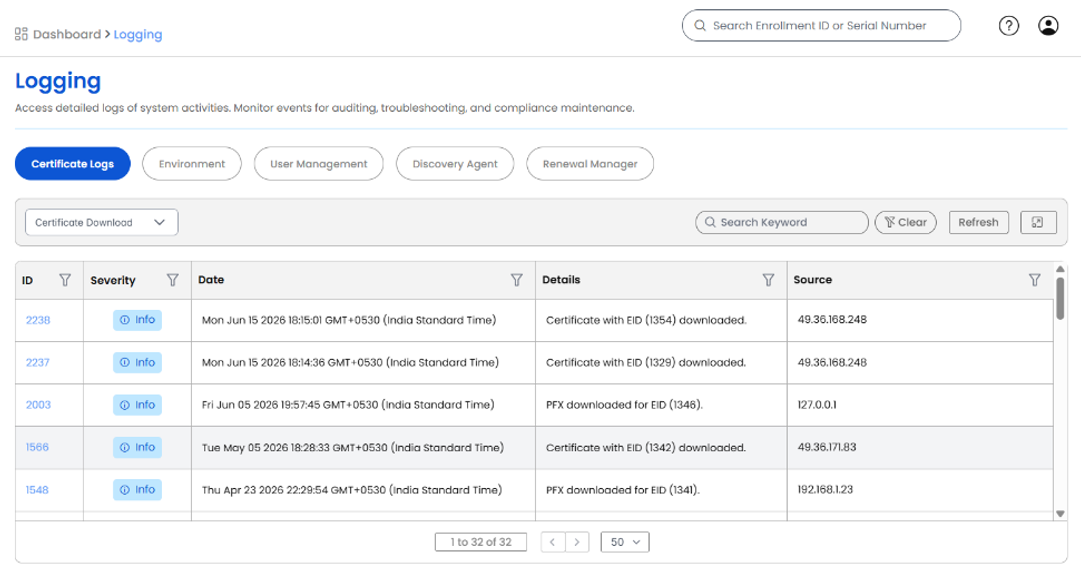
Logging System Overview
The Logging page provides detailed logs of system activities across the platform, supporting auditing, troubleshooting, and compliance maintenance. Logs are organized into five categories accessible via tabs: Certificate Logs, Environment, User Management, Discovery Agent, and Renewal Manager. Each tab can be filtered by event type, searched by keyword, and refreshed on demand. Log entries display an ID, severity level, timestamp, event details, and the source IP address of the action.
Certificate Logs
Records every certificate-related action performed within the platform. Use the dropdown filter to narrow logs by type: Certificate Management (issuance, renewal, revocation, and modifications), Certificate Download (certificate and PFX exports by enrollment ID), or Ownership Transfer (reassignment of certificate ownership between users). Each entry captures the enrollment ID (EID), timestamp, source IP, and a severity indicator, providing a comprehensive and traceable history of certificate access and lifecycle operations.
Environment Logs
Captures changes made to the system environment, such as configuration updates, integrations, or policy modifications. These logs help track system stability and detect unauthorized changes.
User Management Logs
Records all changes related to user accounts, including role assignments, permission modifications, and account status updates. These logs ensure that access control policies are enforced and monitored effectively.
Discovery Agent Logs
Records activities performed by the Discovery Agent, including task execution details, severity levels, timestamps, and source information. These logs support monitoring and troubleshooting of automated discovery operations.
Renewal Manager Logs
Tracks actions performed by the Renewal Manager, capturing task IDs, severity, timestamps, and event details. These logs provide visibility into automated renewal activity and help identify any failures or anomalies in the renewal process.