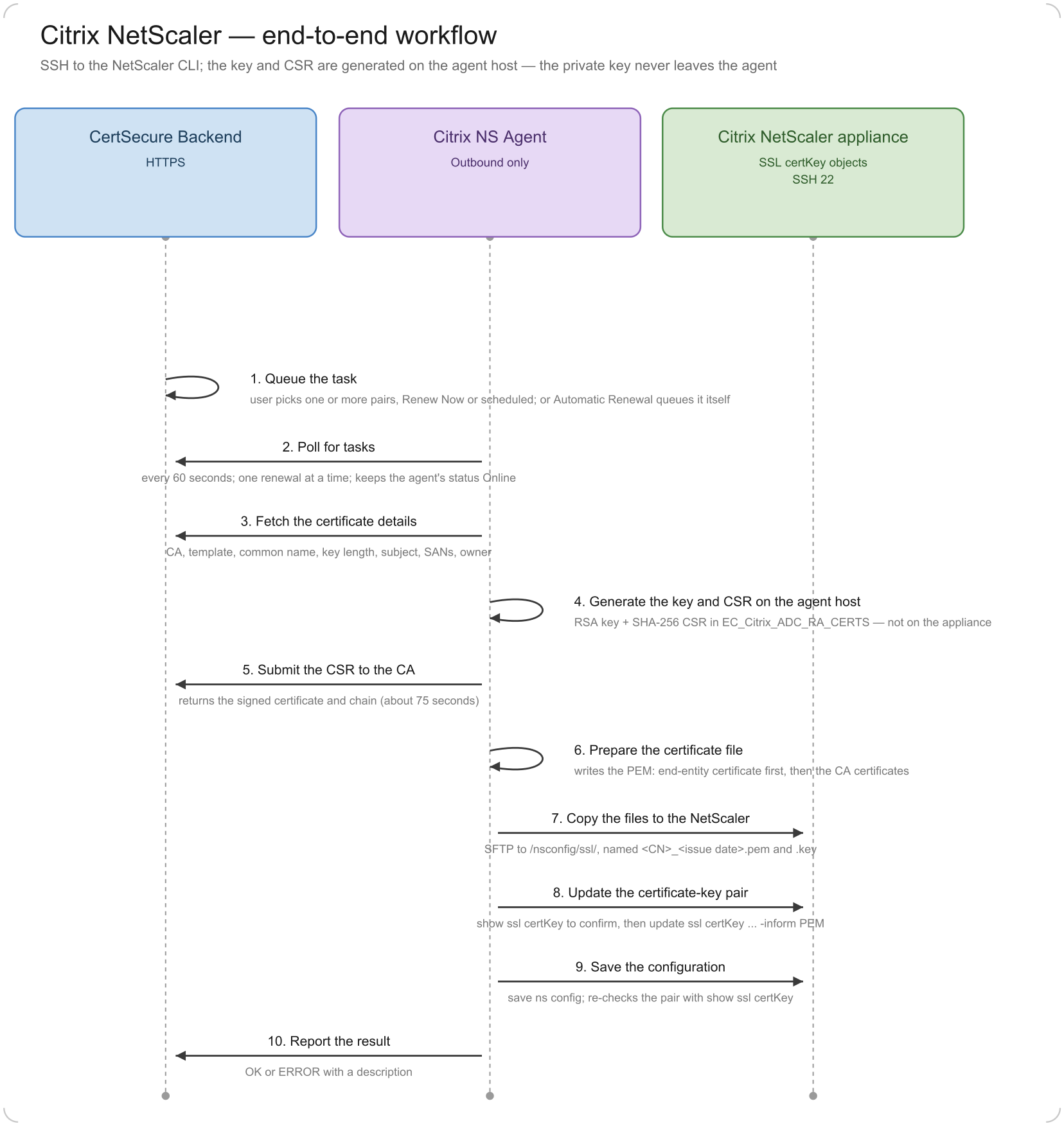
This section describes the end-to-end workflow that the Citrix NS Agent follows to renew a certificate-key pair on a NetScaler appliance. It explains how data moves between the CertSecure Backend, the Citrix NS Agent, and the NetScaler.
Workflow Steps
Queue the task: A user chooses Renew on the agent in the CertSecure UI and selects one or more certificate-key pairs, either as Renew Now or as a scheduled renewal. The backend records one renewal task for each pair. A scheduled task is held until shortly before its scheduled time (up to five minutes ahead), and is skipped while the agent is offline. When automatic renewal is on, the agent queues the tasks itself (see Automatic Renewal).
Poll for tasks: The Citrix NS Agent asks the backend for pending tasks over HTTPS every 60 seconds. It runs one renewal at a time, and does not start a renewal while an expiry check is running. The same call keeps the agent’s status Online.
Fetch the certificate details: The agent reads the details saved for the pair: certificate authority, template, common name, key length, subject, SANs, and owner.
Generate the key and CSR on the agent host: The agent generates an RSA private key and a SHA-256 CSR on the agent host, in its own working folder EC_Citrix_ADC_RA_CERTS. Unlike F5, the key pair is not generated on the appliance.
Submit the CSR to the CA: The agent sends the CSR to the backend with the CA and template saved for the pair. The backend routes the request to the CA, and the agent retrieves the signed certificate together with its chain. The agent waits about 75 seconds for the certificate to become available.
Prepare the certificate file: The agent writes the certificate chain as a PEM file, with the end-entity certificate first and the CA certificates after it.
Copy the files to the NetScaler: The agent copies the certificate and the private key to /nsconfig/ssl/ on the NetScaler over SFTP (TCP 22). The files are named <common name>_<issue date and time>.pem and .key, so each renewal creates a new pair of files.
Update the certificate-key pair: The agent opens an SSH session, confirms with show ssl certKey <name> that the named pair exists, and runs update ssl certKey <name> -cert <file> -key <file> -inform PEM. This swaps the new certificate and key material into the existing object. Any virtual server or service bound to the object keeps its binding automatically.
Save the configuration: The agent runs save ns config so the change persists across a restart, and then checks the pair again with show ssl certKey.
Report the result: The agent updates the task in CertSecure Manager with the outcome (OK or ERROR) and a description, and then becomes available for the next task.
Automatic Renewal
Besides renewing a pair when a user asks for it, the Citrix NS Agent can renew pairs on its own. This is controlled by the Automation Status switch on the agent. When the switch is on, the agent works as follows.
Every 12 hours, and shortly after the service starts, the agent opens an SSH session to the NetScaler and reads the Not Before and Not After dates of each certificate-key pair registered on the agent (show ssl certKey).
For each pair, it calculates the earlier of two dates: the issue date plus the agent’s Renewal Period (in days), and the expiry date.
When that date is two days away or less, the agent asks the backend to queue a renewal for the pair. This is the same Renew and Bind workflow described above.
The check is skipped while a renewal or another check is already running. Manual renewals started during a check wait until it finishes.
Good to know:
Set the Renewal Period (Update Renewal Period) before turning automation on, so the agent knows how early to renew. The default is 200 days. For a certificate whose validity is shorter than the Renewal Period, the expiry date is the one that applies.
Automatic renewal always installs the new certificate and updates the pair right away.
Data Flow
From
To
Protocol and port
Purpose
Citrix NS Agent
CertSecure Backend
HTTPS (the port the backend runs on)
Poll for tasks, read pair details, submit the CSR, retrieve the certificate, report task status.
Citrix NS Agent
NetScaler
SSH and SFTP, TCP 22
Copy the certificate and key, run the NetScaler CLI commands.
CertSecure Backend
Certificate Authority
Specific to the CA connector
Issue the certificate for the submitted CSR.
Failure behavior:
If the update fails, the certificate-key pair keeps the certificate it had before, and the task ends with ERROR.