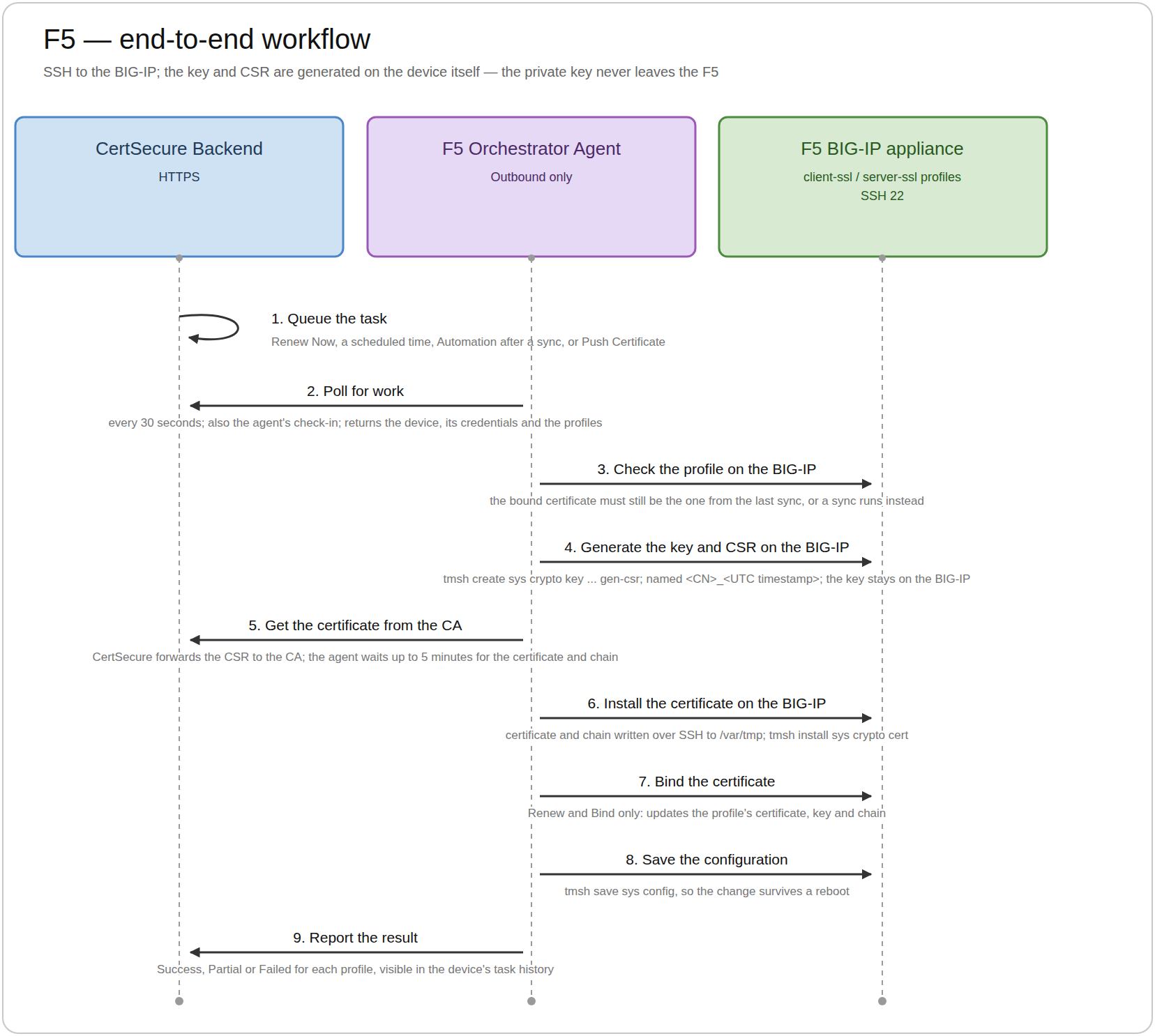
This section describes the end-to-end workflow that the F5 Orchestrator follows to renew the certificate of an SSL profile on an F5 device. It explains how data moves between the CertSecure Backend, the F5 Orchestrator, and the F5 device.
Workflow Steps
Queue the task: A user chooses Renew on a managed profile, either now or at a scheduled time, or Push Certificate on a device; or a sync finds managed profiles with Automation on that are close to expiry. CertSecure records the task. A scheduled task waits until its scheduled time.
Poll for work: Every 30 seconds the F5 Orchestrator asks CertSecure for work over HTTPS. CertSecure returns the device, its SSH credentials (encrypted so that only the F5 Orchestrator can read them), and the profiles to renew. All pending tasks for one device are handled together, so the F5 Orchestrator connects to each device as few times as possible. This call is also its check-in, which keeps its status Online.
Check the profile on the F5: The F5 Orchestrator opens an SSH session (TCP 22) to the device and confirms that the profile still uses the certificate CertSecure saw at the last sync. If the certificate was changed on the F5, the profile is not renewed and a sync runs instead. For a push, it checks that the partition exists.
Generate the key and CSR on the F5: It runs tmsh create sys crypto key with CSR generation in the profile's partition. The new key matches the current one: the same type and size (RSA keys never below 2048 bits, and raised to the template's minimum if needed). The subject and SANs are copied from the current certificate, and the new objects are named <common name>_<UTC timestamp>. The key stays on the F5.
Get the certificate from the CA: The CSR goes to CertSecure with the CA, template, and owner configured on the profile, and CertSecure forwards it to the CA. The F5 Orchestrator waits for the certificate and its chain for up to CA_ISSUE_TIMEOUT_MINUTES (5 minutes by default), and the task details show how long it has been waiting. No SSH session is held open during the wait. If the CA does not issue the certificate in time, the renewal of that profile fails.
Install the certificate on the F5: Over a new SSH session, it writes the certificate to /var/tmp and runs tmsh install sys crypto cert with the same name as the key, so the F5 pairs them. With Push Trust Chain on, the intermediate CA certificates are installed as a second object, <name>_chain. The temporary files are then removed.
Bind the certificate (Renew and Bind only): For a Client SSL profile, it updates the certificate-key-chain entry being renewed and leaves every other entry untouched. For a Server SSL profile, it updates the profile's certificate, key, and chain. It then reads the profile back to confirm that the new certificate is bound. With Renew and Push and with Push Certificate, the profile is not changed.
Save the configuration: It runs tmsh save sys config once for the device, so the change persists across a reboot.
Report the result: The task ends as Success, Partial (some profiles failed), or Failed, with a description for each profile, and CertSecure records the new certificate. Every progress message is visible in the device's task history.
Good to know:
CertSecure syncs every device again every 12 hours by default, and whenever you choose Request Sync, so the certificates and expiry dates you see stay up to date.
Key Terms
Term
What it means
Device
An F5 BIG-IP LTM you add to CertSecure, identified by its management address.
SSL profile
A Client SSL or Server SSL profile on the F5 that holds a certificate. A Client SSL profile that holds more than one certificate (for example, one RSA and one ECDSA) is listed once for each certificate.
Sync
CertSecure reading a device to find its SSL profiles and the certificates they use. A sync only reads; it never changes anything on the F5.
Staged profile
A profile found by a sync. CertSecure shows it and its certificate, but does not renew it.
Managed profile
A profile you moved to Managed and gave a CA, template, and owner. Only managed profiles can be renewed.
Task
A record of one sync, renewal, or push, so you can follow its progress and see the result.
Renewal Options
Option
What it does
When to use it
Renew and Bind
Installs the new certificate and switches the profile to it straight away.
The usual choice.
Renew and Push
Installs the new certificate on the F5, but the profile keeps using the old one.
When you want to switch the profile yourself, for example in a change window.
Automation
Renews a managed profile on its own, with Renew and Bind, when its certificate is close to expiry (15 days by default).
For profiles that should be renewed without anyone having to click Renew.
Push Certificate
Creates a brand-new certificate on the device, in the partition you choose, without changing any profile.
When you need a certificate for a new application or profile.
Data Flow
From
To
Protocol and port
Purpose
F5 Orchestrator
CertSecure Backend
HTTPS (the port the backend runs on)
Check in and get work, report sync results, submit CSRs, retrieve certificates, report task progress and results.
F5 Orchestrator
F5
SSH, TCP 22
Run tmsh commands and write the certificate files.
CertSecure Backend
Certificate Authority
Specific to the CA connector
Issue the certificate for the submitted CSR.
If a renewal fails:
The profile keeps its current certificate. A failed renewal never leaves a profile half-changed, and anything created for it is removed from the F5.
Old certificates are never deleted from the F5, so you can always switch back.