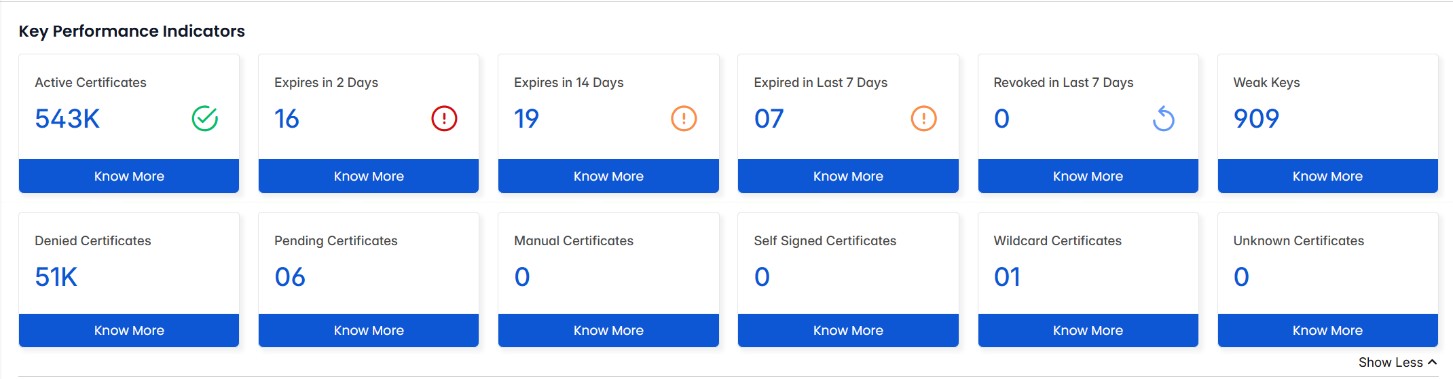
At the top of the CertSecure Manager dashboard, you'll find a convenient display of different
categories that organize the certificates enrolled within the system. These categories provide a
clear overview of the status of each certificate. Let's explore each category in more detail. On
each of the tiles, you will be able to click "Know More" to act as a highway to navigate
throughout your environment.
Below the KPIs you will find a drop-down to configure your
dashboard to a global view or a CA-level view.
Active
This category shows certificates that are currently valid and
actively being utilized by the organization. Active
certificates are not only trusted but also authorized for use
within the organization's systems. They play a crucial role in
securing communication, establishing trust, and enabling
secure transactions.
Expiring Certificates
Certificates in the Expiring Certificates category are
approaching the end of their validity period. While they are
still active, they require attention to ensure uninterrupted
security. Organizations should monitor these certificates
closely and take proactive steps to renew or replace them
before expiration to avoid service disruptions or security
risks.
Expired
Certificates in the Expired category were once active and
provided secure authentication and encryption services.
However, these certificates have reached the end of their
validity period. Once a certificate's lifecycle is over, it
becomes expired and should no longer be used for any secure
operations. Expired certificates need to be renewed or
replaced with new certificates to maintain the security and
integrity of the organization's systems.
Revoked
In the Revoked category, you'll come across certificates that
have been compromised, identified as fraudulent, or are no
longer in use. These certificates have lost their
trustworthiness within the organization and are explicitly
marked as invalid. Revoked certificates are typically the
result of security incidents, such as private key compromise
or unauthorized use. They are no longer considered reliable
and should not be relied upon for any secure operations.
Pending
Certificates in the Pending category are currently undergoing
a review process. Before approval, these certificates are
evaluated by administrators and PKI (Public Key
Infrastructure) admins. The review ensures that the
certificates meet the necessary security standards, compliance
requirements, and organizational policies. Only after the
appropriate authorities grant approval can these certificates
transition into the Active category.
Denied
This category comprises certificate requests that have been
rejected by administrators or PKI admins. Certificates in the
Denied category have failed to meet the organizational
requirements, security standards, or compliance policies. The
denial could be due to various reasons, such as incomplete
information, invalid documentation, or non-compliance with
specific policies. Denied certificates should not be used
within the organization as they have not been deemed
trustworthy.
Weak Keys
Certificates in the Weak Keys category have cryptographic key
lengths or algorithms that are considered insufficient by
current security standards. These certificates pose a
heightened risk of compromise due to advances in computing
power and cryptographic attacks. Organizations should identify
and replace weak key certificates with stronger,
industry-recommended alternatives to ensure secure encryption
and authentication.
High Risk Certificates
Certificates in this category include
Manual, Self-Signed, Wildcard, and
Unknown Certificates. These certificates
present increased security risks due to factors such as lack
of centralized control, weak authentication, or broad
application scope. High-risk certificates should be carefully
managed, regularly reviewed, and, where possible, replaced
with more secure, trusted alternatives to minimize
vulnerabilities within the organization's infrastructure.
Note:
By categorizing certificates into these distinct groups,
CertSecure Manager offers an intuitive and comprehensive view of
the certificate landscape, enabling efficient management and
ensuring the organization's security practices align with industry
standards and best practices.