
- Overview
- Reference Guide
- Setup & Architecture
- Release Notes
- Workflow
- API Reference
- Integration Guide
- Discovery Agent Setup Guide
CertSecure Manager has 4 different types of users.
| User Type | User Role |
|---|---|
| Admin | The admin has the highest authority and access to all the features. |
| PKI Admin | PKI admins have access to most of the product features except for a few exceptions. |
| Department PKI Admin | They have access to most of the product features that are within their organizational unit. |
| Users | Users only have viewing access |
Note: CertSecure Manager can only become functional once the admin is initialized and once enrolled, the admin can no longer be removed.
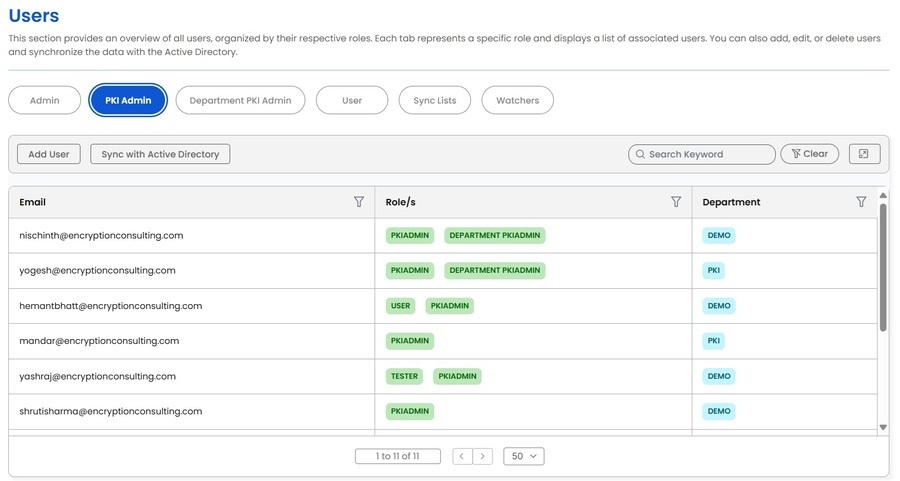
The Users section in CertSecure Manager is accessible for viewing by both the Admin and PKI Admins. However, department PKI Admins are restricted to viewing user details within their own organization. Only the admin has the authority to make edits within this section.
Note: To initiate the functioning of the application, it is mandatory to register the Admin on CertSecure Manager. Registration of the Admin can only occur once, and it is not possible to delete the admin or add a new Admin through the application interface. To change the admin, a request must be submitted to Encryption Consulting for an admin change.
The Admin is responsible for adding or removing PKI admins, Department PKI admins, and users, as well as modifying user roles within the system.
It is important to note that there is only one Admin for CertSecure Manager, and no one within the organization possesses the capability to remove or replace the Admin.
The second most significant role within the system is that of a PKI Admin. PKI Admins possess the same permissions as the admin, with a few exceptions in terms of privilege permissions. One such privilege permission is the renewal of the CertSecure Manager license, which can only be executed by the Admin. Additionally, only Admins can add more PKI Admins.
The department PKI admin holds significant authority within their isolated departmental domain. Their permissions are like those of the global PKI admin, although with certain distinctions in global privilege.
They possess the capability to add users but are limited to two distinct types:
Watchers are users assigned to monitor certificate-related activities within the system. They do not have administrative privileges but receive notifications about certificate events, expirations, and renewals. This role ensures visibility into certificate management without granting modification permissions. Watchers can be assigned at different levels, including organization-wide or specific departments.
In enterprise PKI environments, certificate lifecycle events, expiring certificates, revocations, policy violations, need to reach the right people instantly. CertSecure Manager's Watcher Groups feature ensures exactly that. A Watcher Group is a named, department-scoped collection of users that can be assigned directly to certificates in your inventory. When a certificate event is triggered, every member of the assigned group is notified automatically, no manual distribution lists, no missed alerts.
As organizations grow and certificate inventories expand into the thousands, it becomes impractical to configure individual alert recipients per certificate. Watcher Groups let teams define ownership once and apply it broadly DevOps owns application certificates, Infrastructure owns network device certificates, and Security owns CA and code-signing certificates. When a certificate in any of those buckets approaches expiry or enters a non-compliant state, the responsible team is notified without any manual intervention.
This directly reduces the risk of unplanned outages caused by expired certificates and strengthens audit posture by ensuring there is always a clearly defined, notified owner for every certificate in the environment.
The Sync List feature facilitates integration with the Active Directory to ensure user data remains updated. Admins can synchronize users, roles, and permissions with the organization's directory service. This prevents discrepancies and ensures only authorized personnel have access. Syncing can be performed manually or set to automatic updates at regular intervals.
The Sync Lists tab lists the directory groups that have been mapped to a department, with the columns Active Directory Group and Department. Users with the Manage users permission can add a mapping with the Sync with Active Directory button, which opens the Synchronize with Active Directory dialog.
| Field | Description |
|---|---|
| AD Group | Required. The directory group to map. The list combines the groups of Microsoft Entra ID (Azure AD) with the groups of every connected Keycloak realm whose LDAP provider imports groups. |
| Department | Required. The department in which the members of the group are placed. |
How a mapping is applied depends on the directory:
Roles and user type of an account created by a directory sync are set once, from the default user settings of the realm, and are not changed by later syncs. A role assigned by an administrator is therefore kept.
For a realm that is federated to a directory, CertSecure Manager reads the users of the realm in the background, on each refresh cycle (about every 50 minutes), and creates their accounts. A directory user therefore appears in the Users list before the first sign-in and can be given a department, made an approver or added to a watcher group in advance. Disabled directory users and Keycloak service accounts are not created.
The behaviour is controlled by two settings in the [AUTH] section of conf.ini:
| Setting | Description |
|---|---|
| keycloak_user_sync | auto (default) syncs only the realms that have a user federation provider, so a realm whose users are created inside CertSecure Manager is left alone. on syncs every realm. off turns the sync off. |
| keycloak_user_sync_max_users | The largest number of users read from one realm. The default is 5000. A realm with more users than this limit is not used to report missing accounts. |
An email address that already belongs to an account created by hand is not taken over by the sync. Use the Onboard action in the row menu of the user instead. For a user who is already linked to a realm the same row action reads Sync.
A directory sync never deletes a CertSecure Manager account. Deleting an account would remove its certificate ownership, approver standing and watcher group membership on the strength of a single directory read, and it is not urgent because a user the directory no longer has cannot sign in. Instead, the accounts that the directory does not have are reported to the administrators, who decide whether to restore the person in the directory or to delete the account.
The report is an email to the Admin users with the subject "[CertSecure] N user account(s) not found in the authentication realm". It lists the email address, name, realm and the reason for each account, up to 200 rows; the subject carries the true total. The reasons are:
| Reason | Meaning |
|---|---|
| Not found in the realm during the last directory sync | The account is linked to a realm and the realm was read completely, but the user was not in it. This is the case of a person removed from Active Directory. |
| Never onboarded to an authentication realm | The account was created by hand and was never linked to a realm. |
| No longer a member of any synced Active Directory group | The account was created by the Azure AD (Microsoft Entra ID) sync and the person has left every mapped group. |
The same account is reported again only after 24 hours, so the mail is not repeated on every refresh cycle. An account that returns to the directory, or is deleted, is no longer reported. Nothing is reported when a realm could not be read.
Users with the Manage users permission can delete a user with the Delete action in the row menu of the Users table. The User Deletion dialog asks for a replacement owner before the account is removed:
| Field | Description |
|---|---|
| Before deletion, please transfer the ownership to the other user | Required. Select the user (Select New User) who takes over the certificates owned by the account being deleted. A global administrator can select a user of any department; a department administrator can select only a user of the same department. Select Yes to delete the user or No to cancel. |
The Admin account cannot be deleted, and a user cannot delete their own account. A user who is a watcher is removed from the watchers list.
The account is removed from every user list and can no longer sign in, and its API tokens are revoked. An account that came from a directory (a Keycloak realm or the Azure AD sync) leaves a small deregistration record that holds only the name, the email address and the date of removal. The record stops the directory syncs from creating the account again, because the person still exists in the directory. An account that was created by hand and has no directory behind it is removed completely.
To bring a deleted directory user back, add the user again with Add User. Adding the user clears the deregistration record; a directory sync never does.